Version 15.0 AF-5000 Series Pilot Guide 94
XM Data Service
Once subscribed to an XM service plan, an activation signal will need to be sent while the EFIS and XM
module are powered on (usually for about 15 minutes). The AF-5000 will display the following items from the
“Aviator” XM WX Data Packages: NEXRAD, TFR's, METAR's, TAF's, Winds and Lighting.
XM Weather Diagnostics
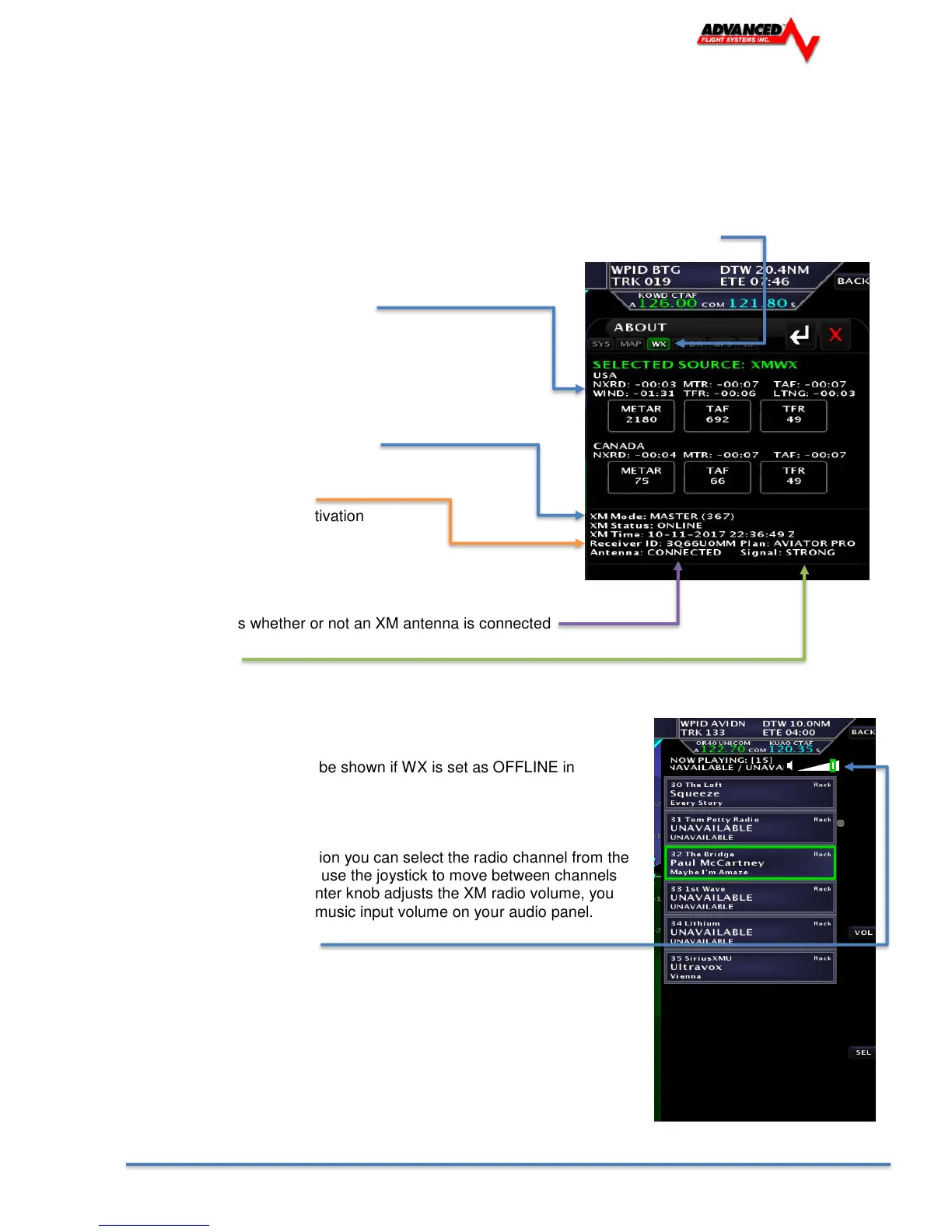
The EFIS > ABOUT >WX page displays pertinent information about the status of the XM Weather receiver.
The page can be displayed by pressing the CHECK -> ABOUT and Selecting the WX Tab.
The age of the displayed XM data
Mode: Screen (MASTER or SLAVE).
Receiver/Radio ID Number
Required when calling XM Activation
1-800-985-9200
Antenna: Indicates whether or not an XM antenna is connected
Signal Strength
Indicates the current strength of the XM satellite signal
(NONE, POOR, AVERAGE, GOOD)
Note: Weather Status will not be shown if WX is set as OFFLINE in
Instrument Calibration.
XM Radio
If have an XM Radio subscription you can select the radio channel from the
CHECK > RADIO button. You use the joystick to move between channels
and press in to select. The center knob adjusts the XM radio volume, you
might also need to adjust the music input volume on your audio panel.
Current Volume and Channel



 To Next Page