PCA-6184, ed. 1 User’s Manual 36
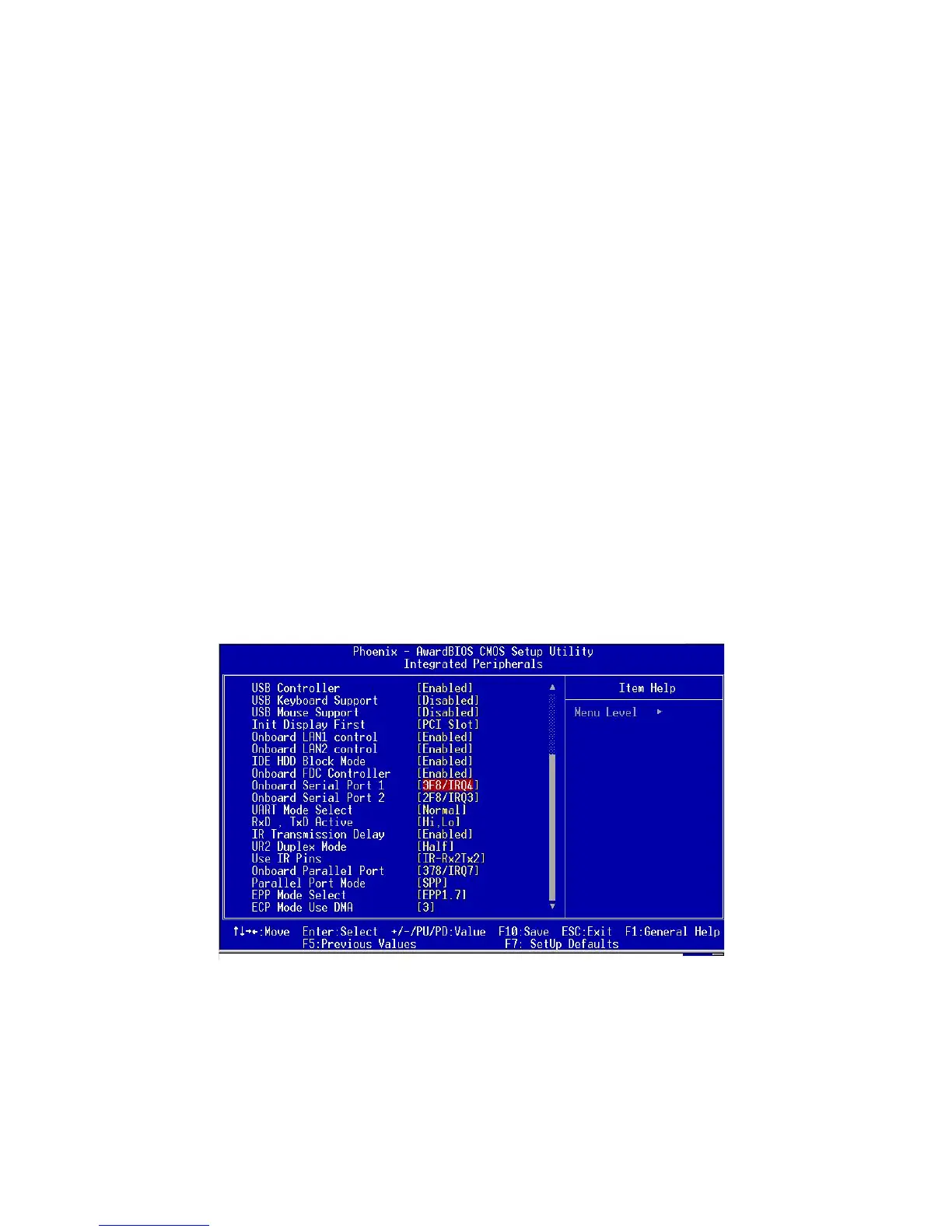
3.6.5 Onboard FDC Controller
When enable, this field allows you to connect your floppy disk drives to
an onboard floppy disk drive connector instead of a separate controller
card. If you want to use a different controller and card to connect the
floppy disk drives, set this field to Disabled.
3.6.6 Onboard Serial Port 1 (3F8H/IRQ4)
The settings are Auto 3F8/IRQ4, 2F8/IRQ3, 3E8/IRQ4, 2E8/IRQ3, and
Disabled for the on-board serial connector.
3.6.7 Onboard Serial Port 2 (2F8H/IRQ3)
The settings are Auto 3F8/IRQ4, 2F8/IRQ3, 3E8/IRQ4, 2E8/IRQ3, and
Disabled for the on-board serial connector.
3.6.8 UART Mode Select
This item allows you to select UART mode. The choices: IrDA, ASKIR,
Normal
3.6.9 RxD, TxD Active
This item allows you to determine the active of RxD, TxD. The Choices:
ìHi, Hi,î ìLo, Lo,î ìLo, Hi,î ìHi, Lo..
Figure 3.6: Integrated peripherals (2)


 To Next Page