4.2 Live View Page
Purpose:
The live video page allows you to view live video, capture images, realize PTZ control,
set/call presets and configure video parameters.
Log in the network speed dome to enter the live view page, or you can click
on the menu bar of the main page to enter the live view page.
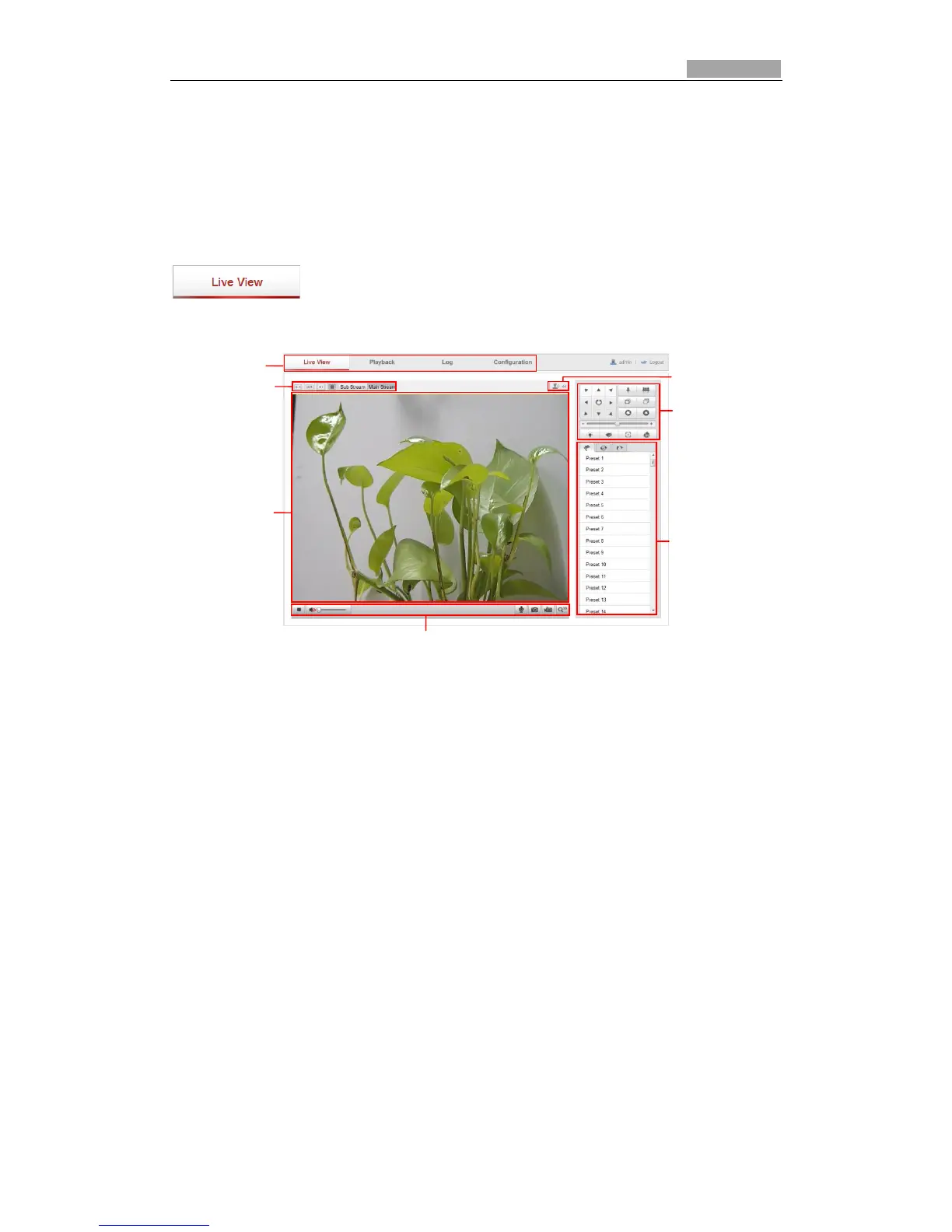
Descriptions of the live view page:
Figure 4-2 Live View Page
Menu Bar:
Click each tab to enter Live View, Playback, Log and Configuration page respectively.
Live View Window:
Display the live video.
Toolbar:
Operations on the live view page, e.g., live view, capture, record, audio on/off,
two-way audio, etc.
PTZ Control:
Panning, tilting, focusing and zooming actions of the speed dome. The lighter, wiper,
one-touch focus and lens initialization control.
Preset/patrol/pattern:
Set and call the preset/patrol/pattern for the speed dome.
Live View Parameters:
Configure the image size and stream type of the live video.



 To Next Page