Hardware Reference Guide 101
RACK MOUNTING THE HIVEMANAGER APPLIANCE
RACK MOUNTING THE HIVEMANAGER APPLIANCE
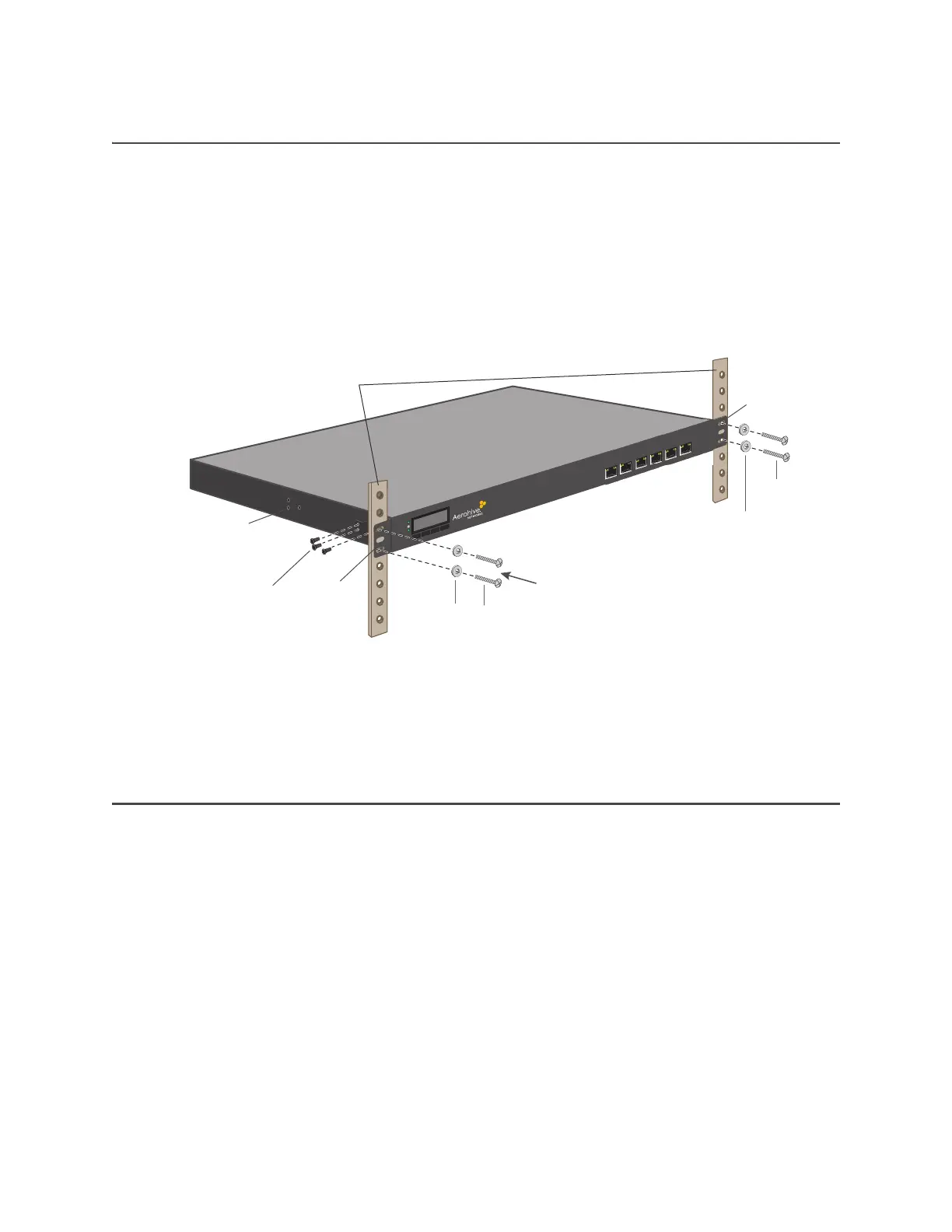
You can mount the HiveManager Appliance in a standard 19" (48 cm) equipment rack using standard rack
screws—typically 3/4”, 1/2”, or 3/8” long with 10-32 threads—and matching washers. The HiveManager ships
with two mounting brackets and six bracket attachment screws. Install the mounting brackets at either the
front or middle of each side of the device (depending on whether you want a front-mount or mid-mount
position, and attach the HiveManager Appliance in the rack using standard rack screws and washers (see
Figure 3).
Figure 3 Mounting the HiveManager in an equipment rack
1. Position the HiveManager Appliance so that the holes in the mounting brackets align with two mounting
holes in the equipment rack rails.
2. Insert a screw through a washer, a hole in the mounting bracket, and a hole in the rail (use two screws
and washers per bracket).
3. Tighten the screw until it is secure.
4. Repeat steps 2 and 3 to secure the other side of the HiveManager Appliance to the rack.
DEVICE, POWER, AND ENVIRONMENTAL SPECIFICATIONS
Understanding the range of specifications for the HiveManager Appliance is necessary for optimal
deployment and operation of the device. The following specifications describe the physical features and
hardware components, the electrical requirements for the power supply and cord, and the temperature
and humidity ranges in which the device can operate.
Device Specifications
• Form factor: 1U rack-mountable device
• Chassis dimensions: 17" W x 1 3/4” H x 16 1/3” D (43.1 cm W x 4.4 cm H x 41.5 cm D)
•Weight: 18 lb. (8.2 kg)
• Console port: RJ45
• USB port: standard Type A USB 2.0 port
• Ethernet ports: six 10/100/1000 Mbps RJ45 LAN ports
• Cooling: Processor - 3x CPU fans with fan duct, 1 system cooling fan
Rack rails
Mounting
bracket
POWER
ST TUS
HDD
Mounting
bracket
Attach mounting
brackets using 3
screws per side
Attach brackets
here for mid-mount
Washers
Rack screws
Washers
Rack
screws



 To Next Page