Chapter 3 The AP170 Platform
38 Aerohive
ACCESSING THE INTERNAL RESET SWITCH
Although not recommended, you can remove the cover the AP170 and access an internal reset switch if
necessary. The following steps describe this process.
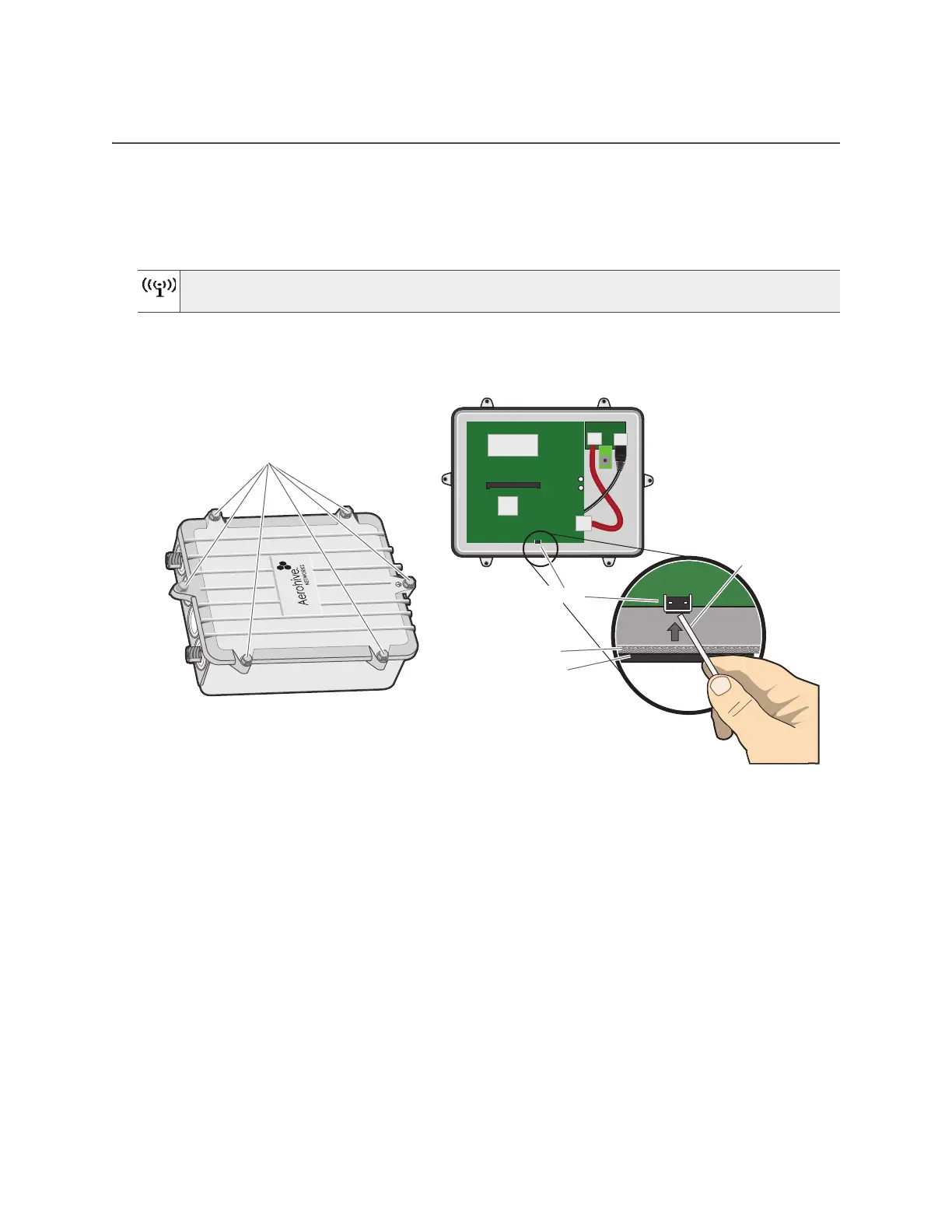
1. Remove the six screws that secure the top to the AP170 chassis and remove the top.
2. Push the tip of a paper clip or similar small tool against the outside edge of the switch to depress the
switch mechanism. Hold this position for a minimum of 10 seconds to reset the device. See Figure 9.
Figure 9 The AP170 internal reset switch
3. Replace the top, being careful not to disturb the weatherproofing gaskets.
4. Tighten the six screws to secure the top to the chassis.
Be very careful not to disturb the black rubber and woven metal gaskets when removing or
replacing the device top. These gaskets are essential for weatherproofing the device.
Remove the six screws that secure the
cover of the AP170.
Paper clip
Rubber gasket
Woven metal gasket
Reset switch



 To Next Page