Chapter 8 The BR100 Router
84 Aerohive
PRODUCT OVERVIEW
The BR100 router is ideal for the small office or teleworkers. An IT admin at corporate headquarters either
configures the CAPWAP settings manually for each device, or enables auto provisioning, which pushes the
configuration to each device as soon as it establishes a connection with HiveManager.
The BR100 router has a single 2.4 GHz radio (802.11b/g/n) with two embedded antennas, one WAN port
(ETH0), four LAN ports (ETH1 through ETH4), and a USB port for WAN connection redundancy. The BR100
router supports up to four SSIDs, four networks, 16 VLANs, and 32 user profiles across both wired and wireless
interfaces. It ships with an AC power adapter and an Ethernet cable.
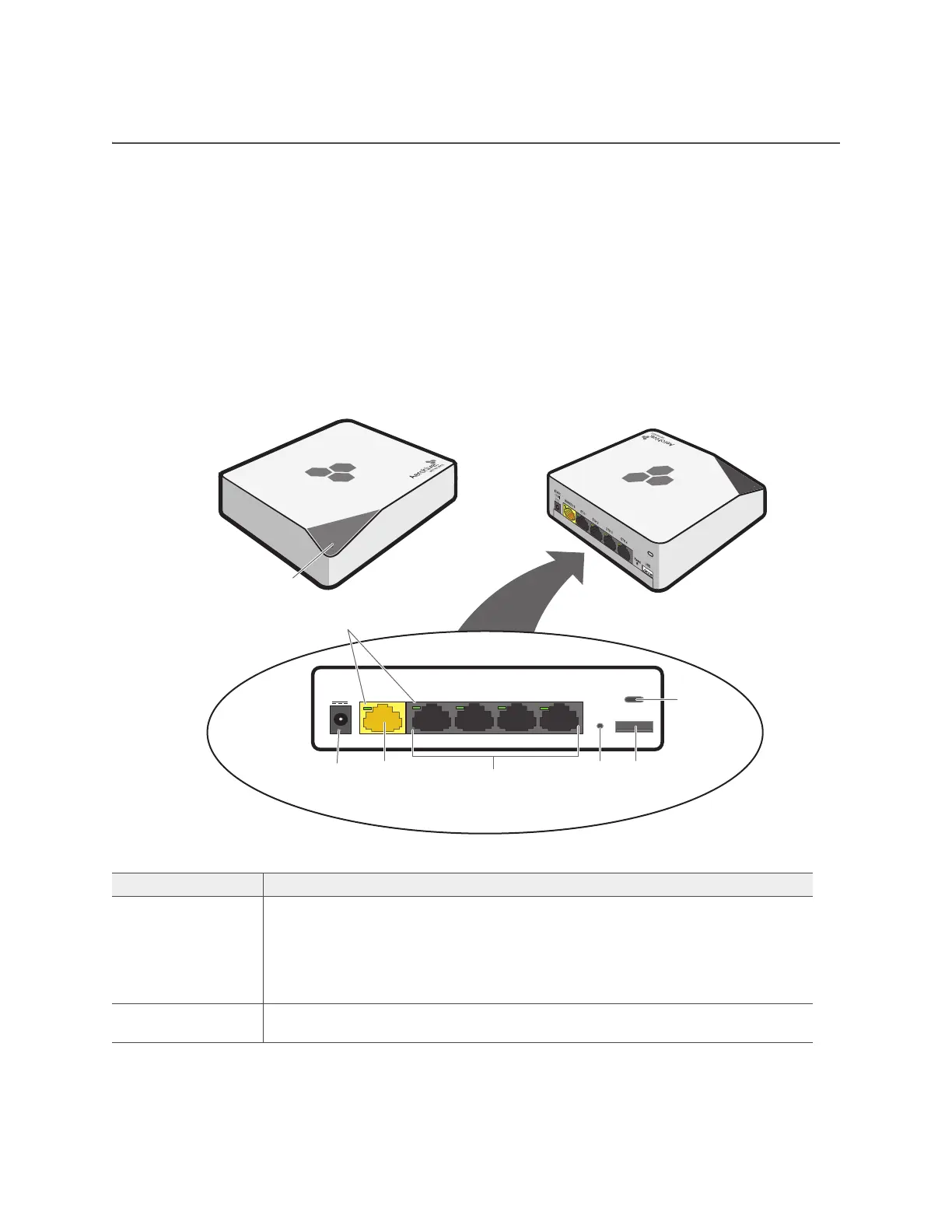
Figure 1 shows the BR100 router hardware components. Each component is described in Table 1 "BR100
router component descriptions".
Figure 1 The BR100 router hardware components
Table 1 BR100 router component descriptions
Component Description
Device status LED The device status LED is located on the triangular wedge on the top of the
device. This LED conveys operational states for system power, firmware
upgrades, connectivity with HiveManager, and WAN failover states. There is a
status LED on the angled top edge of the device, and a status LED next to each
of the Ethernet ports on the rear panel. For details, see "USB Modem Port" on
page 86.
Link status LEDs There are link status LEDs for the WAN port and LAN Ethernet ports on the rear
panel. For details see "USB Modem Port" on page 86.
12VDC
(1 5A)
WAN/ETH 0 ETH 1 ETH 2 ETH 3 ETH 4
Reset USB
Device status LED
Top views
Link status LEDs (5)
Rear panel
Security
connector
USB
connector
Reset
button
LAN ports
WAN port
Power
connector



 To Next Page