Chapter 3 The AP170 Platform
32 Aerohive
Vertical Pole Mount
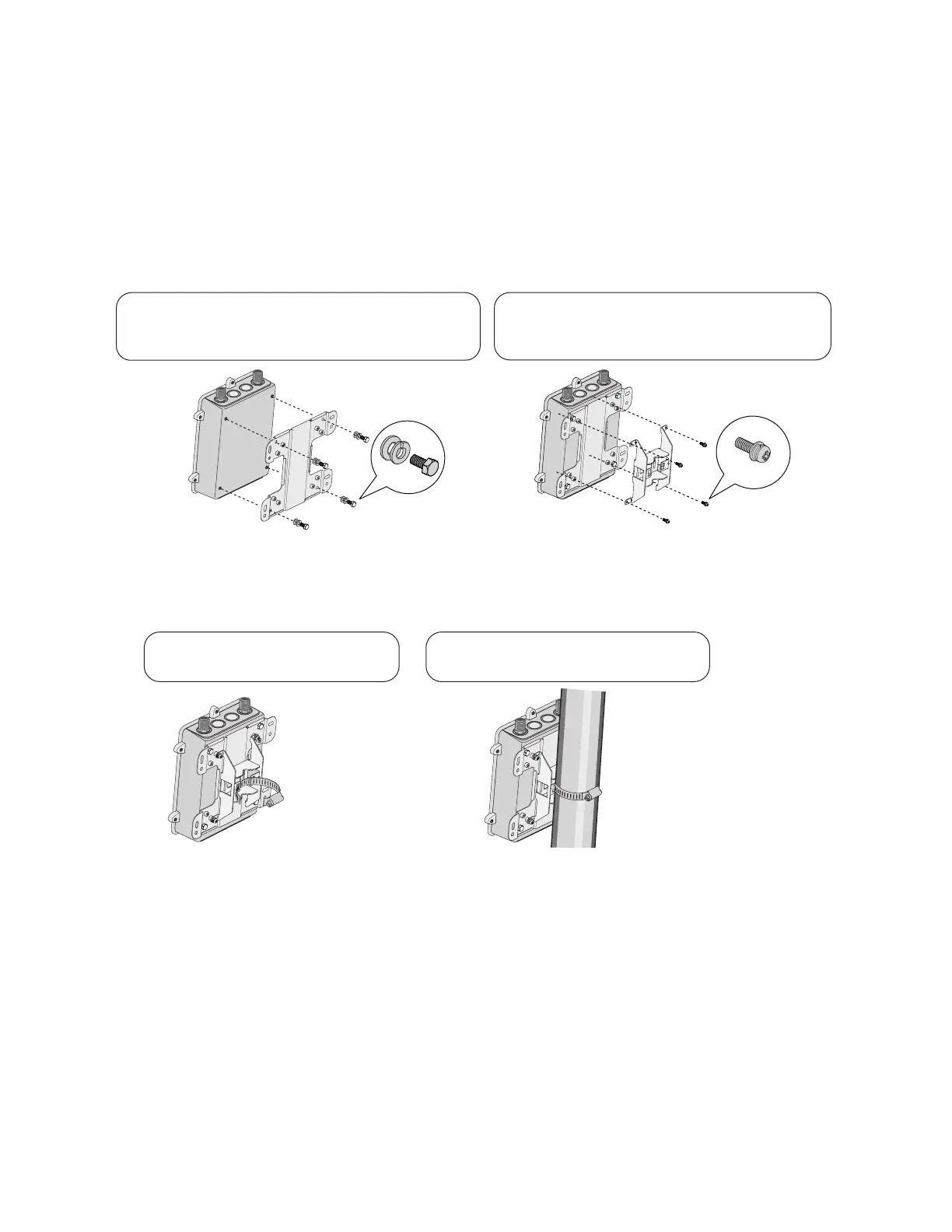
The following steps explain how to mount the AP170 on a vertical pole.
1. Attach the plane bracket to the back of the unit using the hex bolts, lock washers and flat washers.
Tighten the bolts with a socket or nut driver.
2. Mount the base bracket to the plane bracket using the round-head screws, lock washers, and flat
washers. Tighten the screws with a crosshead screwdriver.
3. Thread the open end of the hose strap through the two tabs on the base bracket.
4. Fit the hose strap around the pole and tighten the clamp with a 1/4” (2 cm) slotted screwdriver or a
5/16” (8 mm) drive socket (or nut) driver.
5. Connect the grounding cable to the grounding lug on the unit, as shown in Figure 5 on page 35.
Connect the other end of the cable to an appropriate ground.
Plane bracket
Base bracket
12
Attach the base bracket to the plane bracket
using (4) 1/4” (6 mm) round head screws with
lock washers and flat washers.
Attach the plane bracket to the back of the unit
using (4) 3/8” x 1/2” (10 mm x 13 mm) hex head bolts
and 1/2” (13 mm) lock washers and flat washers.
Hose strap
Thread the hose strap through the
two tabs on the base bracket.
Use a flat blade screwdriver to tighten
the hose strap around the pole.
3
4



 To Next Page