Hardware Reference Guide 31
MOUNTING THE AP170
MOUNTING THE AP170
When you mount the AP170 you can adjust the orientation to vertical for optimum radio transmission. For
example, you can mount the AP170 on a non-penetrating roof stand or to a Winegard bracket, often used
for mounting satellite dishes. The mounting bracket accommodates poles with a 1" to 3.5" (2.5 cm to 8.9 cm)
diameter.
For unobstructed RF coverage, mount the AP170 in a relatively open area. At a minimum, mount it on a pole,
mast, of flat surface so that the antennas have at least a three-foot clearance from any nearby obstructions.
After checking that you have all the materials and tools necessary, and familiarizing yourself with the safety
and site hazard warnings, you are ready to mount the unit. You can mount the AP170 on a vertical or
horizontal pole, or attach it to a flat surface. These options are described below. The device and mounting
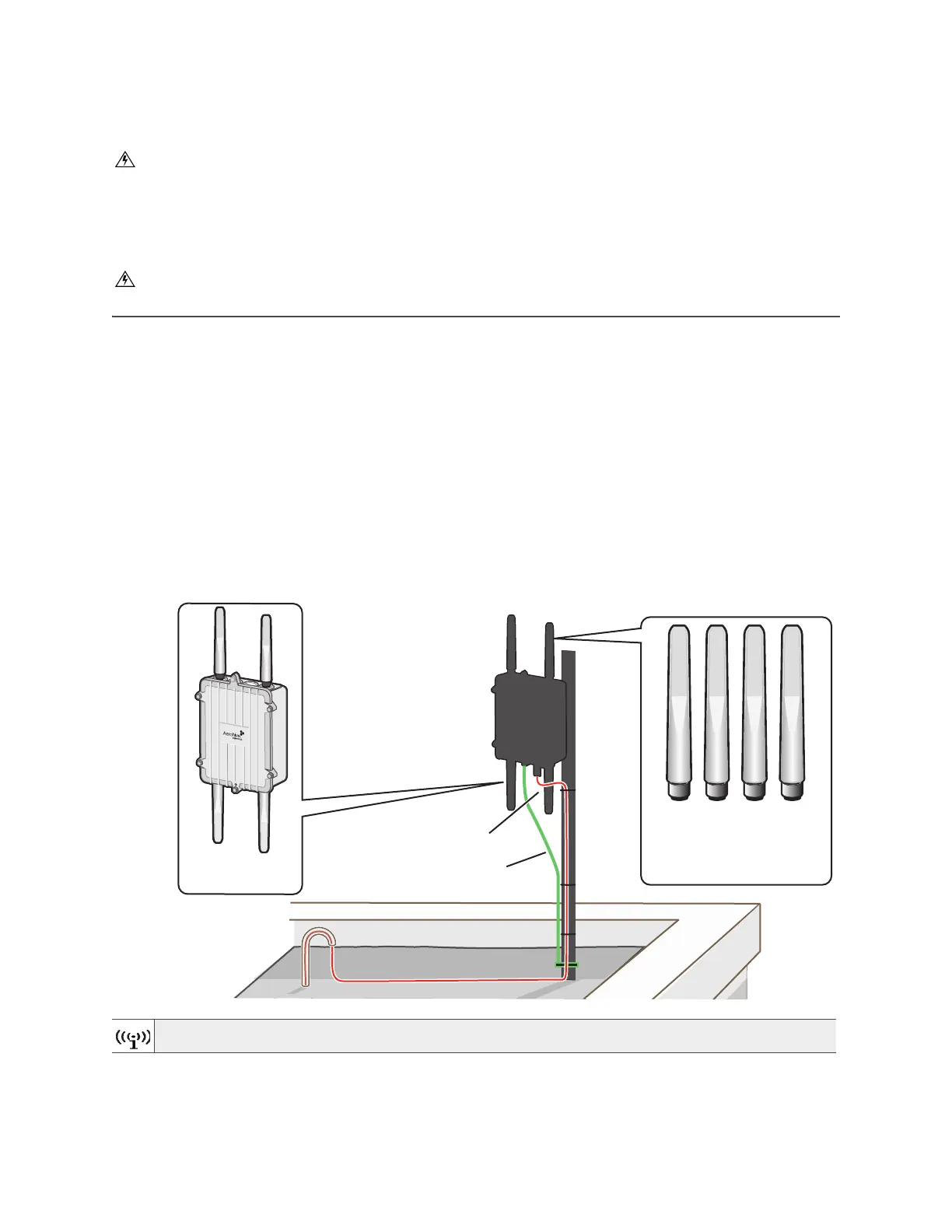
accessories required for mounting the AP170 are shown in Figure 3.
Figure 3 AP170 mounted on a vertical pole with major devices and accessories called out
Do not locate the AP170 enclosure near overhead power lines or other electric light or power circuits,
or where it can come into contact with such circuits. During installation, exercise extreme care not to
come into contact with these circuits, which can cause serious injury or death. For proper installation
and grounding of the product, refer to national and local electrical codes: NFPA (National Fire
Protection Association) 70, National Electrical Code Article 810 (U.S.); Canadian Electrical Code, Part
I, CSA 22.1 and Section 54 (Canada); and if local or national electrical codes are not available, refer
to IEC (International Electrotechnical Commission) 364, Part 1 through 7 (other countries).
Do not connect or disconnect antennas or cables from the AP170 during periods of lightning activity.
For best performance, deploy APs at least 100 feet (30.5 m) apart from each other.
The AP170 mounted
on a grounded vertical pole.
A shielded Ethernet cable
provides both the network
connection and power
through PoE.
The AP170 ground
wire is connected to
the grounded pole.
AP170
(AH-AP-170-N-XX)
Shielded Ethernet cable
N-Type outdoor antennas (4)
AH-ACC-170-ANT-KIT
AH-ACC-170-ANT-2G (2)
AH-ACC-170-ANT-5G (2)
5 GHz 2 4 GHz
Ground wire connected to
grounded pole
5 GHz 2 4 GHz



 To Next Page