Hardware Reference Guide 57
MOUNTING THE AP340
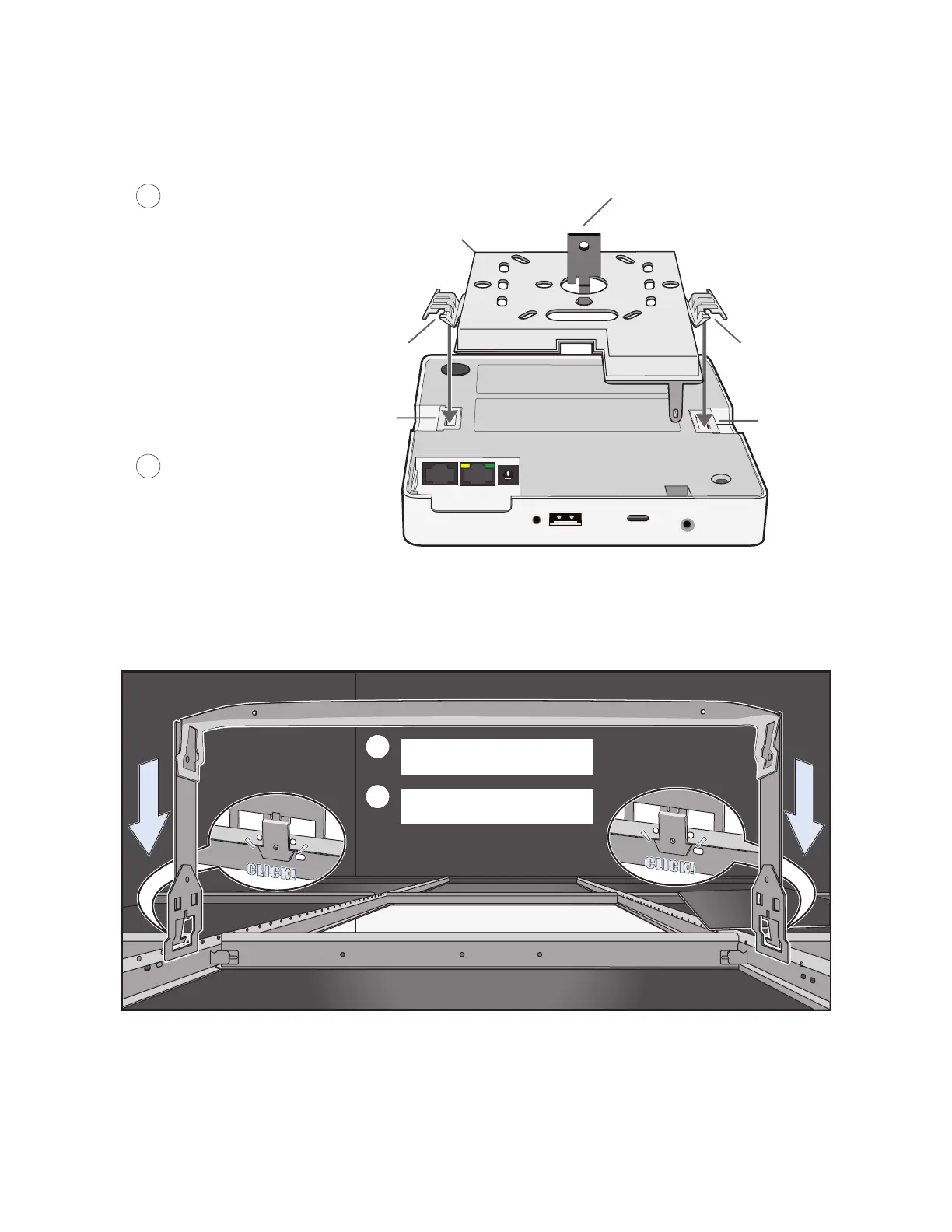
Figure 8 Attaching the AP340 to the mounting plate
4. Remove the ceiling tile next to the area where you want to mount the device.
5. Press the hanger frame downward into place on the ceiling track until the claws on each leg grips the
track below the top ridge (see Figure 9).
Figure 9 Clipping the hanger frame onto the track
Align the V-shaped tabs on the
mounting bracket with the tab
slots on the bottom of the AP.
Insert the V-shaped tabs into the tab
slots until they click into place.
Attach external antennas, if
they are required. (The AP shown
here uses internal antennas.)
Mounting plate
Tab slot
V-shaped tab
V-shaped tab
Tab slot
Hanger clip
3
4
Hanger frame
5
4
Remove the ceiling tile and
enter the plenum.
Press the hanger frame onto
the ceiling track.



 To Next Page