7.3.9.2 Load control system OPTIONAL (load cells).
The overload controller consists of:
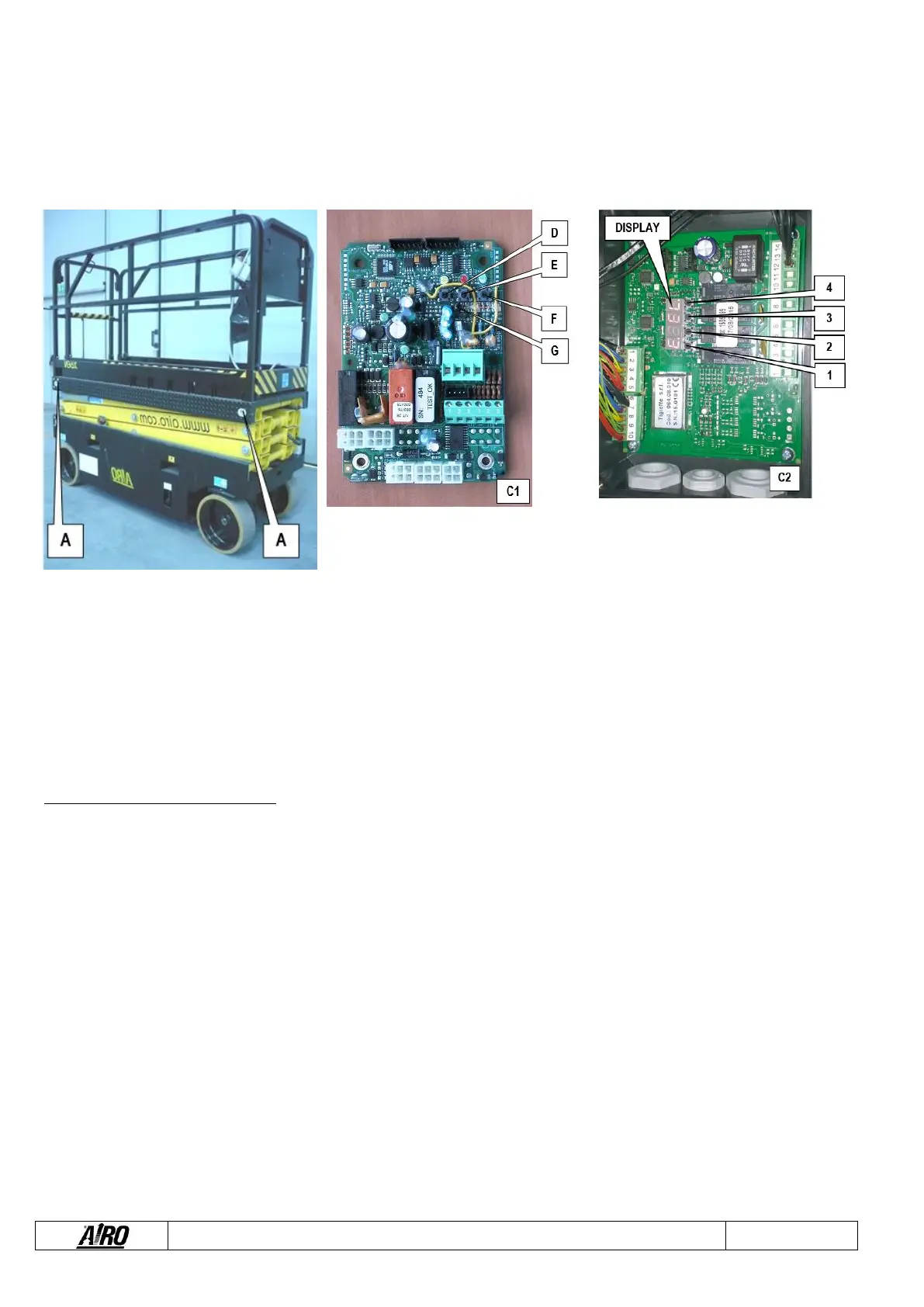
▪ Deformation transducers (A) (4 load cells integrated in the support pins of the platform).
▪ Electronic board (C1 or C2) for the device calibration located inside the box on the platform.
Operation check of the overload controller:
▪ When platform is completely lowered and with extension deck retracted, load a charge evenly distributed equal to the max.
nominal load allowed by the platform (paragraph “Technical features”). In this condition all operations should be possible both
from platform and ground control panel.
▪ With platform completely lowered, add to the nominal load an overload of 20% of the nominal load and carry out the lifting
operation. In this condition the red alarm light and the audible alarm turn on.
If the platform is at a height from the ground higher than that indicated in chapter “Technical features”, the alarm condition locks
the machine completely. To operate the machine again, remove the excessive load.
Check operation at least once a year.
The system needs calibration:
▪ In case of replacement of one of the items composing the system.
▪ When, following an excessive overload, even after removing the excessive load, the danger condition is reported anyway.
To calibrate the device (TYPE “C1”):
▪ Turn off the machine.
▪ Open the box which contains electronic board C1.
▪ With no load on the platform, introduce the jumper to connector G.
▪ Turn on the machine.
▪ Turn on the machine press button D (the yellow and red light turn on).
▪ Press button E (the luminosity of the red light increases a few seconds), and the overload controller will be reset.
▪ Place a load at the centre of the platform equal to the nominal load + 20%.
▪ Press button F (the green light turns on a few seconds).
▪ Press button D again to exit the calibration procedure (the yellow light turns off and if the procedure has been carried out
correctly, the red light stays on signalling the overload).
▪ Turn off the machine.
▪ Open the jumper on connector G.


 To Next Page