▪ Turn on the machine.
▪ Check that after removing the 20% overload (only the nominal load stays on the platform) the alarm condition does not occur in
any of the platform positions (platform lowered, lifted, during drive, with platform extended).
▪ Once the adjustment has been completed, close the box which contains the board.
To calibrate the device (TYPE “C2”):
▪ Turn off the machine.
▪ Open the box which contains electronic board C2.
▪ turn on the machine; the red led and the DISPLAY turn on.
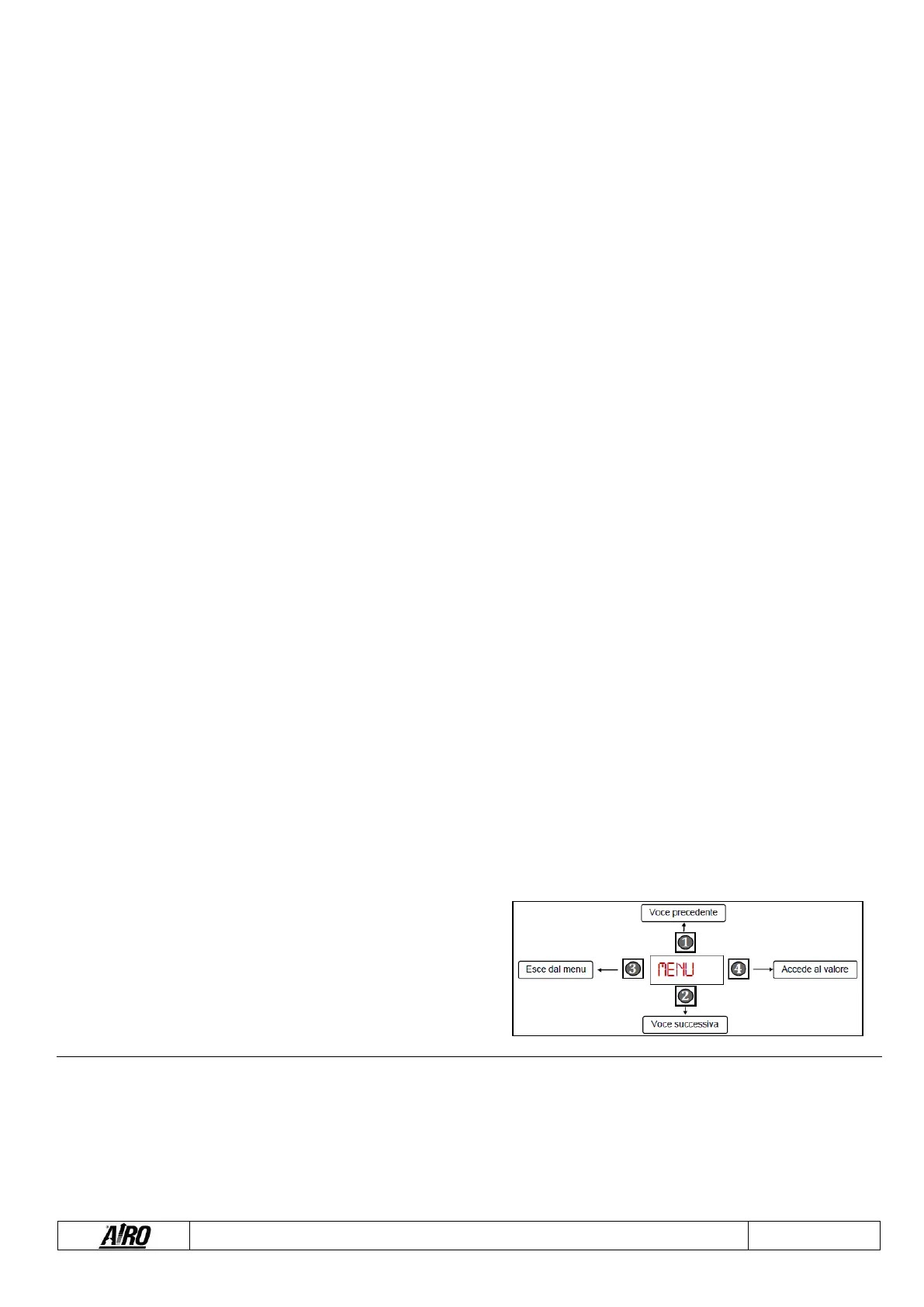
▪ BOARD SETTING: hold down button 4 and 1 for more than 3 seconds until CONS appears on the display. Press button 4 to
get CAP. Press again button 4: a 4-digit number will appear on the display and the first digit will be flashing. Through button 1-
2-3 it is now possible to insert the correct parameter according to the machine (SERIE X = 6000 – SERIE XS = 2800). Press
button 4 to memorize and exit.
▪ SETTING OF THE DIVISION SCALE: press button 2 (SENS will appear); press again button 2 (J01J will appear); press button
4 to visualize the value of the division scale on the display. Through button 1-2-3 insert the correct value (_ _ _1) and press
button 4 to memorize and exit.
▪ RESET OF THE SYSTEM: press button 3 (CONS will appear); press button 2 (CALB will appear); press button 4 to get CAL
on the display. After controlling that no loads are on the platform press button 1. The value of the load on the platform, 0000,
will appear on the display.
▪ NOMINAL LOAD CALIBRATION: position a load that is equal to the nominal load in the centre of the platform (see chap.
“TECHNICAL FEATURES”). The value of the load must be visualized by the display (for example: if the load on the platform is
400 kg, the display must visualize 0400). If that takes place, press button 4 to memorize and exit. Otherwise, press button 2
and through button 1-2-3 set the correct value of the load and press button 4 to memorize and exit.
▪ SETTING OF THE ALARM LOAD: press button 3 (CALB will appear); press button 2 (PARM will appear); press button 2
(ALAR will appear); press button 4 (PREA will appear); press button 2 to get BLOC on the display. Press 4 and through button
1-2-3 set the correct value of the load that must be equal to the NOMINAL LOAD + 20% (for example: if the nominal load is 400
kg, tha alarm load is 480 kg. So the number to be set is 0480). Press button 4 to memorize and exit.
▪ SETTING OF THE SENSITIVITY OF THE SYSTEM: press button 2 to get DIFF. Press button 4 and through button 1-2-3 set
the 0030 and press button 4 to memorize and exit.
▪ FINAL TEST: press button 2 to get TEST on the display. Press button 4 to test the system, PASS refers to the correct
execution of the procedure; FAIL refers to a wrong execution of the procedure, which has to be repeated.
▪ EXIT: press button 3 (ALAR will appear); press button 3 to exit. Now the display visualizes the load on the platform.
Information about the functions of the buttons for the load control system, type “C2”:


 To Next Page