Page 10
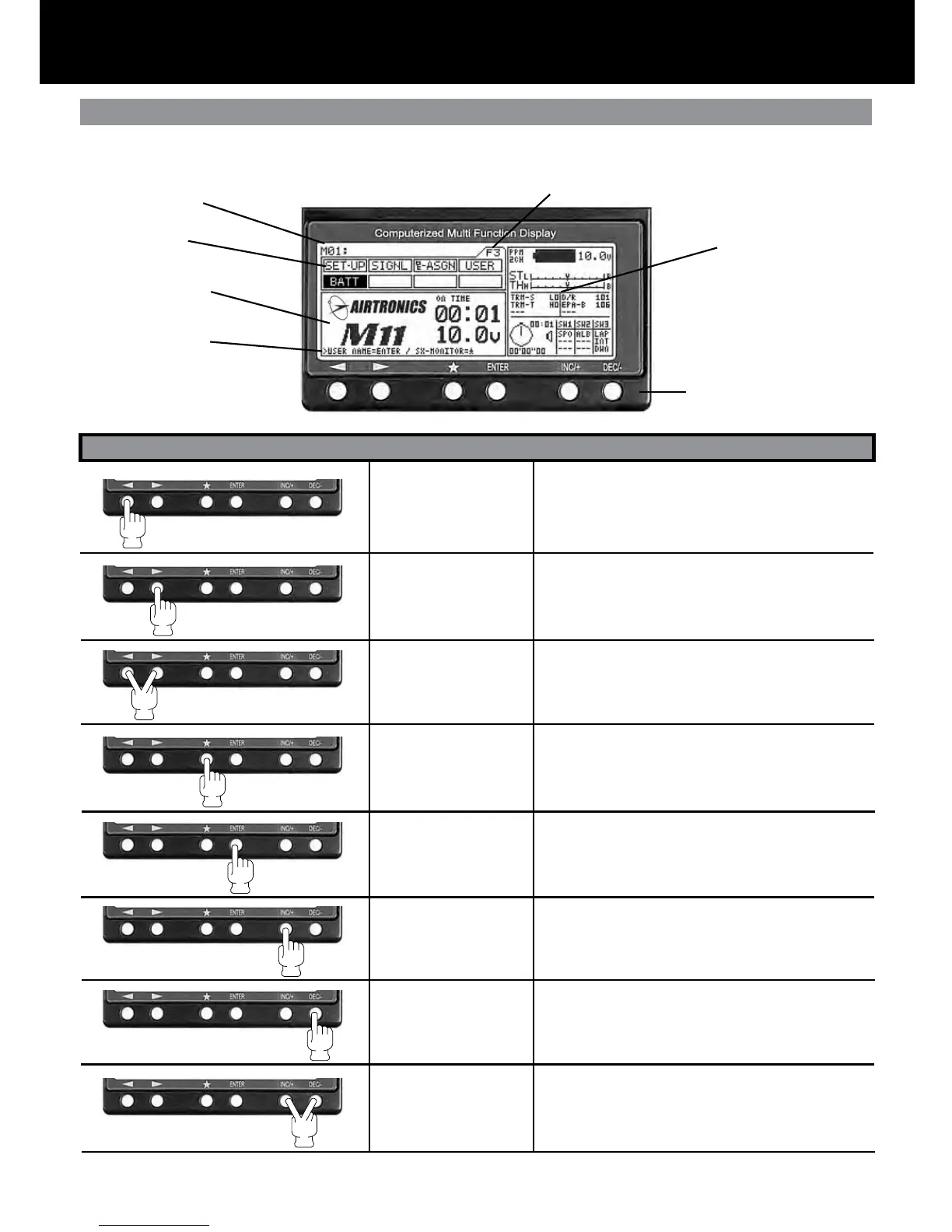
Key Pad Menu Buttons
HELP Display Area
Using the Key Pad Menu Buttons
Function select Key
(Left)
Function select Key
(Right)
Function Page select
Key sequence
Scroll Key
Enter Key
INC+ Key
(Increase)
DEC- Key
(Decrease)
INC+ and DEC-
(Reset)
Moves the Menu Function cursor left to the previous
(backwards) menu function.
Moves the Menu Function cursor right to the next
(forward) menu function.
Pressing down on both keys will scroll through func-
tion pages in order. F1, F2 and F3.
The menu function cursor will highlight the rst func-
tion on that page.
Will move the menu key backwards in the program-
ming area. Also used in the HELP display area.
Programming Area
Menu Function
Model Number
Function Page
Information Area
Key Pad
é
Will move the menu key forward in the programming
area. Also used in the HELP display area.
Increases number values in programming area.
Scrolls up selection list.
Decreases number values in programming area.
Scrolls down selection list.
Resets selection to factory default setting.
Key Name Function
The M11 has 6 keys for menu operations. You will nd the use of the 6 keys summarized below.



 To Next Page