Page 28
[COPY/CLEAR]
Model Copy / Model Clear
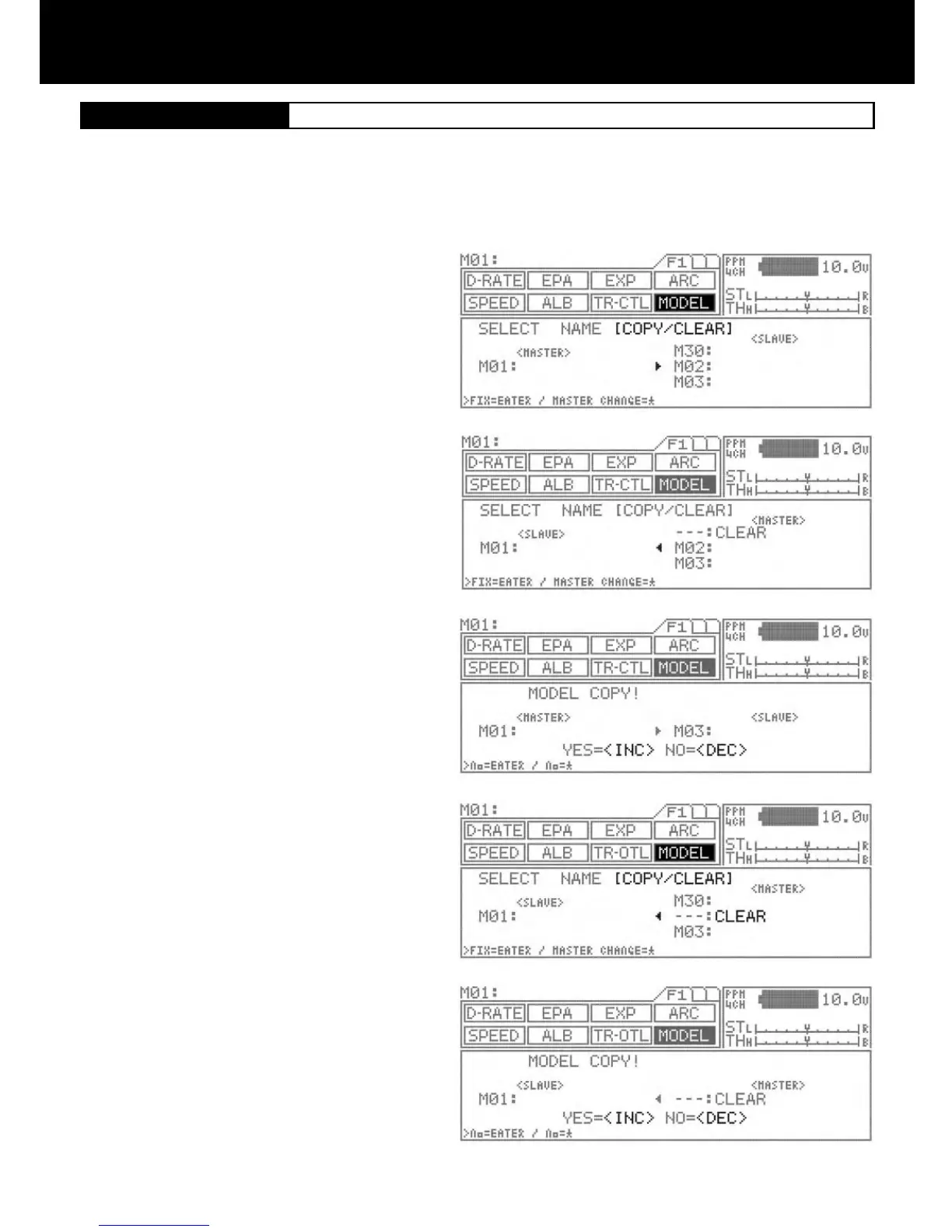
COPY MODEL DATA
Using the function select keys, move the cursor to
[COPY/CLEAR] in MODEL.
To copy data from the current selected (Master) model
to another model (Slave), use the INC/+ or DEC/- keys
to change the model numbers up or down to the model
number you would like to copy the current model (Mas-
ter) to.
After you have selected the model number you wish to
copy the current model (Master) to, press the ENTER
key. The screen will now change and ask you:
YES=<INC> and NO=<DEC>
Press the INC/+ key to copy the current (Master) model
to the new model (Slave) you have selected. Press the
DEC/- key to return to the previous screen.
To copy data from another model to the one your cur-
rently using, use the star key to change the current
model (Master) to (Slave). In turn the model you would
like to copy from will now show (Master). The (Master)
will always overwrite the (Slave).
Select the model (Master) you want to copy from using
the Inc.+ or Dec.- keys and then press the ENTER key.
A conrmation screen appears, allowing to conrm that
choice is correct. To proceed with copying, press Inc.+,
or to cancel press Dec.- key. During copying, the mes-
sage EXECUTING! appears until copying is completed.
CLEARING MODEL DATA
Using the function select keys, move the cursor to
[COPY/CLEAR] in MODEL.
Using the star key, change the current model (Master) to
(Slave).
Press both INC/+ or DEC/- keys simultaneously to select
the (- - -:CLEAR) model.
Now press the ENTER key to select. The screen will
change and ask, YES=<INC> or NO=<DEC>. Select yes
to clear the current model or no to return to the previous
screen. This operation clears all data for models M01 to
M30.
NOTE:
CLEAR can be selected by simultaneously pressing
Inc/+ and Dec/-.
While clearing is in progress, the message EXECUTING!
appears until operation is completed.
This function enables you to copy data from the currently selected model to another, or to copy another model’s data into the model
currently selected. Data can be cleared (initialize) on the current model that being selected.
1.
2.
3.
4.
5.
6.
7.
8.
9.



 To Next Page