HP406 Service Manual
Page 9 of 12
3 A
DJUSTMENTS
3.1 General
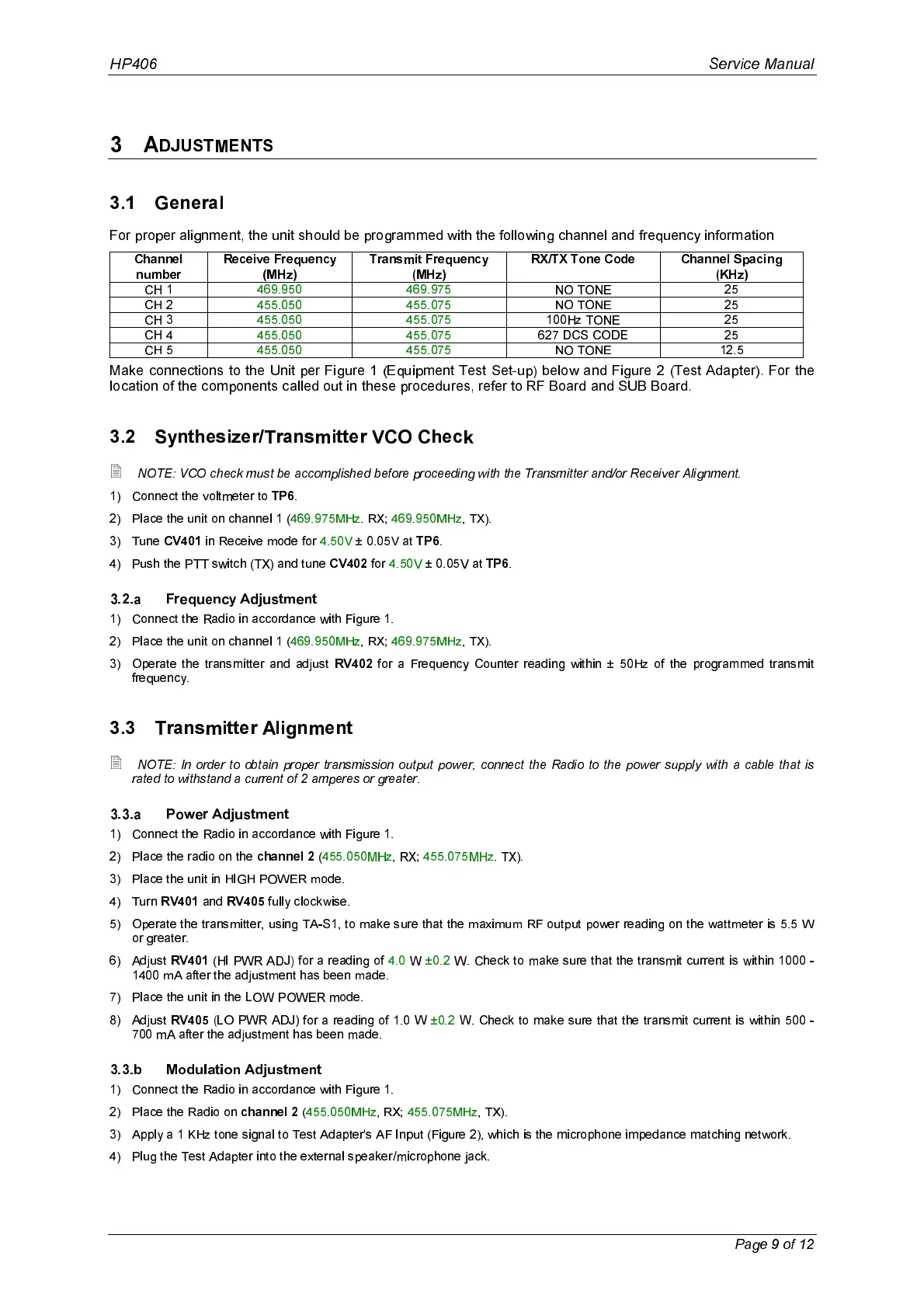
For proper alignment, the unit should be programmed with the following channel and frequency information
Channel
number
Receive Frequency
(MHz)
Transmit Frequency
(MHz)
RX/TX Tone Code Channel Spacing
(KHz)
CH 1 469.950 469.975 NO TONE 25
CH 2 455.050 455.075 NO TONE 25
CH 3 455.050 455.075 100Hz TONE 25
CH 4 455.050 455.075 627 DCS CODE 25
CH 5 455.050 455.075 NO TONE 12.5
Make connections to the Unit per Figure 1 (Equipment Test Set-up) below and Figure 2 (Test Adapter). For the
location of the components called out in these procedures, refer to RF Board and SUB Board.
3.2 Synthesizer/Transmitter VCO Check
2
NOTE: VCO check must be accomplished before proceeding with the Transmitter and/or Receiver Alignment.
1) Connect the voltmeter to
TP6
.
2) Place the unit on channel 1 (469.975MHz. RX; 469.950MHz, TX).
3) Tune
CV401
in Receive mode for 4.50V ± 0.05V at
TP6
.
4) Push the PTT switch (TX) and tune
CV402
for 4.50V ± 0.05V at
TP6
.
3.2.a Frequency Adjustment
1) Connect the Radio in accordance with Figure 1.
2) Place the unit on channel 1 (469.950MHz, RX; 469.975MHz, TX).
3) Operate the transmitter and adjust
RV402
for a Frequency Counter reading within ± 50Hz of the programmed transmit
frequency.
3.3 Transmitter Alignment
2
NOTE: In order to obtain proper transmission output power, connect the Radio to the power supply with a cable that is
rated to withstand a current of 2 amperes or greater.
3.3.a Power Adjustment
1) Connect the Radio in accordance with Figure 1.
2) Place the radio on the
channel 2
(455.050MHz, RX; 455.075MHz. TX).
3) Place the unit in HIGH POWER mode.
4) Turn
RV401
and
RV405
fully clockwise.
5) Operate the transmitter, using TA-S1, to make sure that the maximum RF output power reading on the wattmeter is 5.5 W
or greater.
6) Adjust
RV401
(HI PWR ADJ) for a reading of 4.0 W ±0.2 W. Check to make sure that the transmit current is within 1000 -
1400 mA after the adjustment has been made.
7) Place the unit in the LOW POWER mode.
8) Adjust
RV405
(LO PWR ADJ) for a reading of 1.0 W ±0.2 W. Check to make sure that the transmit current is within 500 -
700 mA after the adjustment has been made.
3.3.b Modulation Adjustment
1) Connect the Radio in accordance with Figure 1.
2) Place the Radio on
channel 2
(455.050MHz, RX; 455.075MHz, TX).
3) Apply a 1 KHz tone signal to Test Adapter's AF Input (Figure 2), which is the microphone impedance matching network.
4) Plug the Test Adapter into the external speaker/microphone jack.



 To Next Page