HP106/HP406 Programmer software guide
Ver. 1.0 Page 8
3.5 Create a new programming filename
IMPORTANT! If this is the first time you are using the programming software, or it is the first time you are going to create a new file, you
must restore the default signal database as explained in the par. 7.3 before going on with the following steps.
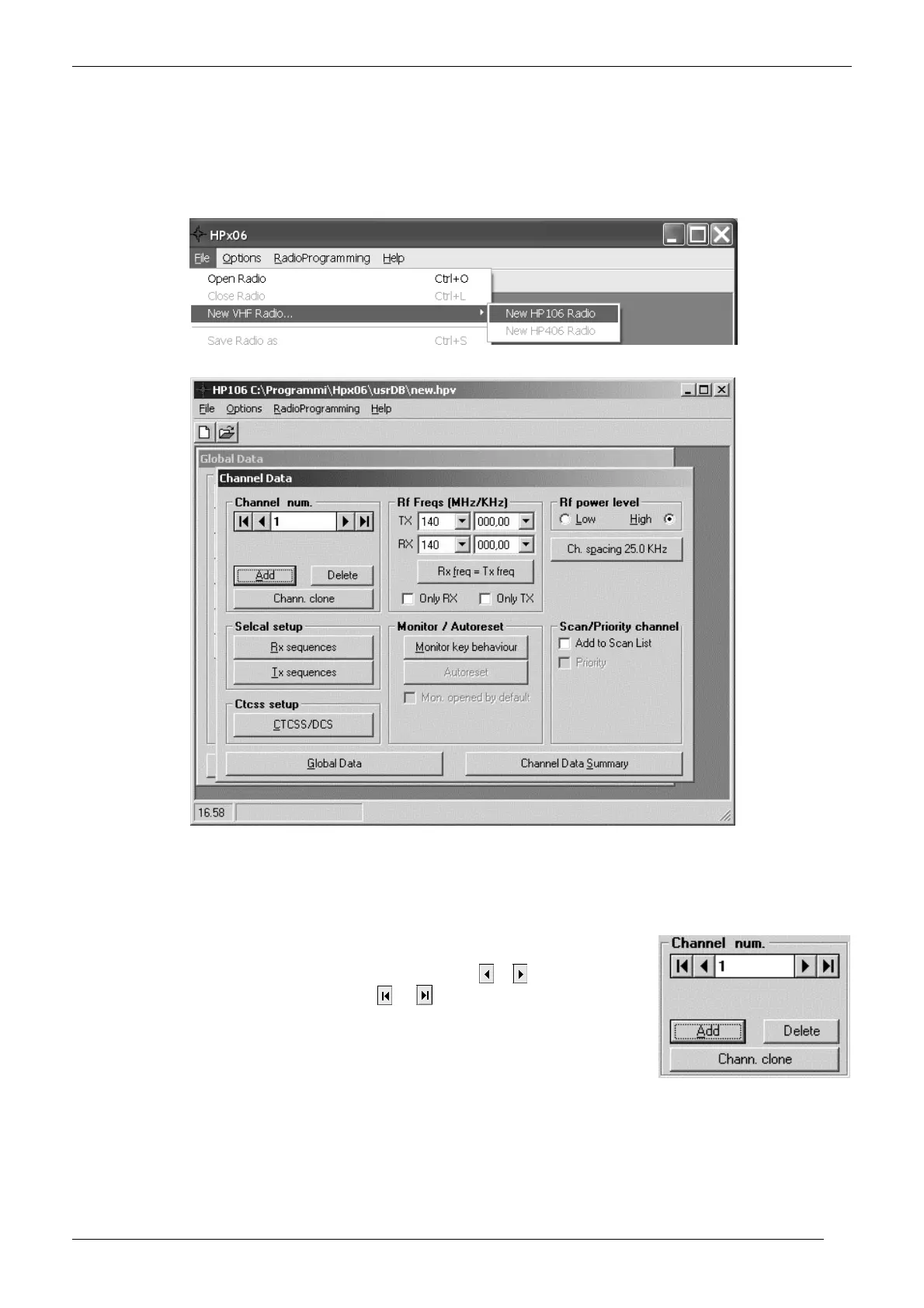
1) If you have just started the programmer software in your PC you will see a blank window.
2) From the menu File select New radio…, then click one of the New HPx06 Radio… (depending on the operating band of the radio to be
programmed).
3) A new file creation will open.
Type the database name you want to create (any name will do, anyway we recommend to type the
customer’s name), then press the Save button: the Channel Data window will open.
Important: we’ll always refer this window as “Channel Data window”. You will see in Chap 4 that this is one of the two main windows in
this program (Channel data and Global Data).
3.6 Basic parameters: TX/RX frequency, channel spacing, power monitor and group
scanning
1) Make sure that the Channel num dialog box is displaying the channel number you are going to
setup (if it is the first channel you are programming, only 1 is available).
If the channel number is not the one you want to program, press the or buttons in order to
select the needed one. You can also use the
or buttons in order to quickly jump,
respectively, to the first or to the last programmed channels



 To Next Page