HP106/HP406 Programmer software guide
Ver. 1.0 Page 6
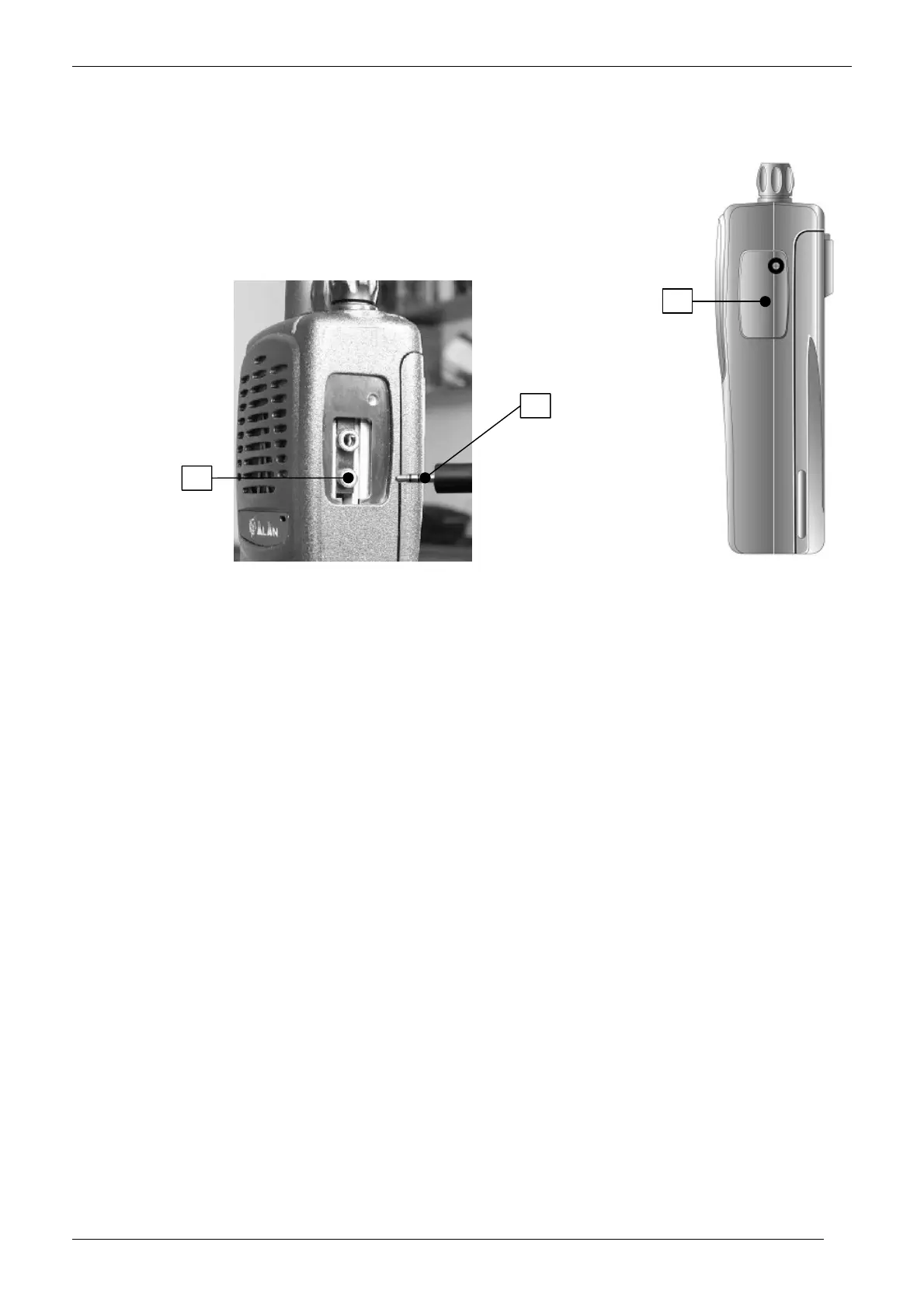
2.4 Connecting to your computer
This section explains how to connect the transceiver to your computer’s serial port. You will need to use the supplied serial
cable (item C previously described in “Unpacking”).
1) Make sure that the transceiver is turned off.
2) Locate the connectors protection cover in the transceiver’s right side [A]
3) With a suitable screwdriver, unscrew the screw which locks the protection cover and remove it in
order to access the connectors
4) Insert the end of the supplied serial cable provided with 2,5 mm stereo jack plug [B] in the 2,5 mm
jack socket of the transceiver [C]
5) Push gently the cable’s 2,5 mm stereo jack into the transceiver’s one until it is firmly in place.
6) Connect the other end of the serial cable to your computer’s serial port and make sure it’s firmly in place.
Do not force the jack plug into the socket.
If you need to remove the connector, pull it by grasping the connector itself (not the cable)
Store the transceiver’s protection cover in a safe place. It must be replaced after the programming is completed
Please see your computer’s operating instructions if you need help.
A
C
B



 To Next Page