HP106/HP406 Programmer software guide
Ver. 1.0 Page 23
6.5 Enabling/disabling the key and warn beeps (Key & Warn beeps button)
Normally, when you press any key or rotate the channel switch, you hear a short beep as a confirmation in the loudspeaker.
Moreover, in case of mistakes or particular events, different beeps are emitted. If your customer requires a very silent use,
you can disable the said acoustic signals as follows:
From the Global Data window - Set-Up area - click the Key & Warn beeps button: you will toggle it
OFF or ON depending on the times you press the button.
We recommend, when possible, to leave the acoustic signals ON in order to improve the transceiver’s ease of use.
6.6 Setting the acoustic signals (rings)
You can set up and configure the acoustic warning signals which the radio emits when a Selcall is received in order to obtain
the audio effect you prefer. Independent settings are available for each kind of received Selcall, i.e. Primary (Seq I),
Secondary (Seq II) or Group (Group call). Before doing that, have a look to the following paragraph in order to know how
each ring is composed.
6.6.a Format of rings (acoustic signals)
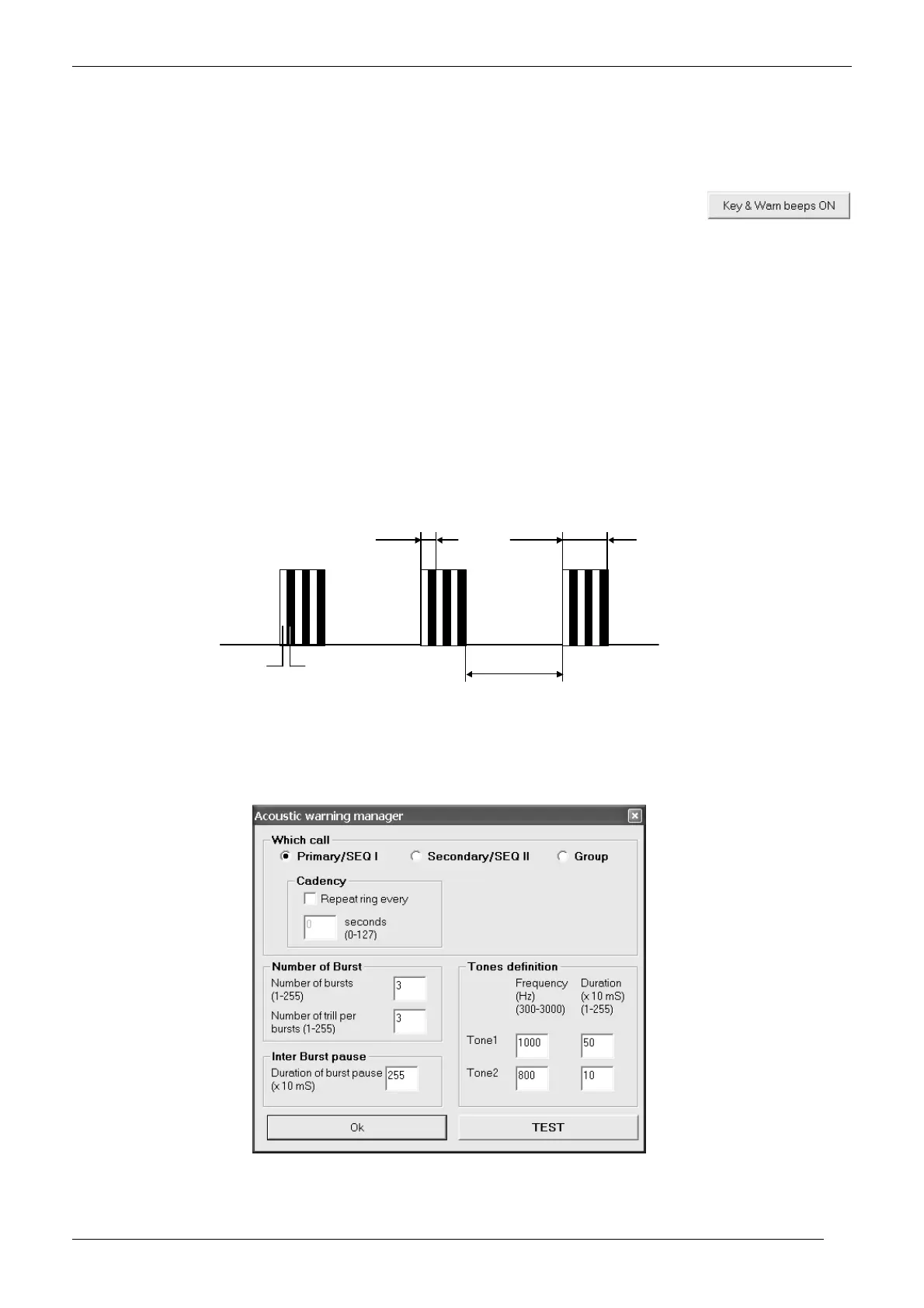
Each ring is composed by a preset number of bursts (from 1 to 255). Each burst is obtained by alternating two tones (Tone 1
and Tone 2) a preset number of times. Let’s call each alternation as trill. In other words, a ring is composed by a preset
number of bursts which are composed by a preset number of trills which are composed by two tones. You can set not only
the frequency and duration of each tone, but also the number of trill per burst, the number of bursts which make each ring,
the pause between each burst and the cadency (repetition of each ring). The following diagram shows a ring made by 3 burst,
each of them made by 3 trills
A good management of burst, trills etc. allow you to create a wide range of sounds in the rings which can imitate a lot of
situations (e.g. alarm tones) or well known rings (e.g. your Country’s typical phone ring when a Selcall is received). This
additionally improves the ease of use.
6.6.b Setting procedure
1) From the Global Data window - Set-Up area - click the Acoustic signals button: the Acoustic warning manager window opens.
2) Select the event which you want to change the acoustic signal using the related radio button in the Which call area:
• Primary (Seq I) – When primary selcal (with Sequence I) is properly received
Burst Trill
Inter burst
pause
Tone 1 (white) Tone 2 (black)



 To Next Page