EasyManua.ls Logo

Align Super Combo TREX 500PRO DFC RH50E01XT - 8. 3 GX Flybarless System Installation; 3 GX Installation and Mounting; Canopy Assembly

Align Super Combo TREX 500PRO DFC RH50E01XT
45 pages
Print Icon
To Next Page IconTo Next Page
To Previous Page IconTo Previous Page
Loading...
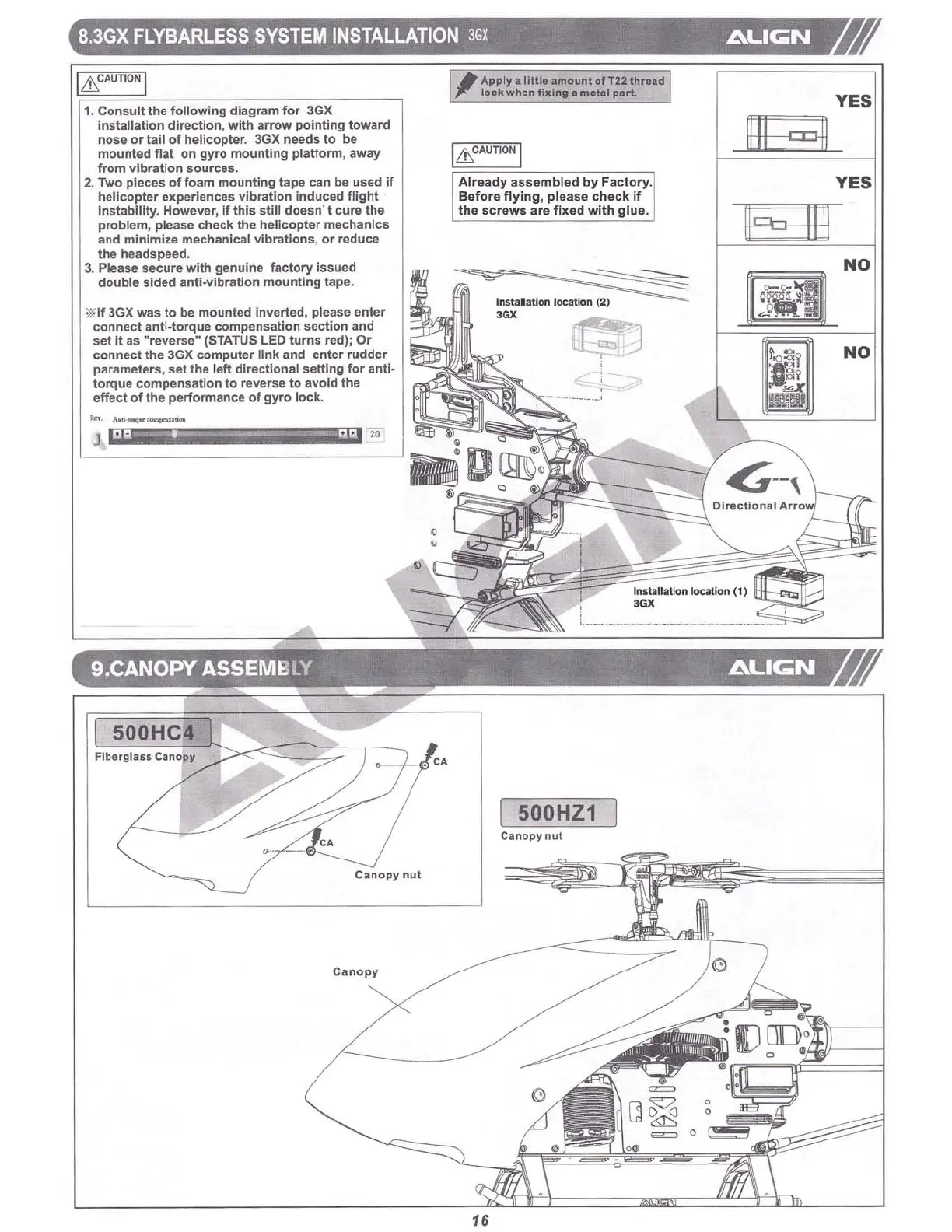
8.3GX
FLYBARLESS
SYSTEM
INSTALLATION
3GX
L\UC;N
NO
NO
YES
YES
JIbO@L
*"""
~
Install ation location (2)
'OX
Al
read
y
asse
mbled by Factory.
Before
fl
yin
g, ple
ase
che ck if
the
sc
re
ws
are
fi xed
wit
h
glu
e.
r-
~
Apply .
11
1
11
.
amounl
0'
T22lhread
1J
~
lock
when
filling
. melal
art.
"
9.CANOPY ASSEMBLY , .
L\UC;N
. .
*If 3GX
was
to be
mount
ed in ve
rted
, please
enter
con
nec
t anti-to r
que
compensation
sect
ion
and
set
It as "reve rse" (STATUS LEO
turns
red);
Or
c
onn
ect
the 3GX computer
link
and
enter
rudder
parameters, set the l
eft
directi
onal
se
tt
ing
for
anti-
to rque compe nsation to reverse
to
a
void
the
effect of th e p
erformanc
e
of
gyro lock.
1. Consult the following
diag
ram for 3GX
installation
direction
,
with
arrow
pointing
towa
rd
nOS8
or
tail of helicopter. 3GXn
eeds
to be
mounted
flat
on
gyro
mounting
pl
atform
,
away
from vibration sources.
2. Two pieces of foam
mounting
tape can be used if
heli
copter
exp
eriences v ibration
induced
flight
Instability
.
How
ever, if
this
stit l
doe
sn
't
cure
the
problem, plea
se
che
ck the helicopter me
chanic
s
and
minimiz
e mechanical vibrations, or reduce
the h
eads
peed
.
3. Please secure
with
genuine fa
ctory
Issued
doubl
e
sid
ed
ann-
v
lbr
ati
on
mounting
tape .
500HC4
Fib
eflli
us
C
anopy
C
anopy
nul
Ca no py
500HZ1
Ca
nopy
nut
=
.
'-==-.
,
---
o
c
.
o'
o
Back to the cover

Table of Contents

Related product manuals