11.AILERON ROLL RATE 1
Setting Instruction:
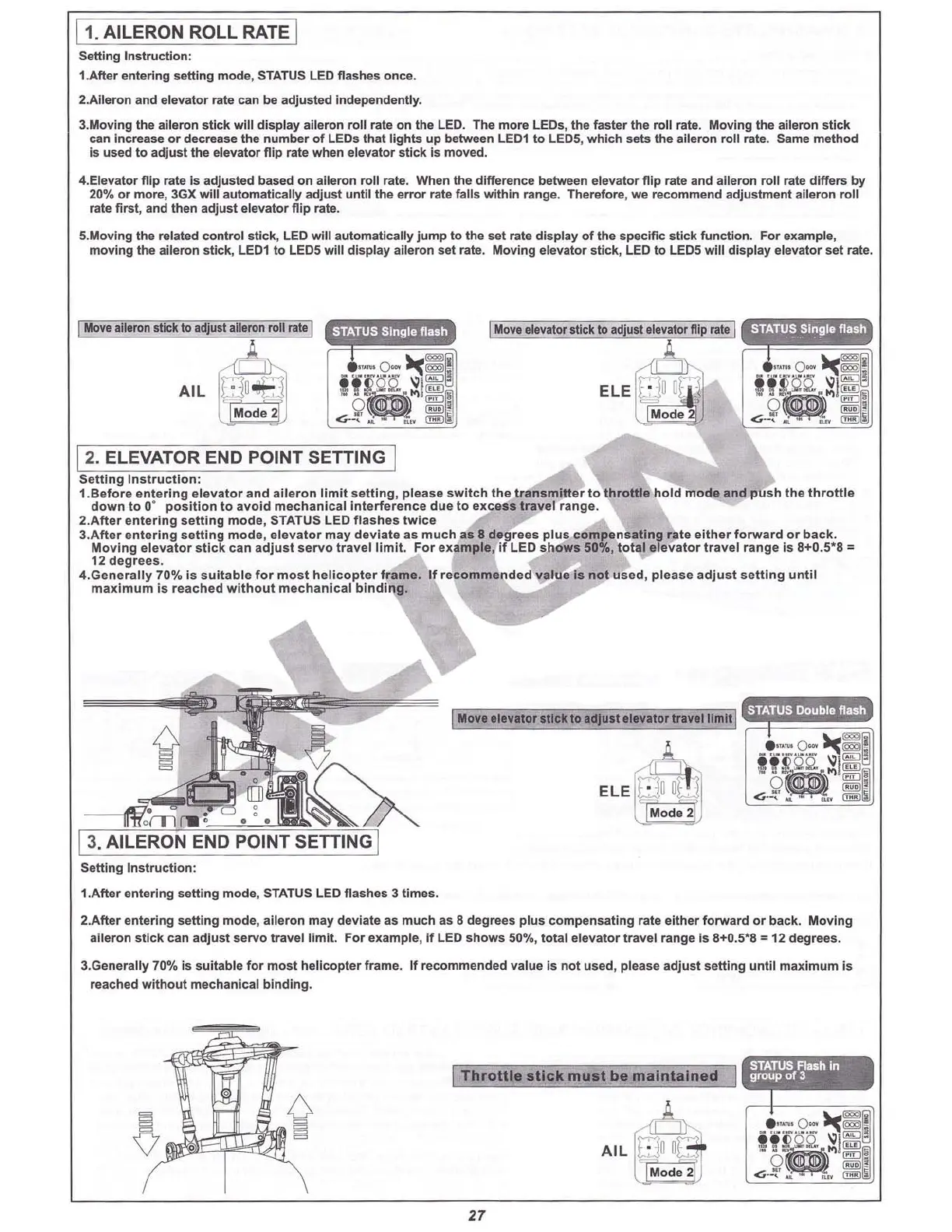
1.After entering setting mode, STATUS LED flashes once.
2.Alleron and elevator rate can
be adjusted independently.
3.Moving the aileron stick wlll disp lay aileron roll rate on the LED. The more LEOs, the faster the roll rate. Moving the aileron stick
can increase or decrease the number of LEOs that lights up between LE01 to LE
OS
, which sets the aileron roll rate. Same method
Is used to adjust the elevator flip rate when elevator stick Is moved.
4.Elevator flip rate Is adjusted based on aileron roll rate. When the difference between elevator flip rate and aileron roll rate differs by
20% or more, 3GX will automatically adjust until the error rate falls within range. Therefore, we recommend adjustment aileron roll
rate first, and then adjust elevator flip rate.
S.Moving the related control stick, LED will automatically Jump to the set rate display of the specific stick function. For example,
moving the aileron stick, LE01 to
LEOS
will display aileron set rate. Moving elevator stick, LED to LE
OS
will disp lay elevator set rate.
A
8"
ELE
u;ln
nlli
Mode2
I
Move
e
levato
r stick10
adJusl
elevator
flip
rate
I
•
Moveelevator stick to adjust elevator travel limit
,-
AIL
~lu
o€J
Mode 2
I
Move
aileron stickto
adju
st
aileron
roll raleI
• •
o
nl
rWt
c
•
13.AILERON END POINT
srn
iNG]
Setting Inst ruction:
1.After entering sett ing mode, STATUS LEO flashes 3 times.
12.ELEVATOR END POINT SETTING 1
Setting
Instruction
:
1.Before
ent
ering
elevator and aiteron lim it sett
ing
, please
switch
Ihe t
ransmitter
to t
hrottle
hold
mode and push the t
hrottle
down
to O· position to
avoid
mechanica
l Int
erf
erence due to
exce
ss travel range.
2
.After
ente ring
setting
mode, STATUS LED flashes
twice
3.After entering
setti
ng mode,
elevator
may
deviat
e as
muc
h as 8 degrees plu s compe
nsating
rale
eit
her
forwa
rd or
back
.
Moving e
levator
st
ick
can adj ust servo travel
limit
. For example, If LED
shows
50%,
total
ele
vator
travel rang e Is 8+0
.5'8
'"
12 degrees.
4.Gene
rally
70% Is SUitable
for
mos t h
eli
copt
er frame . If recommended
val
ue Is
not
used , please
adjust
setting
unti
l
ma
xim
um is reach ed
witho
ut
mechanica
l bi
nding.
2.After entering setting mode, aileron may deviate as much as 8 degrees plu s compe nsating rate either
forw
ard or back. Moving
aileron stick can adjust servo travel lim it. For example, If LED shows 50%, total ele
vator
travel range Is 8+0.5*8 '" 12 degrees.
3.Generally 70% Is suitable for most helicopter frame. If recommended value is not used, please adj
ust
setting until maximum Is
reached
without
mechanical binding.
T
hr
ott
le s
ti
ck: m
us
t
be
m a
in
ta
ln
e
Cl
AIL
t:;::lfi
fi
G-
I
M
o d
~
t
j
STATUS
F1uh In
group
of
3
27
Use the rudder stick to enter this setting mode. The status
light will flash twice.
Use the rudder stick to enter this setting mode.
The status light will flash three times.



 To Next Page