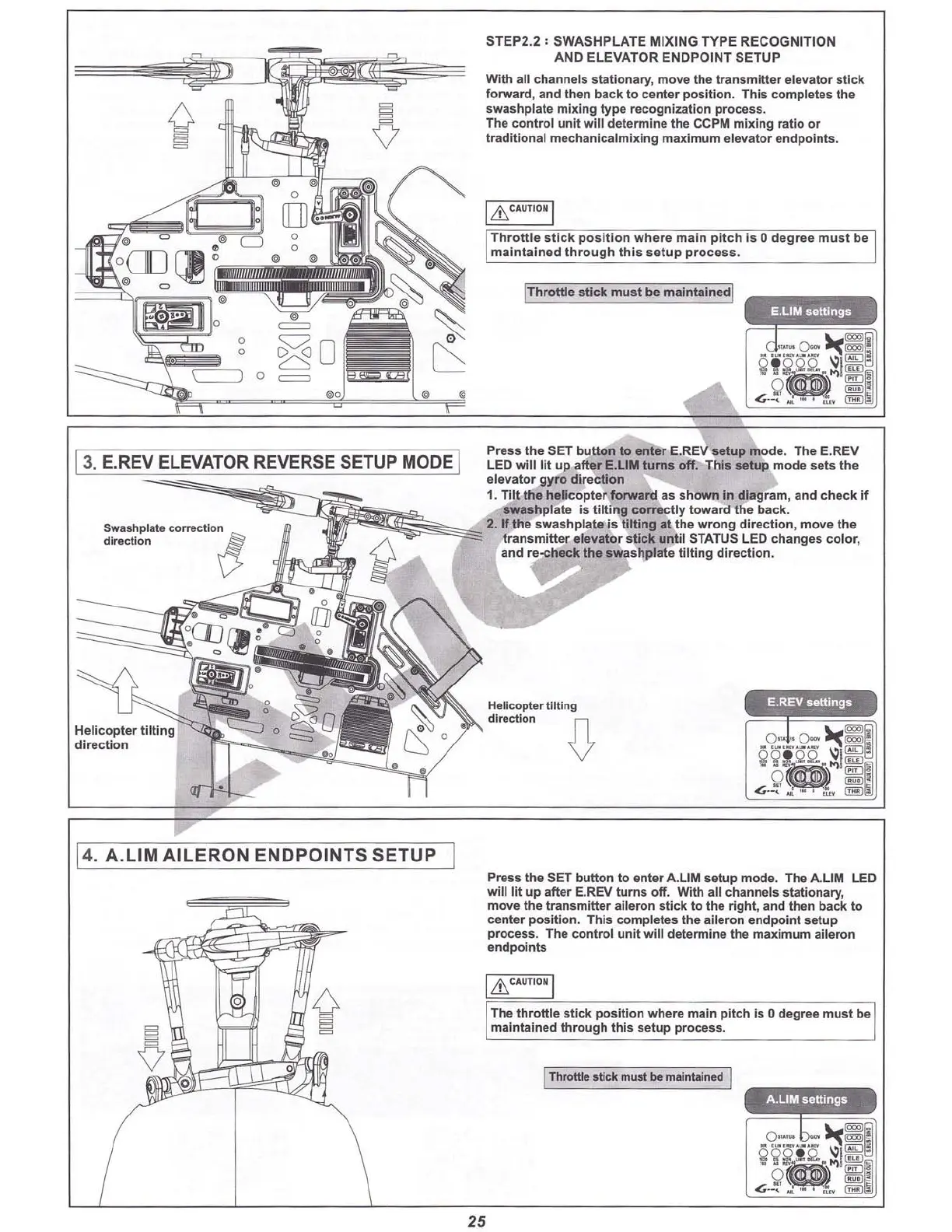
13.E.REV ELEVATOR REVERSE SETUPMODEI
Swa
shplalecorrection
direction
8
STEP2.2 ; SWASHPLATE MIXING TYPE RECOGNITION
AND ELEVATOR ENDPOINT SETUP
With all channels stationary, move the transmitter elevator
stic
k
forward, and then back to center positio n. This completes the
swashplate mixing type recognization process.
The
cont
rol unit will determine the CCPM mixing ratio or
trad
itio
nal mechanicalmixing maximum elevator endpoints.
I & CAUTION 1
Thr
ott le
stick
positio
n where main pi tch Is 0 d
egr
ee must be
maintain ed
thr
ough
thi
s
set
up
proc
ess .
IThrottle stick must be maintalnedl
Press the SeT button to enter E.RE
Vs
etup mode. The E.REV
LED w
l1l
lit up after E.LlM turns
off
. This setup mode sets the
elevator gyro
dir
ecti
on
1. Tilt the helico pter
forw
ard as shown In d
iagr
am, and check
if
swashplate is tilting
co
rrectly toward the back.
~
2
.l
f the swash plate is tilting
at
the wrong direction, move the
tran
smitt
er elevator stick until STATUS LED changes color,
and re-check the swashplate
tilt
ing directi on.
14.A.
LIM
A
ILERO
N
ENDPO
INTS
SETUP
o
Press the SeT button to enter A
.L1
M setup mode. The
A.L1M
LED
will
lit up after E.REV turns off. With all channels stationary,
move the transmitter aileron stick to the right, and then back to
center po
sit
ion. This completes the aileron endpoint setup
process. The control unit will determine the maximum aileron
endpoints
1&CAUTION 1
The throttle s
tick
pos
iti
on where main pitch is 0 degree must be
maintained through this setup precess.
IThrottle stick must be maintained I
25



 To Next Page