14.SWASHPLATE DAMPENING SETTINGI
Setti ng Inst
ruction:
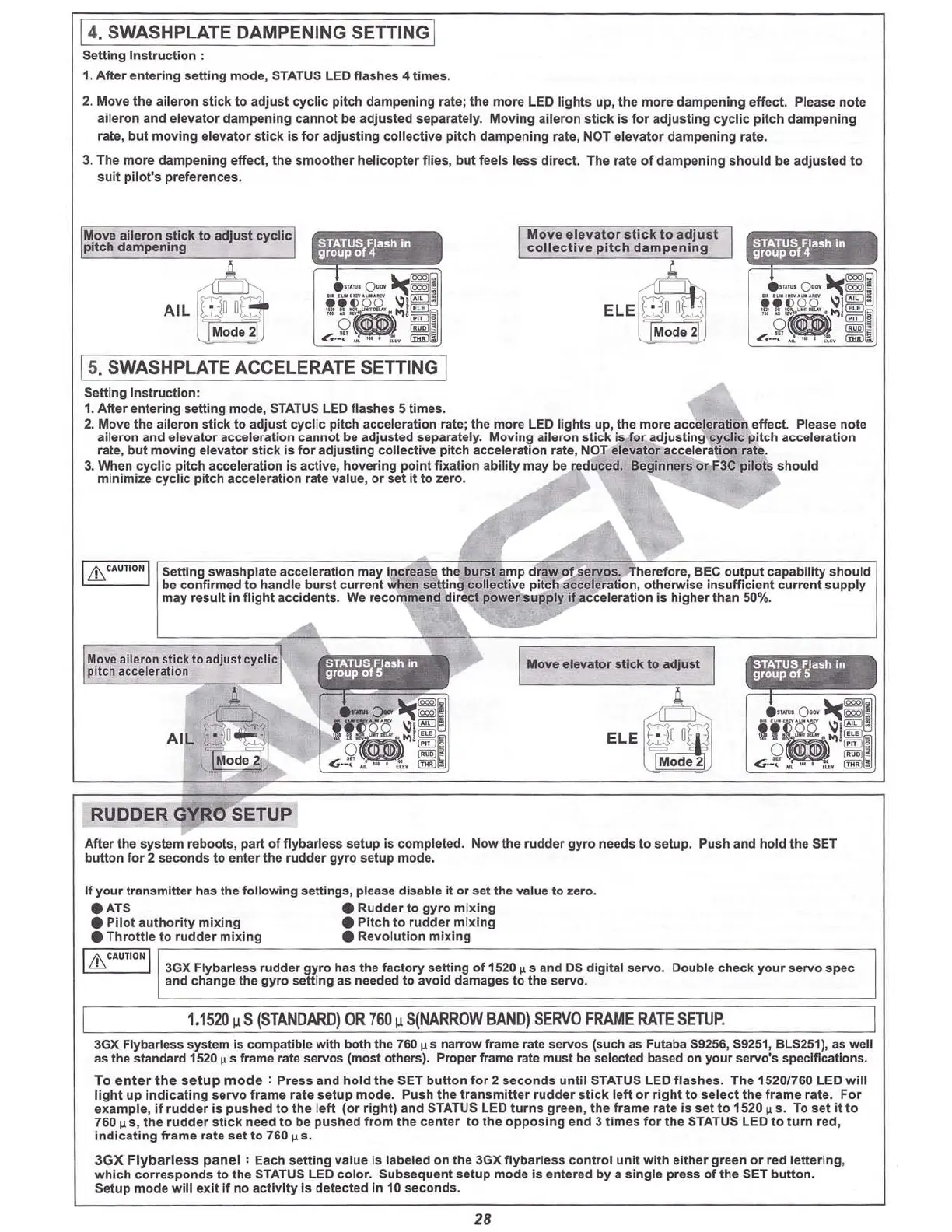
1. After entering setting mode, STATUS LED flashes 4 times.
2. Move
the
aileron
sti
ck to adj
ust
cyc lic pitch da
mpen
ing rate; the more LED li
ght
s up,
the
more da mpening effect. P
lease
n
ot
e
aileron and e
levat
or dam
pening
cannot be adjus ted separate ly. M
oving
aile
ron
s
tick
Is
for
adj
usti ng cy
cli
c pi
tch
dampe
ning
rate, but moving elevato r stick is for adjusting collective pitch d
amp
ening
rate, NOT elevator d
ampe
ning rate.
3. The m
or
e
damp
ening
e
ffec
t, the sm
oot
her heli c
opter
fli es, but feels less
dir
e
ct
. The rate
of
d
ampe
ning should be adj
us
ted
to
suit p
ilo
t's preferences.
STATUS
Flash In
group
of
4
ElE
~
U
U
~
Mod e 2U
Mo
vo
ele
vato
r
sti
ck t o adj
ust
coll
e
cti
ve
pi
tc
h d ampenin g
STATUS
Flash In
group
of
4
• ..•
o-
~~~
All
kfJ
O0!1
i
~
~\~
I
I
~
Mode
2)
G
..'.:
'~
.
~~
Se
tting
swas
hplate accelera
tio
n
may
increa se the
bur
st amp draw of-servos. Therefo re, BEC
output
capa
bility
should
be confi rme d to
hand
le
bur
st curre nt
when
setting c
cuec
ttve pltch acce leration , oth erwise in
suffi
ci
ent
curre nt supply
may result In fli
ght
accidents. We rec
ommend
direct p
ower
suppl
y if ac
celeration
is hi
gher
than 500/•.
Move ai
ler
on stick
to
adj ust
cycli
c
p
itch
damp
ening
I
Lh
CAUTIONI
15.SWASHPLATE ACCELERATE SETTING 1
Sett
ing
Ins
tru
ction :
1. After entering setti ng mode, STATUS LED fla shes 5 time s.
2. Move the ailero n
st
ick
to
adj
ust
cyclic
pitc
h acceleration rate; the m
or
e LED lights up , the more accel
erati
on effect. Please n
ot
e
aileron and elevat
or
acce leration
cann
ot be
adju
sted separately. Movin g a
iler
on st
ick
Is for adj
usti
ng cyclic pit ch
acce
ler
ation
rate, but moving elevat
or
s
tick
is f
or
adjusting
coll
ecti
ve
pit
ch acceleration r
at
e, NOT elevator acceleration rate.
3. When cyclic pitch acceleration is a
ctive
,
ho
vering point fi xation abil
ity
may be reduced. Beginners or F3C
pilot
s
sho
uld
minimi
ze
cyc
lic
pit
ch acceleration rate value, or
set
it to zero.
Move aileron sti ck to adjust cycli c
pitch acceleration
STATUS
Flash in
group of 5 .
Move elev
ator
stick to adjust
!'L
ElE
QUOm
Mode
2
STATUS
Flash In
group
of
5
RUDDER YRO SETUP
Aft
er the
sys
tem reboots,
part
of
f1
ybarless
set
up is completed. N
ow
the ru
dder
gyr
o needs to setup. Push and
hold
th e SET
bu
tto
n
fo
r 2 secon
ds
to e
nter
the
rudder
gyro setup
mod
e.
If your tr an
smitt
er has the
foll
owin
g sett ings, please disable it or set the value to zero.
• ATS • Rudd er
to
gyro
mixing
•
Pilo
t
auth
ori
ty
mi
x
ing
•
Pitch
to ru
dd
er mi
xin
g
•
Thr
o
ttl
e
to
rud der mi
xin
g • Revol ution
mixing
I
l'
CAUTI
ONI
as
3GX Fl
ybar
less
rudd
er g
yr
o has the f
acto
ry setting of 1520 II
sa
nd DS digital
servo
. Double c
heck
yo ur servo
spec
and change the g
yro
setting as needed to avoid damages to the s
erv
o.
1.
152
0"
S
(STANDARD
)
DR
760
" 5
(NARROW
BAND)
SERVO
FRAME
RATE
SETUP.
3GX Flybarless s
yst
em is com p
atib
le with both the 760
1.1
S narrow frame rate servos [such as Futaba S9256, S9251, BLS251), as welt
as the stan
dard
1520 u s frame rate servos (most others). Prop er frame rate
mus
t be selected based on your servo's spec
ific
ations.
To
ent
er
the
setup
mod
e : Pr
ess
and
hold
th e SET
button
f
or
2
second
s
until
STATU S LED fla
she
s.
The
1520
(760 LED w
ill
lig
ht
up
ind
ic
atin
g serv o frame
rat
e set up
mod
e. Push th e
tran
sm
itt
er
rudder
stic k l
eft
or
right to sele
ct
th e fr am e rate.
For
exa mple, if
rud
der is pus hed to
the
left
(or
rig
ht)
and
STATUS LED turns g
ree
n,
th
e f
rame
rate is
set
to 1520
us
. To set
it
to
760 u e. th e
rudd
er
st
ick
need
to be pu sh ed from
the
center
to
th e opp
osing
end 3 ti mes
for
the STATUS LED
to
turn
red ,
Indicati ng
fram
e
rat
e set
to
760 u s.
3G
X
Flyb
arl
ess p
an
el
: Each sett ing va
lue
is labeled on th e 3GX fly bar
less
c
ontr
ol
unit
wit h either
gre
en or red l
ett
er
ing
,
which co
rrespo
n
ds
to the STATUS LED col
or
. Subse que nt
setu
p
mode
is
ente
red by a sing le press
of
th e SET b
utto
n.
Se
tup
mod e w
ill
exit
if
no
activ
ity
Is
det
ect
ed In 10 s
eco
nds.
28
Use the rudder stick to enter this setting mode.
The status light will flash four times.
Use the rudder stick to enter this setting mode.
The status light will flash five times.



 To Next Page