7. Thermal Protection; When the ESC temperature reaches 80 ·C for any reason. it wilJengage the battery protection circu it, reducing
power to the ESC. We recommend mounting the ESC in a location with adequate air flow and ventilation.
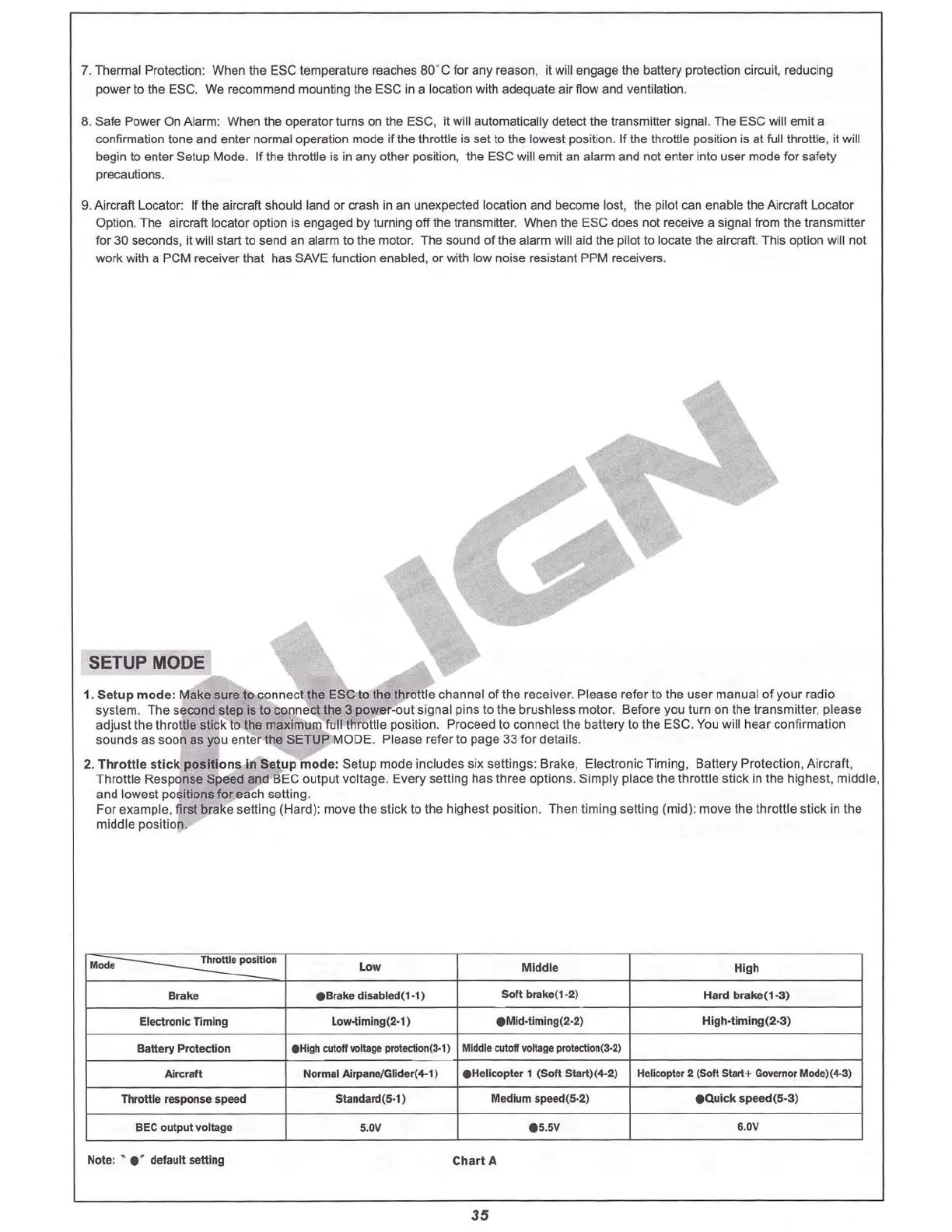
8.
safe
Power On Ala rm: When the operator turns on the ESC. it will automatically detect the transmitter signal. The ESC will emit a
confirmation lone and enter normal operation mode if the throttle is set to the lowest position. If the throttle position is at full throttle , it will
begin to enter Setup Mode. If the throttle is in any other position, the ESC will emit an alarm and not enter into user mode for saf
ety
precautions.
g. Aircraft l ocator: If the aircraft should land or crash in an une xpected location and become lost. the pilot can enable the Aircraft
locato
r
Option. The aircraft locator option is engaged by turning off the trans mitter. When the ESC does not receive a signal from the transmitter
for 30 seconds, it will start to send an alarm to the motor. The sound of the alarm will aid the pilot to locate the aircraft. This option will not
work with a PCM receiver that has SAVE function enabled. or with low noise resistant PPM receivers.
SETUP MODE
1. S
etup
mod e: Make sure 10 con nect the ESC to the throttle channel of the receiver. Please refe r to the
user
manual of your radio
system. The
seco
nd step is to
connect
the 3 power-out signal p
ins
to the b
rushless
motor. Before you turn on the tra
nsmille
r, p
lease
adjust the throttle stick to the ma ximum full throttle position. Proceed to
connect
the
balle
ry 10 the ESC. You will hea r confirmation
sounds as soo n as you
enter
the SETUP MOD E. Please
refer
to page 33 for details.
2.
Thr
o
ttle
sUck
positions
In Se
tup
mode
: Setup mode includes six settings: Brake, El
ect
ronic Timi ng. Battery Protection, Airc raft,
Throttle
Respo
nse Speed and BEC ou
tput
voltage. Every setting has three
options
.
Simply
place the throttle
stic
k in the highest.
middle
.
and lowest positions for each setting.
For example ,
firs brake
selling
(
Har
d): move Ihe
stic
k to the hig
hest
position. Then timing se
lti
ng (
mid)
:
move
the throttle stick in the
middle position.
....
.,,
""
Electronic n mlng
Battery Protection
Low
eBrake disabled(1-1)
Low-tlmln
g(2-
l)
Middle
SO
ft br
Bke
(1-2)
eM
kl-tlming(2·2)
High
Hard brake(1·3)
High·Umlng (2
·3)
Aircraft
BEe output voltage
Note: • e ' default
se
il
ing
NOfmal
A1rpa
nt/Glider(4-1)
Standard(5·1)
5
.DV
eHelicopter 1 (
SOft
Start)(4·2) He
licopte
r 2 (
Soft
Slart+
Gooffl
mor
Mode
)(4·3)
Medium speed{5-2)
eQulck
speed(5-3)
eS
.5V 6.0V
Chart A
35
For safety, remove the blades before doing this. Stay clear of the tail and head in case
they turn. The motor must be connected in order to hear the tones.




 To Next Page