SETUP
PRE·CHECK
- -
--
I
"',
CAUTION I
L!:l.
While u
sin
g 3GX
FBL
sys
tem, be sure to
turn
o
ff
the
follow
ing fun ct ion s in the tr an
smitt
er
*
Swas
h R
ing
*Linkage
Comp
ens
ation
*
Swas
h Mix *
Mixi
ng *Acceleration
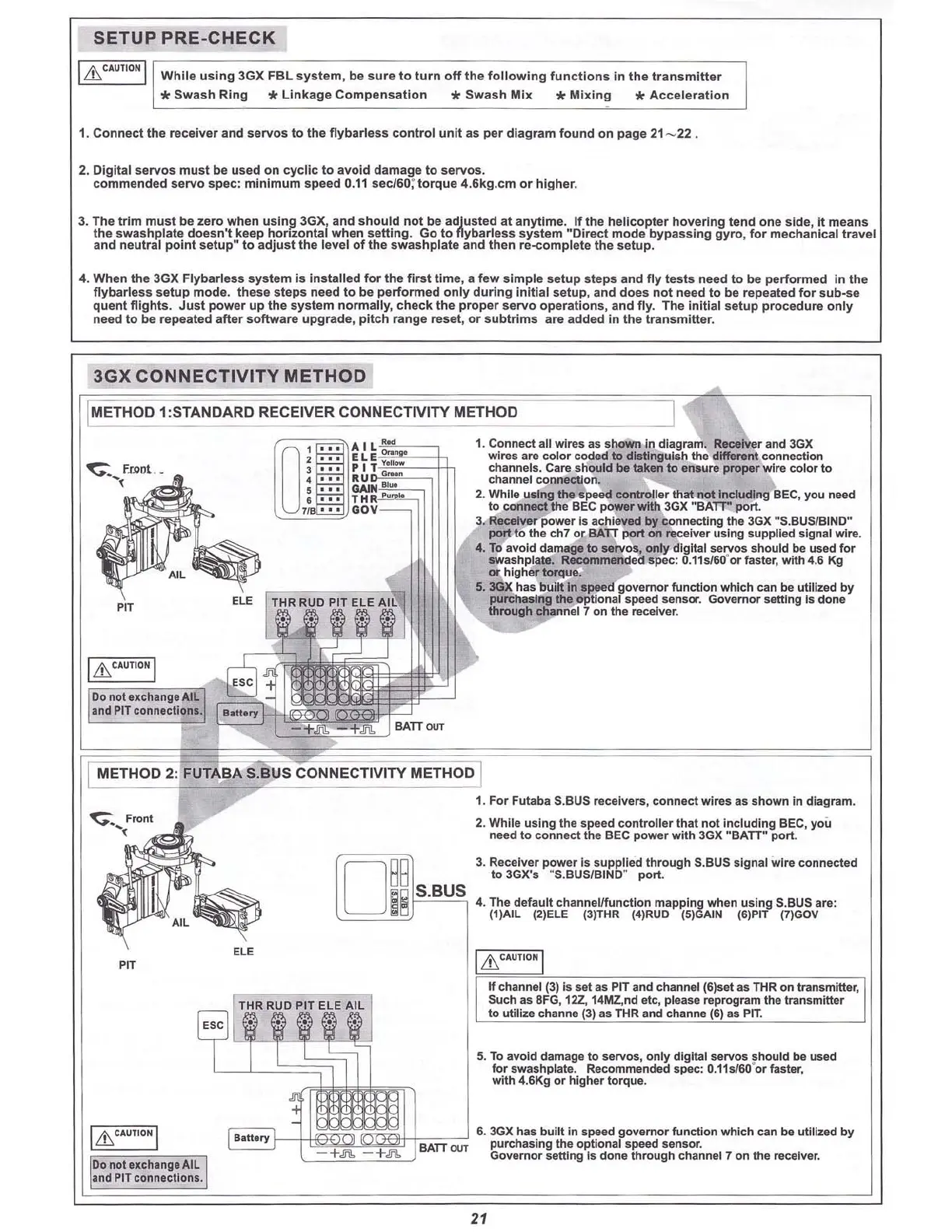
1. Connect the receiver and s
ervos
to the
f1
ybarless con
tro
l unit as per dia
gr
am found on page 21- 22 .
2. Digital servos must be used on cyclic to avoid damage to servos .
commended servo spec: m
inimum
speed 0.11 see/50; torque 4.6kg.cm or higher.
3. The trim must be zero when
u
sin~
3GX, and should not be adju sted at anytime. If the helicopter hovering tend one side, it means
the swashplate doesn't keep hom:ontal when setting. Go to flyba rless system "nrrect mode bypassing
gyr
o, f
or
meChanical travel
and neu
tral
po
int
se
tup"
to
adju
st th e l
evel
of the swashp
late
and then re-e
ompl
ete the setup.
4. When th e 3GX Flybarless
sys
tem is
inst
alled f
or
the
first
time, a few simple setu p
steps
and fl y tests need to be pe
rform
ed In the
flybarless set
up
mode. t
hese
ste ps need to be pe
rfo
rmed
onl
y dUring I
nit
ial setup,
and
does not need to be repeated for sub -se
quent
flig
hts. Ju
st
power
up
the
sys
tem n
ormall
y, chec k the
pr
oper
servo
o
peratio
ns , and fly. The
ini
tial setup
pr
oc
edure
on ly
need to be repeated aft er
so
ftwa
re up
gr
ade, pit
ch
r
ang
e reset, or sub
trl
ms are ad
ded
in the trans mitte r.
3GX CONNECTIVITY METHOD
--~
1. Connect all wires as shown In diagram. Receiver and 3GX
wires are color coded to distinguish the different connection
channels. Care should
be
taken to ensure proper wire color to
cha
nne
lcon
nectio
~
2. While using the speed controller that not including BEC, you need
to connect the BEC power
with 3GX "
BAn:"
port.
3. Receiver power Is achieved by connecting the 3GX
RS
.BUSIBINO"
JKl'rt
to the ch7 or
BAn
port
on receiver using supplied signal wire.
4. To avoid damage
to servos, only digital servos should be used f
(ll'"
swashplate. Recommended spec: 0.11
516
0'
(lI'"
faster, with 4.6 Kg
Of higher torque.
5. 3GX has built In speed go
vemor
function which can be utilized by
purchas
ing
the
optional speed sens
c::r
. Governor setting Is done
through channel 7 on the receiver.
-+
.ft:
+
.!ii!.
BATTOUT
O
~
:
::
:U~
-
I
=
!
·
~~~
n
3 ' "
PIT
a.-
4 • • • RU
5 ' "
GAIM
-
e
...
THR
"""'"
7/8 ' " OOV
prr
Do not IXcha
ngl
AI[
and PITco
nnlc
tions.
IMETHOD 1:STANDARD RECEIVER CONNECTIVITY METHOD
METHOD 2: FUTABA S.BUS CONNECTIVITY METHOD
D
~
~
S
.
B
U
S
--.==-:e""
1. For Futaba S.BUS receivers, connect wires as shown in diagram.
2. While using the speed controller that not
incl
uding BEC, you
need to connect the BEC power with 3GX
RB
ATI"
port.
3. Receiver power Is supplied through S.BUS sig nal wire connected
to 3GX's "S.BUS/BINO"
port
.
4. The default channel/function mapping when using S.BUS are:
(1)AIL (2)ELE (3)THR (4)RUD (5)GAIN (6)PIT
(7)GOV
E
LE
prr
I
Lh
CAU
TION I
Donot IXchangiA1L
.n
d PITcennectlcns .
BA
TT~
If channel (3) is set as PIT and channel (6)lIet as THR on transmitter,
Such as 8FG,
12Z, 14MZ,nd etc, please reprogram the transmitter
to util ize channe
(3) as THR and channe (6) as PIT.
5. To avoid damage to servos, only digital servos should be used
for swashplate.
Recommen
ded
spec: 0.11
5160
·or faster,
with 4.6Kg or higher torque.
6. 3GXhas b
uilt
in speed governor function which can be utilized by
purchasing the optional speed sensor.
Governor setting is done through channel 7 on the r
e<:
eiver.
21



 To Next Page