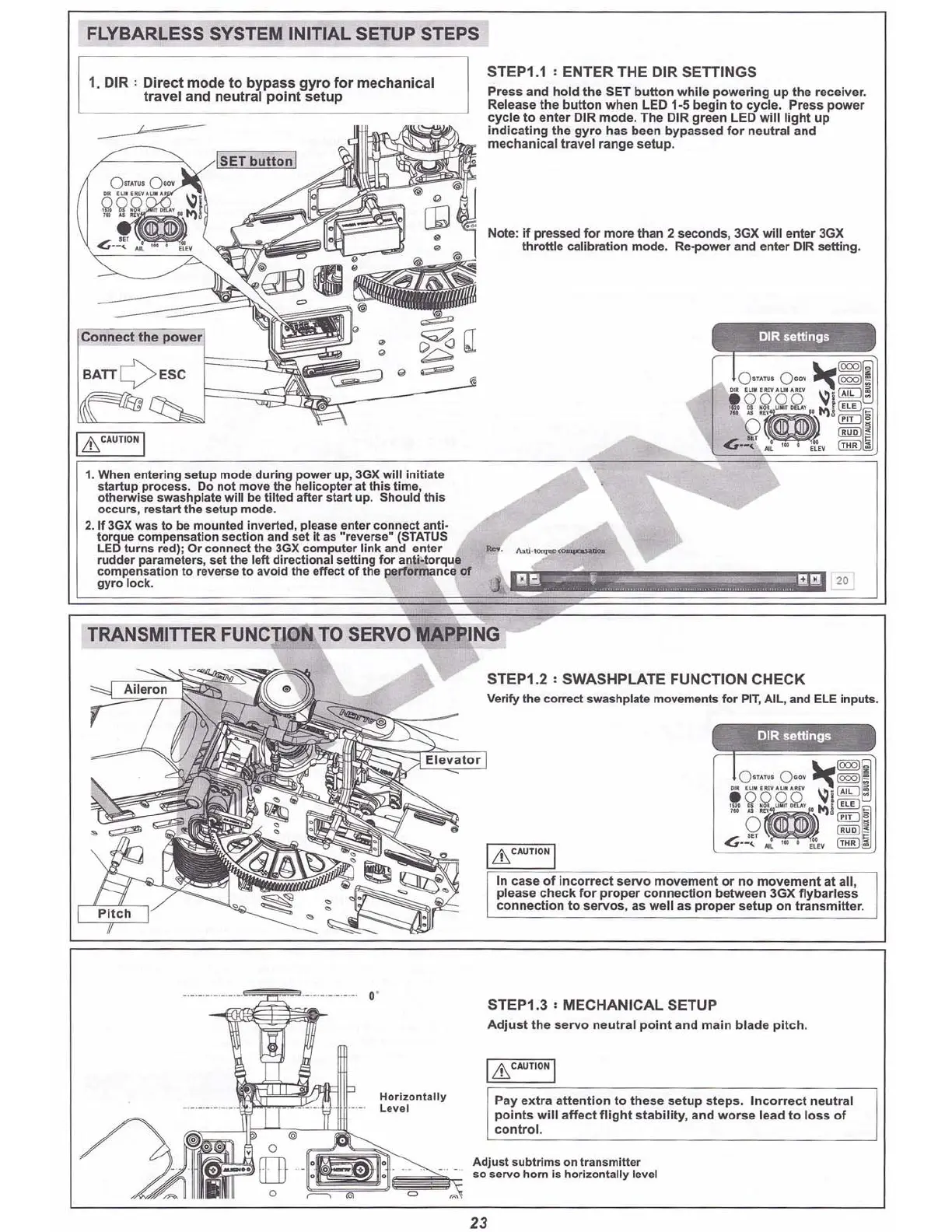
FLYBARLESS SYSTEM INITIAL SETUP STEPS
+.
20
~
Note: If pressed for more than 2 seconds, 3GX will enter 3GX
throttle calibration mode. Re-power and enter OIR setting.
STEP1.1 , ENTER THE DIR SETTINGS
Press and hold th e SET b
utto
n wh
ile
pow
erin
g up the
receiver
.
Release the bu
tton
when LED 1-5 begin to cycle. Press power
cyc le to enter DIR mo de. The DIR
gr
een LED will li ght up
indicating the gy ro has been bypassed for neutral and
mechanical travel range setup.
[gT
buttonl
1. When entering setup mode during power up, 3GX will initiate
startup process. Do not move the helicopter at
thi
s time ,
otherwise swashplate will be tilted after start up. Shoul d this
occurs, restart the setup mode.
2. If 3GX was to be m
ount
ed Inverted, please enter co n
nect
anti-
torque com pensation section and set It as "reverse " (STATUS
LED turns red): Or connect the 3GX computer lin k and enter
rudder parameters , set the left directi onal se
tt
ing
for
anti..torque
compensation to reverse to avoid the effect
of
the p'e
rfo
rmance
of
gyro lock.
1. DIR '
Dir
ect
mode to
byp
ass
gyro
f
or
me
chani
cal
tr
avel and
neutr
al po
int
setup
BATT
QE
SC
Connect the powe
r.
I
LhC
AUTIONI
TRANSMIITER
FUNCTION TO SERVO MAPPiNG
STEP1.2 , SWASH PLATE FUNCTION CHECK
Verify the eorreet $wilshplate movements
for
PIT, AIL, and
Elf
inputs.
I
Lh
CA
UT
IO
N!
In case of Inc
orre
ct
servo
mov
ement
or
no movement at all,
pleas e check
fo
r pr
op
er
connect
ion betw een 3GX
f1
ybarl
ess
c
onn
e
cti
on
to
se
rvos,
as we ll as pr
op
er
set
up on
tran
smitter
.
,.
Horizonta lly
l evel
--
0--
•
STEP1.3 , MECHANICAL SETUP
Adj
ust
the
servo
n
eutr
al p
oin
t
and
m
ain
bl ade pi
tch
.
I&
CA
UT
I
ON
I
Pay ex
tra
att
e
ntio
n to thes e setup
ste
ps. Inc
orr
ect neu
tr
al
p
oint
s
will
affec
t f
ligh
t
sta
bili
ty
, a
nd
wo
rse
lead to loss of
co
nt
rol.
Adjust subl rlms on transmitter
so servo horn is horizontally level
23
It is best to do this
before installing
servos.



 To Next Page