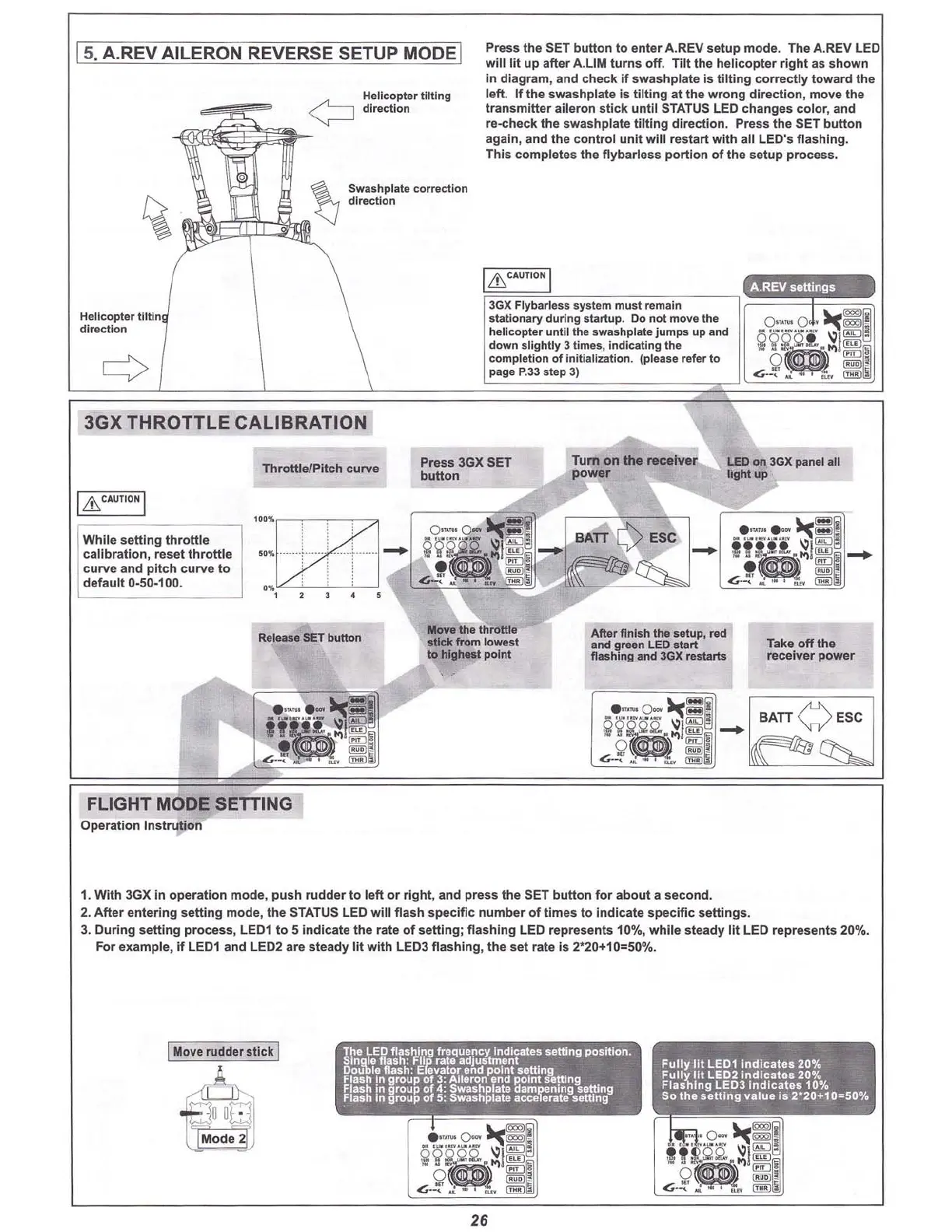
15.A.REV AILERON REVERSE SETUP MODEI
Helicopter tilting
direction
$washp
l"te
correc:tlon
d
irec
tion
Press the SET button to enter A.REV setup mode. The A.REV LED
will lit up after A.
lIM
turn
s off . T
ilt
the helicopter r
ight
as s
how
n
in dia
gr
am, and check if
swas
hp
late
is t
ilt
ing
co
rrect
ly to ward the
left . If the
swashp
late Is t
ilt
ing at the w
rong
dire
cti
on , move the
tra
nsmitter aileron s
tick
until
STATUS LED cha
nges
color, and
re-check the swashplate tilting direction. Press the SeT button
agai n, and th e con
tro
l
unit
will rest
art
with all LED' s
flas
hing.
This co mple
tes
the
f1y
bar
less
portion of the
se
tup p
rocess
.
[
Lh
CAUT'O
NI
A.REVsettings
Take o
ff
the
receiver power
Afte r fl nish the setup, re<f
and
green LED st art
flashinA and
3GX
restarts
3GX
Flybarless
system
must remain
statio
nary
durin
g sta
rtu
p. 00 not move the
helicopter until the swashplate
jum
ps up and
down
slig
htly
3
time
s, i
ndicat
ing the
completion
of
ini tialization. (please
refer
to
page
P.33 step 3)
Press 3GX SET
butt
on
Release SET
bull
on
Throttl e/Pitch curve
''''
G2tJ.
, .
i : :
••
'llo
-------,.••...
----
-
~
......
; : i
.'llo ; ; :
, J J • •
3GX
THROTTLE
CALIBRATION
While
se
tti
ng
thr
ottl
e
calib
rat
io
n, reset th
rottle
curve and pitch curve to
default 0-50·100.
Helicopter tililn
direction
I
&.
CAUTION I
FLIGHT MODE SETTING
Operation Instrutlon
1. With 3GX in operation mode, push rudder to left or rig ht, and press the SET button for about a second.
2. After entering
sett
ing mode, the STATUS LED will flash specific number of times to Indicate spec
ific
setti ngs.
3. During setting process, LED1 to 5 Indicate the rate of setting; flashing LED represents 10%, while steady
lit
LED represents 20%.
For example,
if
LED1 and LED2 are steady
lit
with LEDJ flashing, the set rate is 2'20+10=50%.
I
Move
rudderstick I
dm
A
8
uo
m
Mode
26



 To Next Page