[Select by mo
ving
the
rudd
er
st ick left an d rf9liiJ
RUD
~
O
G
U
M
O
d ~ 2
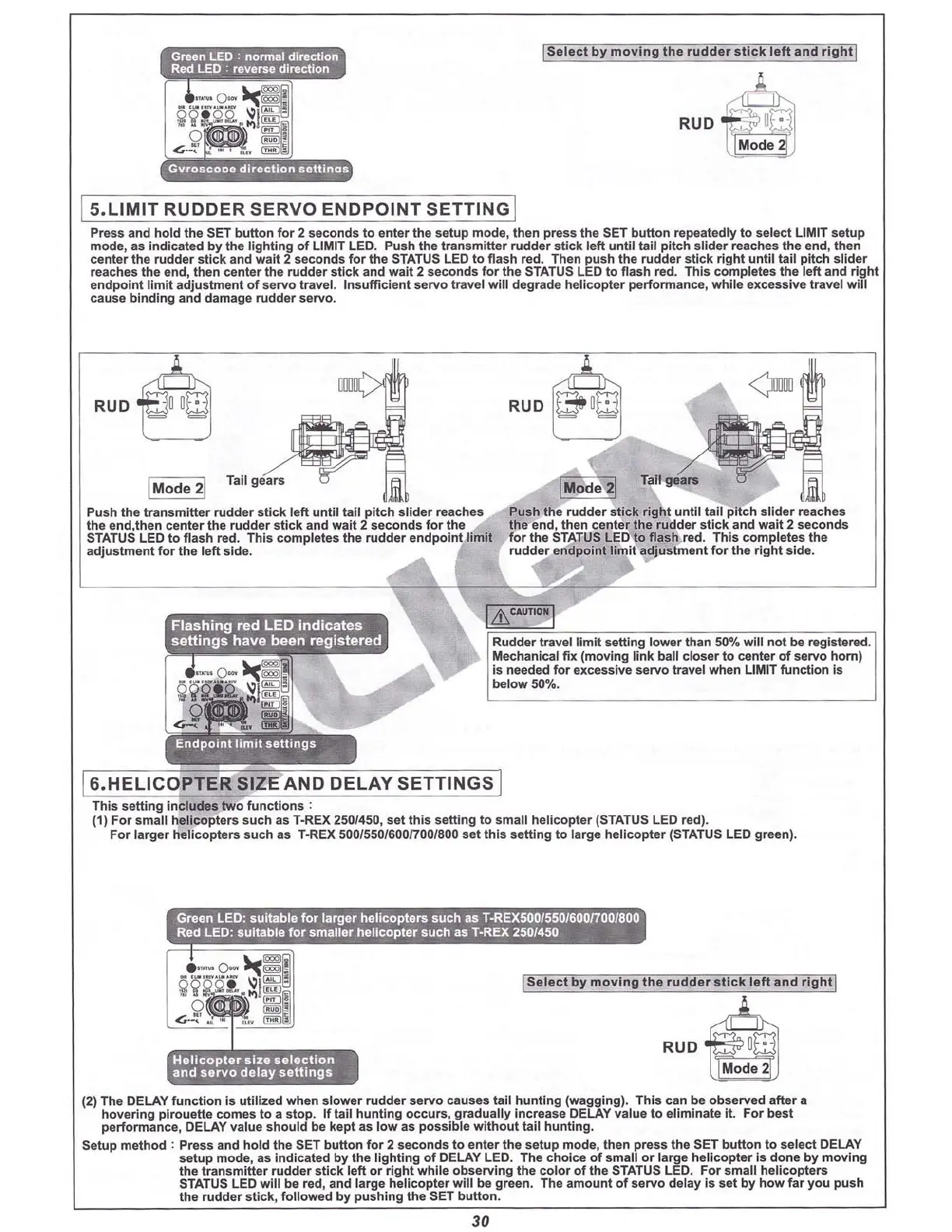
I S.LIMIT RUDDER SERVO ENDPOINT SETTING I
Press and
hold
the SET
butt
on
fo
r 2 seconds to enter the setup mode, then press the SET bu
tto
n repeatedly to select LIMIT setup
mod e, as indicated by the lighting
of
LIMIT LED. Push the transmitter
rudd
er
stick
left
un
til
tall
pit
ch slider reaches the end, then
center the rudder stick and wait 2 seconds for the
STATUS
LED to flash red. Then push the rudder stick
right
until tail pitch slider
reaches the end, then center the rudder stick and wait 2 seconds for the STATUS LED to flash red. This completes the left and rig ht
endpoint
limit
adjustment of serve travel. Insufficient servo travel will degrade helicopter performance, while excessive travel will
cause
binding
and
dama
ge ru
dder
s
erv
o.
RUD
~
IMode 2!
Tall
gears
Push the
transmitt
er
rud
der
st
ick
left un
til
tall pi
tch
slider re
ache
s
the end,then c
enter
the
rudd
er stick and wait 2 se
cond
s f
or
the
STATUS LED to flash red. This completes the rudder endpoint
limit
adjus tment for the left side.
Push
the
rudder
sti
ck
righ
t
until
tail
pit
ch
slid
er
reach es
the end, then center the rudd er stick and wait 2 seconds
for the STATUSLED to flash red. This completes the
rudder
endpoint
limit
adju
stm
ent
for
the
right
side.
I&
CAU
TIONI
Rudder travel limit
se
tting lower than 50% will n
ot
be registered.
Mechanical fi x (mo
ving
link
ball
clo
ser
to center
of
servo
hom)
is needed for excessive servo tr avel when
UMIT
function
Is
below 50%.
16.HELICOf TER
~IZ
E'AND
DELAY SETTINGS I
This se
tt
ing
include
s
two
fun
cti
on s :
(1) For small helicopters such as
l·RE
X2501450, set this setting to small he
lico
pter (STATUS LED red).
For larger helicopters such as T·REX 500/550/600(70
01
800 set thi s setting to large helicopter (STATUS LED green).
Helicopter
size
selection
and
servo
delay
settings
ISelect
by
mo
ving
the
rudder
stI ck
left
and
rl
ght
l
RUD 4
~
(2) The DELAY function is utilized when slower rudder servo causes tail hunting (wagging) . This can be observed after a
hovering
pir
ouette comes to a stop. If tail huntin g occurs, gradually Increase DELAY value to eliminate it. For best
performance, DELAY value should be kept as low as possible without tail hunting.
Setup method ; Press and hold the SET button for 2 seconds to enter the setup mode, then press the SET
butt
on to select DELAY
setup mode, as Indicated by the lighting of DELAY LED. The choice of small or large helicopter is done by moving
the tran
smitt
er rudder stick
left
or
right
while observI ng the color of the STATUSLED. For small he
licopt
ers
STATUSLED
will
be red, and large helicopter w
ill
be green. The amount of servo delay is set by how far you push
the rudder stick, foll owed by pushing the SET
butt
on.
30



 To Next Page