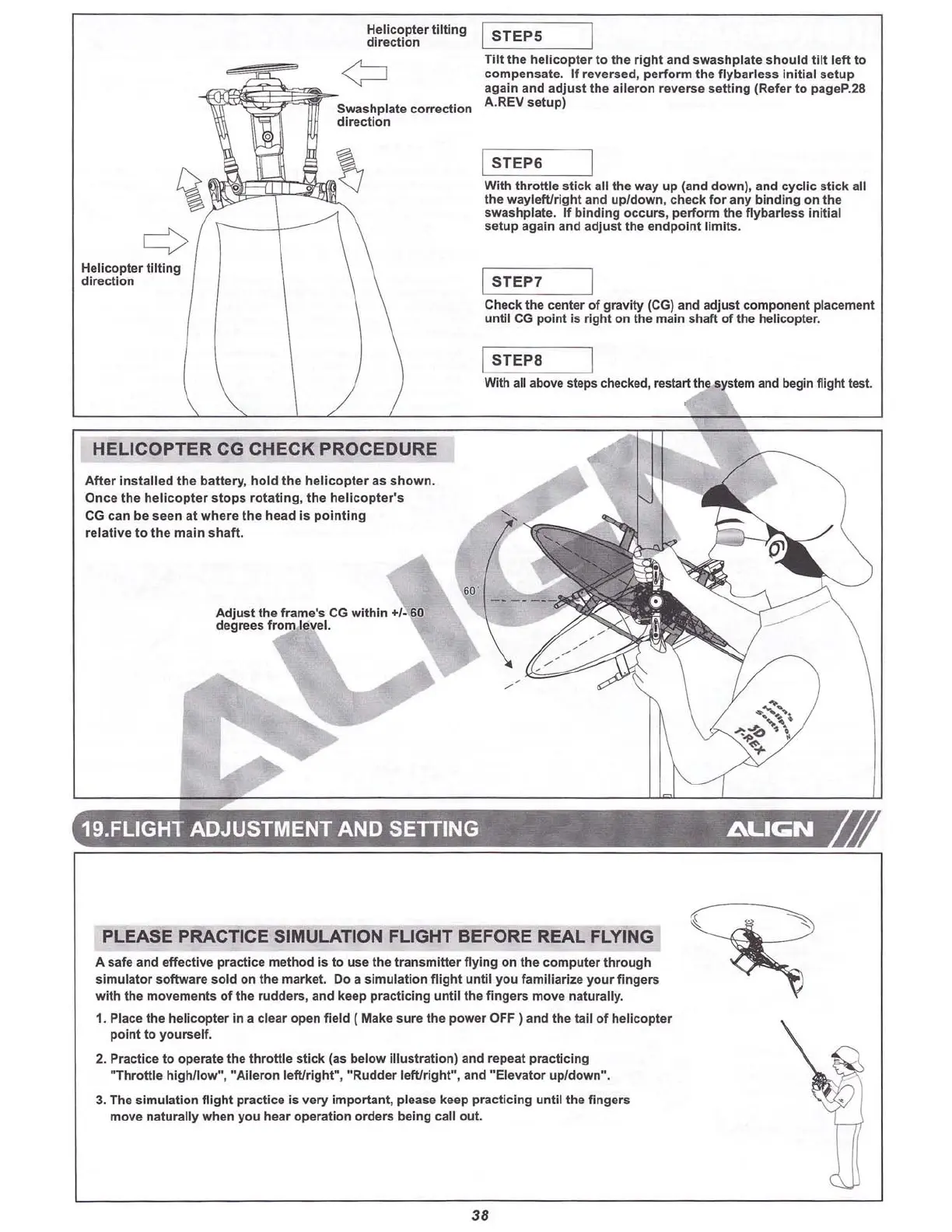
He
lico
pte r
til
ting
directi on
Helicop ter
til
t
ing
direction
ISTEPS
Tilt
the
he
licopte
r
to
the
rig ht and swa
shp
late
sho
uld
tilt
left
to
co mpe
nsate
. If reversed, pe
rf
orm
the
flyba
r
less
I
nitial
setup
again and ad
just
the
ailer
on
reverse
sett
ing
(Refe r
to
pageP.28
A.REV
setup
)
ISTEP6
W
ith
th
rott
le
sti
ck ail the way up (and
down)
, and
cyc
lic
s
tick
all
the
wayleft/right
and
upl
dow
n,
check
for
any
binding on the
swas
hplate. If
bindi
ng
occurs
,
perform
the fly
barless
Initial
set
up again and adj
ust
the e
ndpoi
nt limits.
ISTEP 7
Check the center of
grav
ity
(CG) and adj
ust
co
mpo
nent placement
until
CG point is right on the main shaft of the hellcopter.
ISTEP8
With all above steps checked, restart the system and begin flight test.
HELICOPTER CG CHECK PROCEDURE
A
ft
er i
nsta
lle
d the ba
tt
ery
, hol d the h
eli
copter as s
how
n.
O
nce
th e hel icopter
stops
rota
tin
g, the heli
cop
ter's
CG can be see n at wh ere th e head Is po i
nting
relative
to
the main
shaft
.
Adju
st
the frame's CG within ...t: 60
degrees from level.
19.FLlGHT ADJUSTMENT AND
SETIING
ALI~N
PLEASE PRACTICE SIMULATION FLIGHT BEFORE REAL FLYING
A safe and
effect
ive practi ce method is to use
the
tran sm itter flying on the
com
puter through
sim u
lator
softwa
re sold on the market. Do a simu
lation
fl
igh
t
until
you
familia
rize you r fi
ngers
with the movements of the ru dders, and keep practi
cing
until
the
fi
ngers
move natur ally.
1. Place the heli cop ter in a clear ope n fi eld
(Make
sure
the
power
OFF ) and the tall
of
he
licopte
r
point to
yourse
lf.
2. Practice
to
ope rate the thro
ttl
e st
ick
(as be
low
ill
ustratio
n) and repeat practicing
"Th
rott
le hig
hllo
w" , "Aile ron le
ft/r
igh
t"
, RRudder left/r
ight"
, and
"Elevato
r
upl
dow
n
R
•
3. The sim u
lati
on fl ight prac
tice
Is very imp
ortan
t, please keep practi
cin
g
until
the fingers
move na
turally
when you hear opera
tion
orde
rs being
call
out.
38



 To Next Page