Part 3.4: USB3.0 interface
There are 4 USB3.0 ports on the AXU2CGB-E carrier board, supporting
the HOST working mode, and the data transmission speed is up to 5.0Gb/s.
USB3.0 is connected through the PIPE3 interface, and USB2.0 is connected to
the external USB3320C chip through the ULPI interface to realize high-speed
USB3.0 and USB2.0 data communication.
The USB interface is a flat USB interface (USB Type A), which is
convenient for users to connect different USB Slave peripherals (such as USB
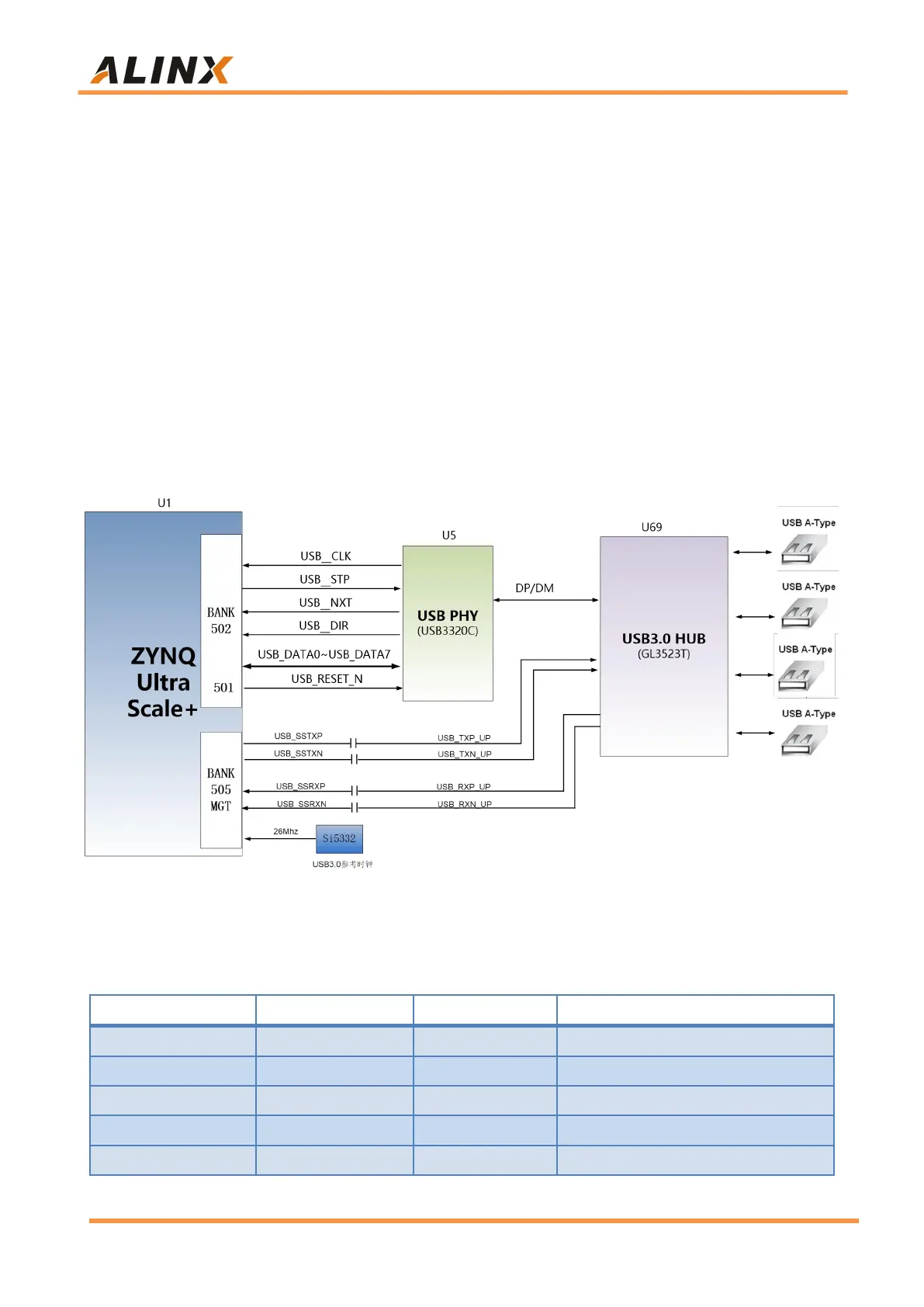
mouse, keyboard or U disk) at the same time. The schematic diagram of
USB3.0 connection is shown as 3-4-1:
Figure 3-4-1: USB3.0 Interface Schematic
USB Interface Pin Assignment:
USB3.0 Data Transmit Positive
USB3.0 Data Transmit Negative
USB3.0 Data Receive Positive
USB3.0 Data Receive Negative


 To Next Page