8
Altai A8n (ac) Series Super WiFi Base Station
Configuration Guide
Altai Technologies Ltd. All rights reserved
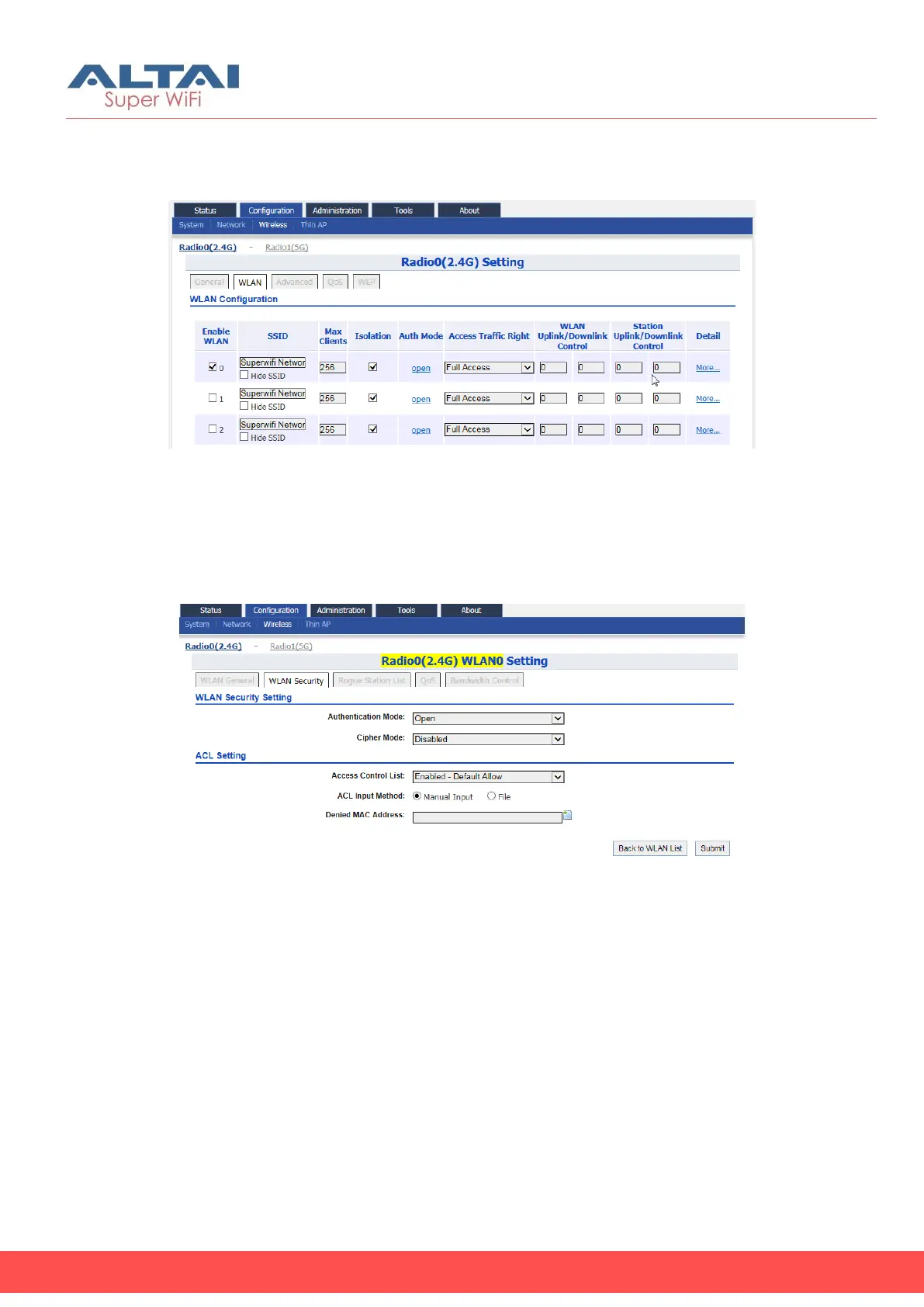
12. For 2.4G Radio: Go to Configuration > Wireless > Radio0(2.4G) >
WLAN
For 5G Radio: Go to Configuration > Wireless > Radio1(5G) > WLAN
Figure 9 – Radio 2.4G WLAN List
13. Provide unique SSID on each enabled WLAN
14. Click Submit
15. For 2.4G Radio: Go to Configuration > Wireless > Radio0(2.4G) >
WLAN > WLAN 0-15 > WLAN Security
For 5G Radio: Go to Configuration > Wireless > Radio1(5G) > WLAN >
WLAN 0-15 > WLAN Security
Figure 10 – Radio 2.4G WLAN0 Security Setting
16. Setup suitable settings of WLAN Security on each operating WLAN
17. Click Submit
18. Save and apply the settings



 To Next Page