31
Altai A8n (ac) Series Super WiFi Base Station
Configuration Guide
Altai Technologies Ltd. All rights reserved
Radio 1 – 5GHz Radio
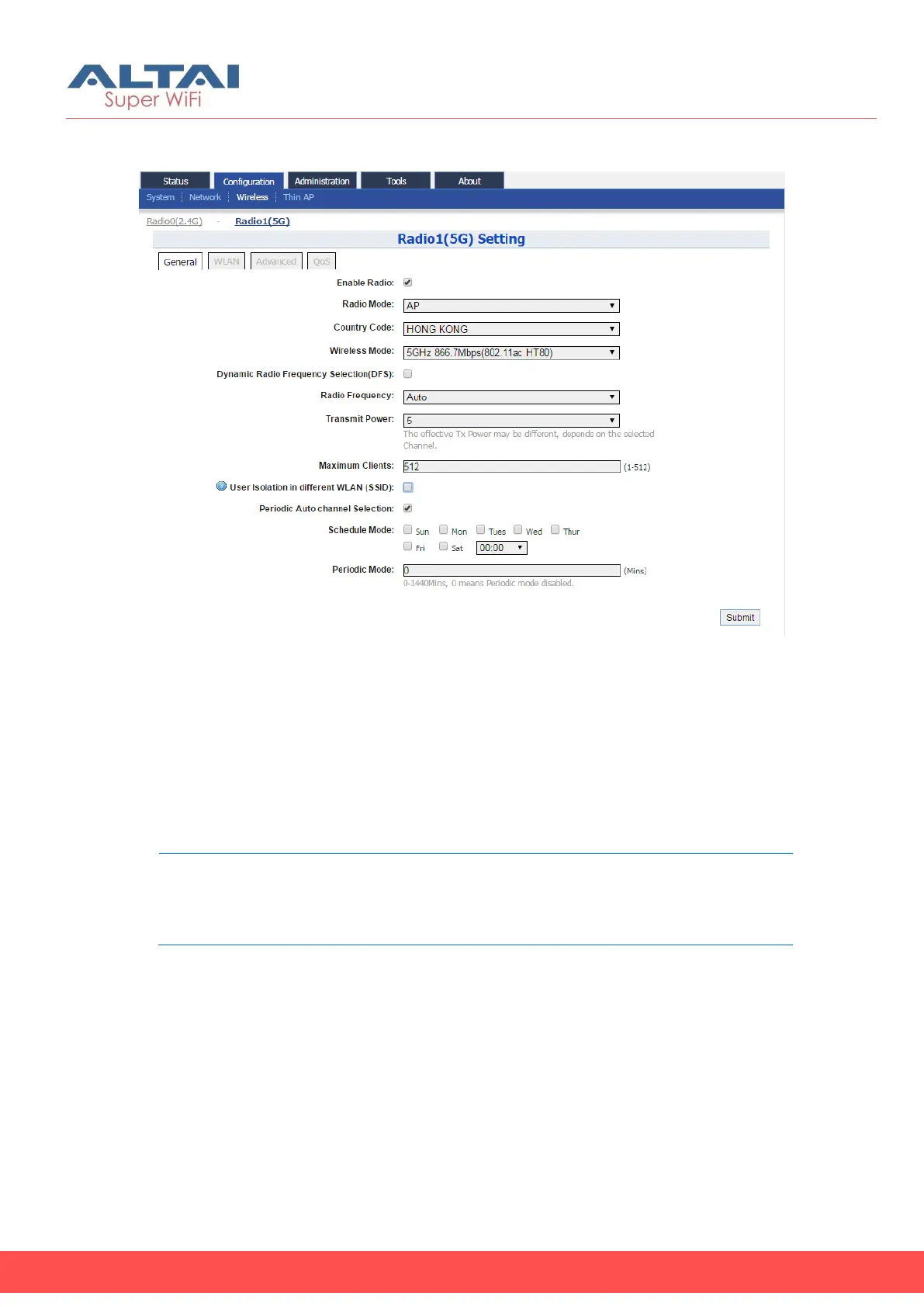
Figure 30 – Radio1 (5G) General Setting of AP
Radio General Configuration
1. Go to Configuration > Wireless > Radio1(5G) > General
2. Select Enable Radio checkbox to enable radio interface
3. Select AP in Radio Mode
4. You can change the following settings:
Country Code – Select an option that matches your device’s
installation location; Hong Kong is the default setting.
Note:
- Country code sets the regulatory domain for the radio
frequencies and maximum transmission power that AP can
use
Wireless Mode – Select suitable Wi-Fi operating mode for the AP:
5G 54Mbps (802.11 a)
5G 144Mbps (802.11 na HT20); Default Setting
5G 144Mbps (802.11 n-only HT20)
5G 300Mbps (802.11 n-only HT40+)
5G 300Mbps (802.11 na HT40+)
5G 300Mbps (802.11 na HT40-)
5G 300Mbps (802.11 n-only HT40-)
5G 173Mbps (802.11 ac HT20)
5G 400Mbps (802.11 ac HT40+)



 To Next Page