49
Altai A8n (ac) Series Super WiFi Base Station
Configuration Guide
Altai Technologies Ltd. All rights reserved
4.2.9. VLAN
VLAN is layer-2 network domain that may be partitioned to create
multiple distinct broadcast domains, which are mutually isolated so
that packets can only pass between them via one or more routers.
Note:
- VLAN can be enabled on Switch mode ONLY
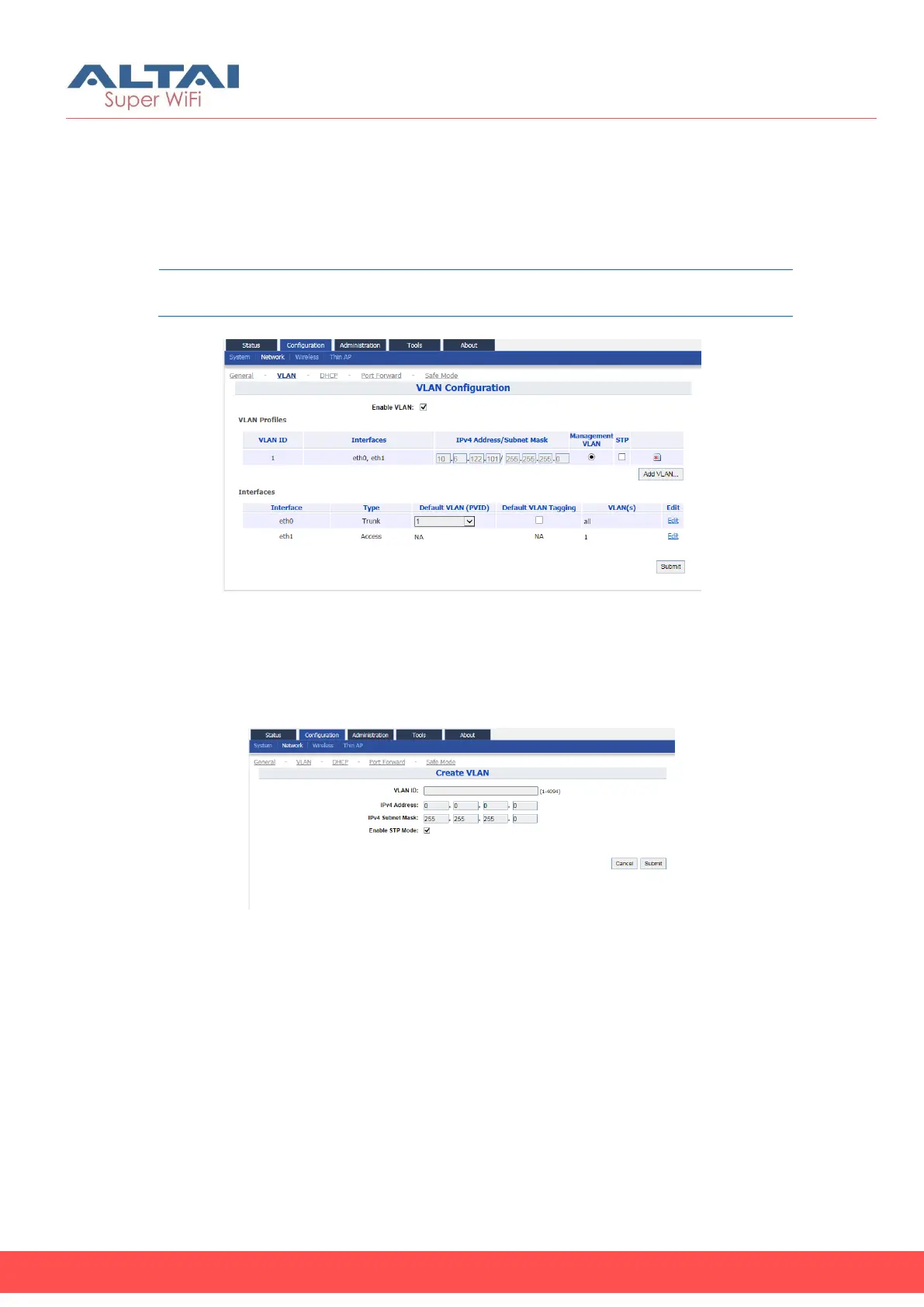
Figure 49 – VLAN Settings
Enable VLAN
1. Go to Configuration > Network > VLAN
2. Click Submit
3. Go to Configuration > Network > VLAN > VLAN Profiles
Figure 50 – VLAN Setting – Create VLAN
4. Click Add VLAN to create new VLAN
5. Change the following settings:
VLAN ID – Type in an identification number that represents a VLAN
IPv4 Address – Type in IP address for the VLAN
IPv4 Subnet Mask - Type in subnet mask for the VLAN
Enable STP Mode – Select the checkbox to enable STP on VLAN
6. Click Submit
7. Select a desired VLAN as Management VLAN
8. Click Submit



 To Next Page