85
Altai A8n (ac) Series Super WiFi Base Station
Configuration Guide
Altai Technologies Ltd. All rights reserved
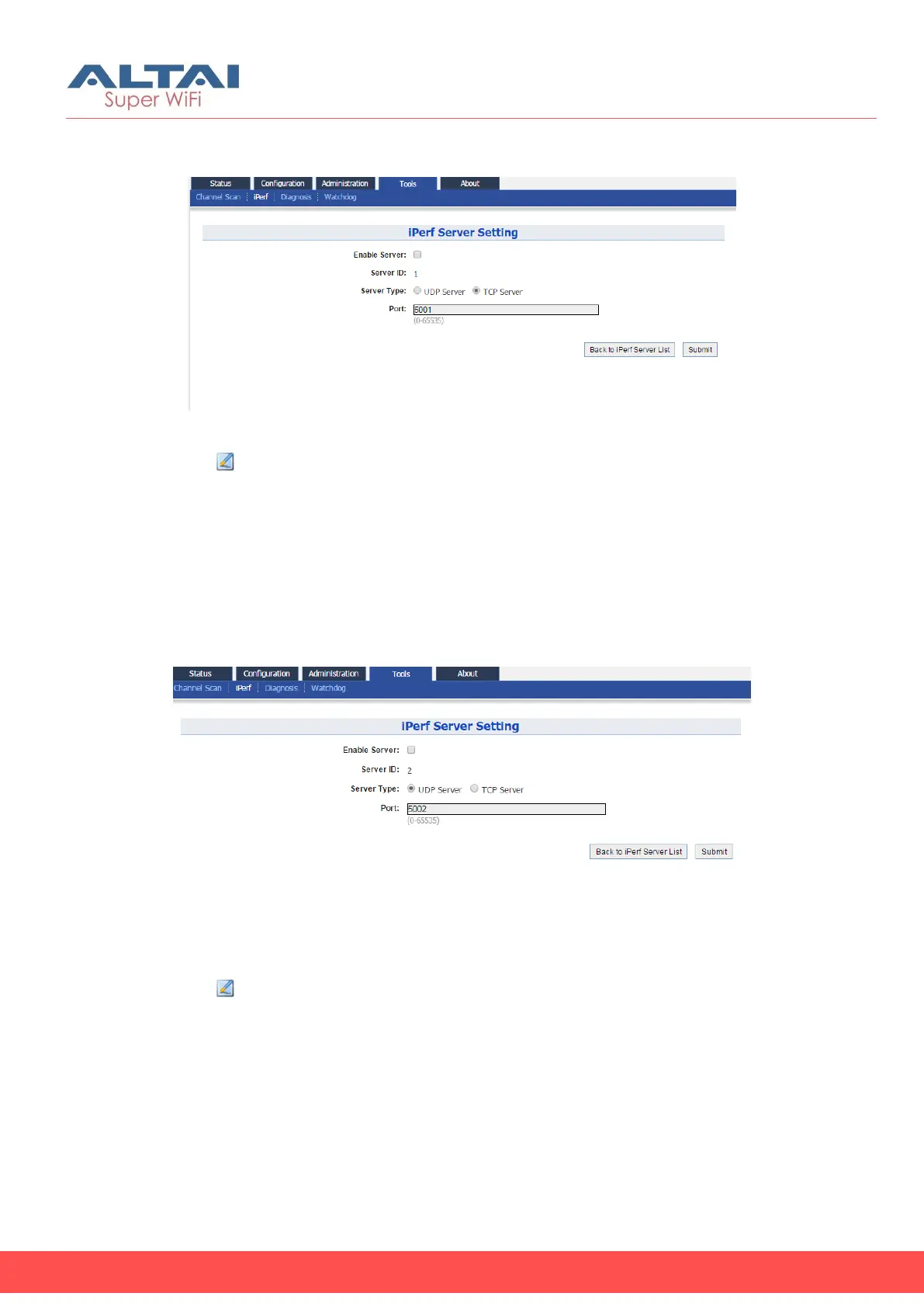
7.2.1. Enable iPerf TCP Server
Figure 93 – iPerf TCP Server Setting
1. Go to Tools > iPerf
2. Click of either Sever ID 1 or Sever ID 2
3. Click Enable Server checkbox to enable iPerf TCP Server
4. Click TCP Server checkbox
5. Specify the listening port between 0 and 65535 on Port [Optional]
6. Click Submit
7. Click Save & Apply
7.2.2. Enable iPerf UDP Server
Figure 94 – iPerf UDP Server Setting
1. Go to Tools > iPerf
2. Click of either Sever ID 1 or Sever ID 2
3. Click Enable Server checkbox to enable iPerf UDP Server
4. Click UDP Server checkbox
5. Specify the listening port between 0 and 65535 on Port [Optional]
6. Click Submit
7. Click Save & Apply



 To Next Page