4
4
.
.
6
6
U
U
s
s
i
i
n
n
g
g
t
t
h
h
e
e
L
L
C
C
D
D
M
M
o
o
d
d
u
u
l
l
e
e
The LCD module has built-in fonts and can be used to display text by sending appropriate
commands to the display controller called HD44780. Detailed information for using the display is
available in its datasheet, which can be found on the manufacturer‟s website, and from the
DE2_115_datasheets\LCD folder on the DE2-115 System CD. A schematic diagram of the LCD
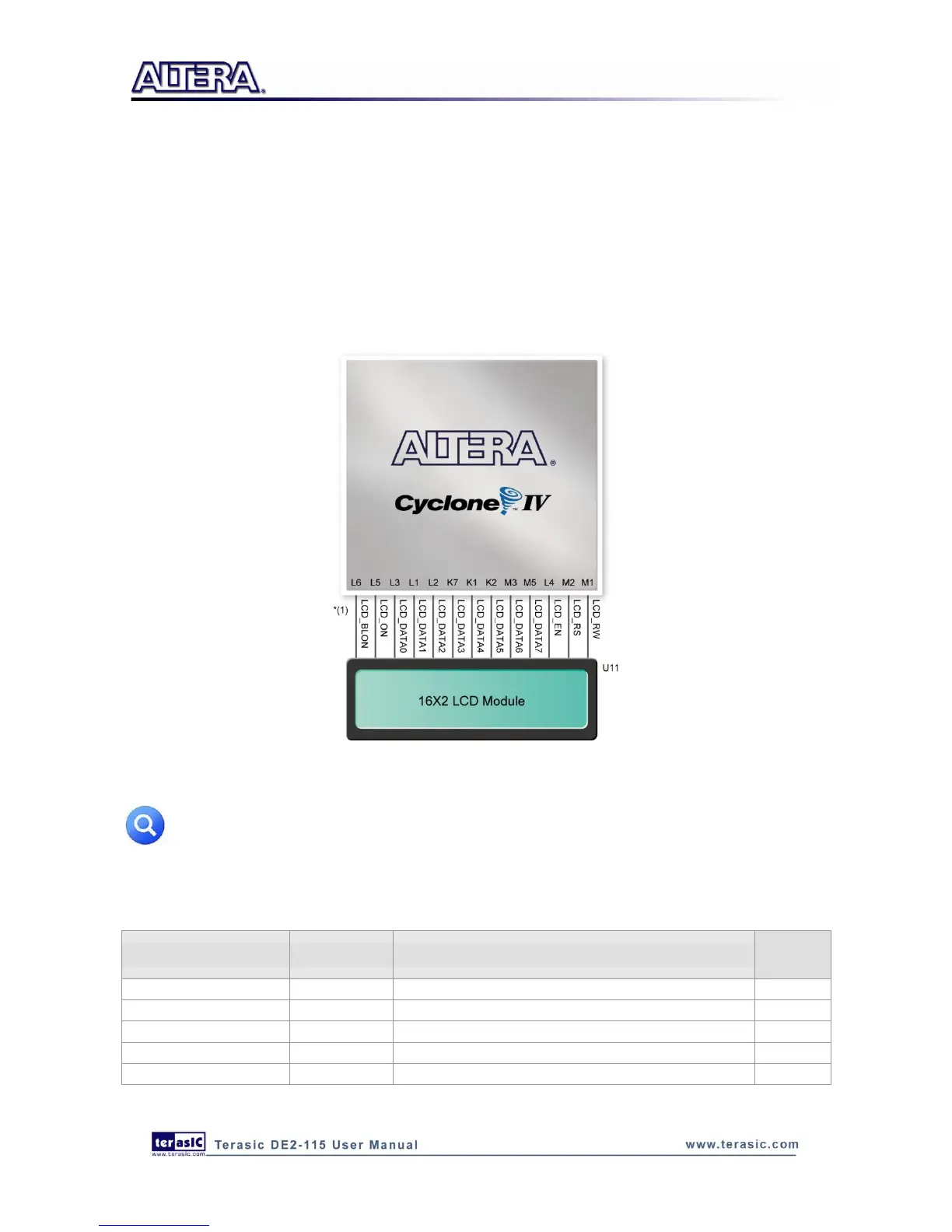
module showing connections to the Cyclone IV E FPGA is given in Figure 4-12. The associated pin
assignments appear in Table 4-6.
Figure 4-12 Connections between the LCD module and Cyclone IV E FPGA
*(1): Note the current LCD modules used on DE2-115 boards do not have backlight.
Therefore the LCD_BLON signal should not be used in users’ design projects.
Table 4-6 Pin Assignments for LCD Module



 To Next Page