EasyManua.ls Logo

Altera DE2-115 - Using the 7-Segment Displays

Altera DE2-115
116 pages
Print Icon
To Next Page IconTo Next Page
To Previous Page IconTo Previous Page
Loading...
36
LEDR[15]
PIN_G15
LED Red[15]
2.5V
LEDR[16]
PIN_G16
LED Red[16]
2.5V
LEDR[17]
PIN_H15
LED Red[17]
2.5V
LEDG[0]
PIN_E21
LED Green[0]
2.5V
LEDG[1]
PIN_E22
LED Green[1]
2.5V
LEDG[2]
PIN_E25
LED Green[2]
2.5V
LEDG[3]
PIN_E24
LED Green[3]
2.5V
LEDG[4]
PIN_H21
LED Green[4]
2.5V
LEDG[5]
PIN_G20
LED Green[5]
2.5V
LEDG[6]
PIN_G22
LED Green[6]
2.5V
LEDG[7]
PIN_G21
LED Green[7]
2.5V
LEDG[8]
PIN_F17
LED Green[8]
2.5V
4
4
.
.
4
4
U
U
s
s
i
i
n
n
g
g
t
t
h
h
e
e
7
7
-
-
s
s
e
e
g
g
m
m
e
e
n
n
t
t
D
D
i
i
s
s
p
p
l
l
a
a
y
y
s
s
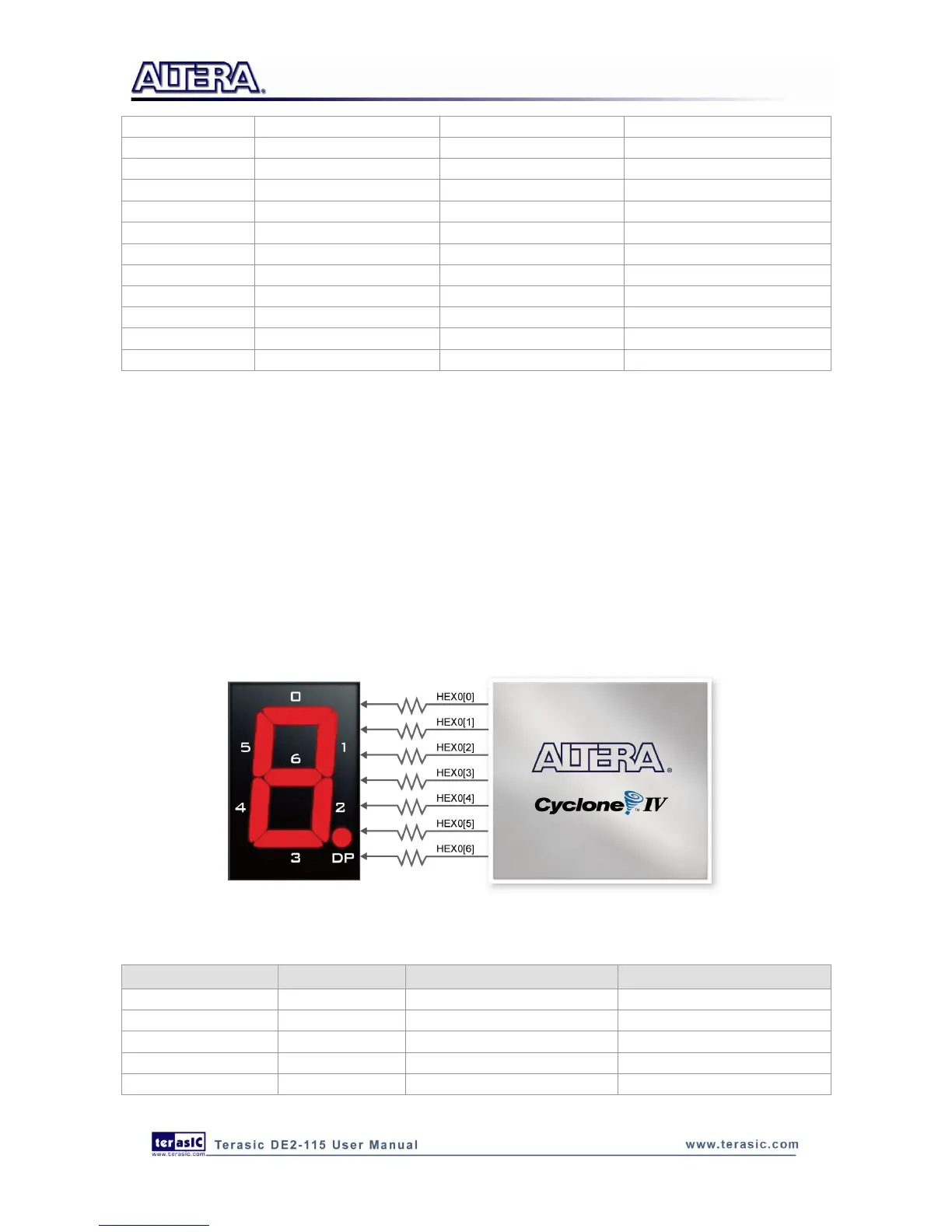
The DE2-115 Board has eight 7-segment displays. These displays are arranged into two pairs and a
group of four, behaving the intent of displaying numbers of various sizes. As indicated in the
schematic in Figure 4-10, the seven segments (common anode) are connected to pins on Cyclone
IV E FPGA. Applying a low logic level to a segment will light it up and applying a high logic level
turns it off.
Each segment in a display is identified by an index from 0 to 6, with the positions given in Figure
4-10. Table 4-4 shows the assignments of FPGA pins to the 7-segment displays.
Figure 4-10 Connections between the 7-segment display HEX0 and Cyclone IV E FPGA
Table 4-4 Pin Assignments for 7-segment Displays

Signal Name
FPGA Pin No.
Description
HEX0[0]
PIN_G18
Seven Segment Digit 0[0]
HEX0[1]
PIN_F22
Seven Segment Digit 0[1]
HEX0[2]
PIN_E17
Seven Segment Digit 0[2]
HEX0[3]
PIN_L26
Seven Segment Digit 0[3]
HEX0[4]
PIN_L25
Seven Segment Digit 0[4]

Table of Contents

Related product manuals