malletKAT User Manual (ver.07-17-18)
Global Auxiliary Shortcut #50-55
malletKAT Express
Auxiliary Editing Screens require pressing the Edit Footswitch and Sustain 1 pedal at the same time (See Section
4.1.1(https://alternatemode.com/online-docs/malletkat/#malletkat-express-accessing-editing-functions)
)
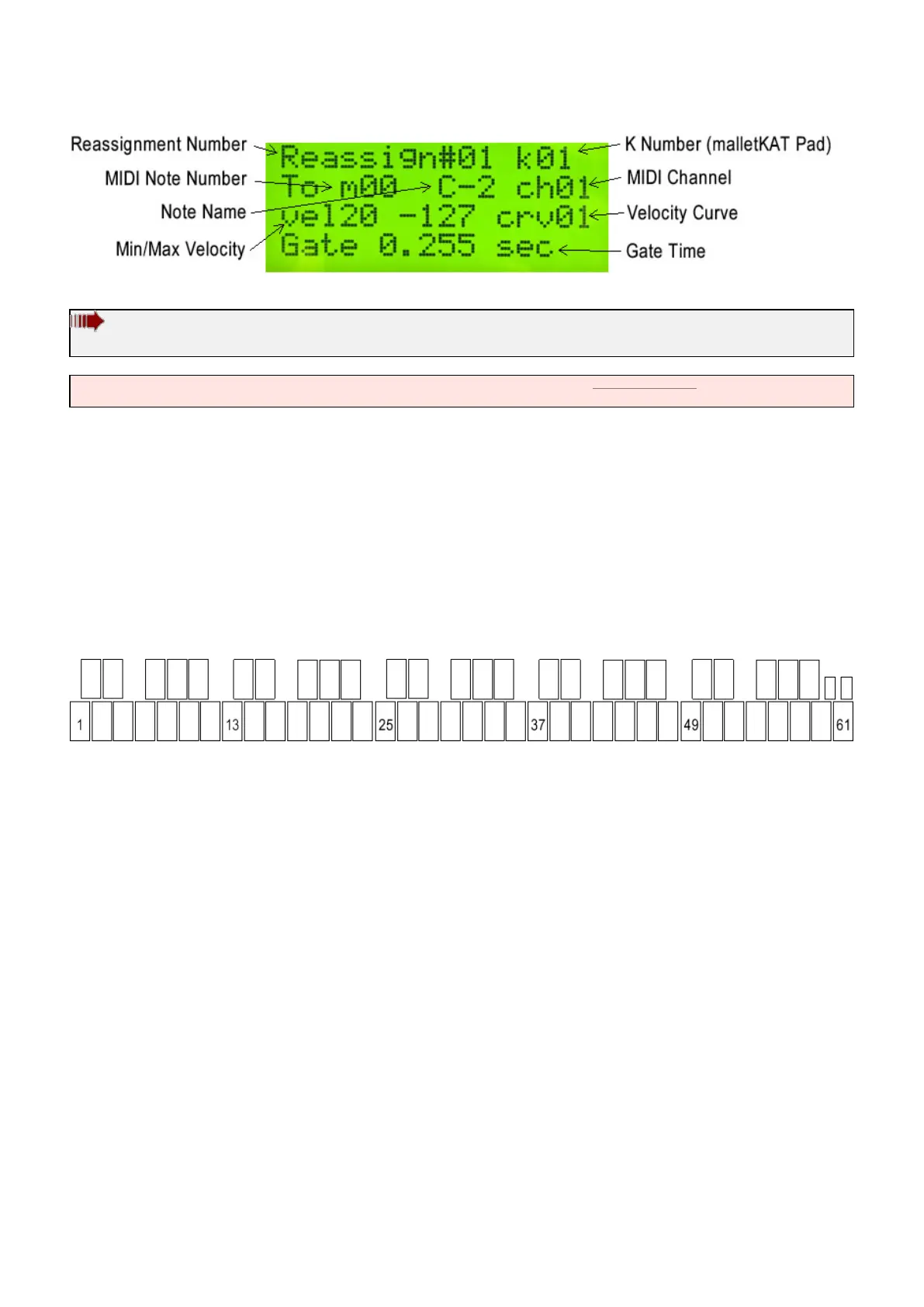
REASSIGNMENT NUMBER
Parameters = 01…14
On the first line of the display, select which one of the 14 Reassignments you wish to Edit.
REASSIGN K NUMBER
Parameters = 01-61
The next selection on the rst line is “k” followed by a number up to three digits. The “k” stands for which KAT pad
on the malletKAT you want to reassign to a different sound. The highest note on the malletKAT is the high C,
number k61. The lowest note on a 5 octave malletKAT is the low C, the number is k01.
You can use the INC/DEC pads to get to the pad number that you want to Edit OR you can quickly jump to the
pad you want by stepping on the Sustain One (when the Reassign Screen is visible) then while both Footswitches
are held down, hit the pad on the malletKAT that you want to edit. You will see the “k” number change as you tap
on the different pads on the malletKAT.
REASSIGN M NUMBER
Parameters = C-2 – G8
On the second line of the display, you can select the MIDI NOTE that you want to assign to the pad selected on
the rst line. Notice that both the MIDI NOTE NUMBER and the Actual Note/Octave name are displayed at the
same time.
If you want to disable a pad entirely in a Reassignment Layer, set the note number for this pad to 128. This
has a special definition of OFF. Notes that are OFF in a reassignment Layer are not passed through to Controller
One – and therefore Controller One will function as it would as if there was no Reassignment Layer there at all.
You can use the INC/DEC pads to change the note that you want to reassign here or you can use the shortcut.
When in this editing screen, step on the Sustain Two (the Edit Footswitch should already be depressed). While
these pedals are down, when you strike a pad, it reflects the note that will sound on the “k” pad. You can change
the octave in KIT AUXILIARY to get at lower or higher note numbers (e.g.: C-1, C-9, C-10).
REASSIGN CHANNEL
Parameters = 01-16
60 / 109



 To Next Page