PARSTAT MC Hardware Manual
PARSTAT MC Hardware Manual 18
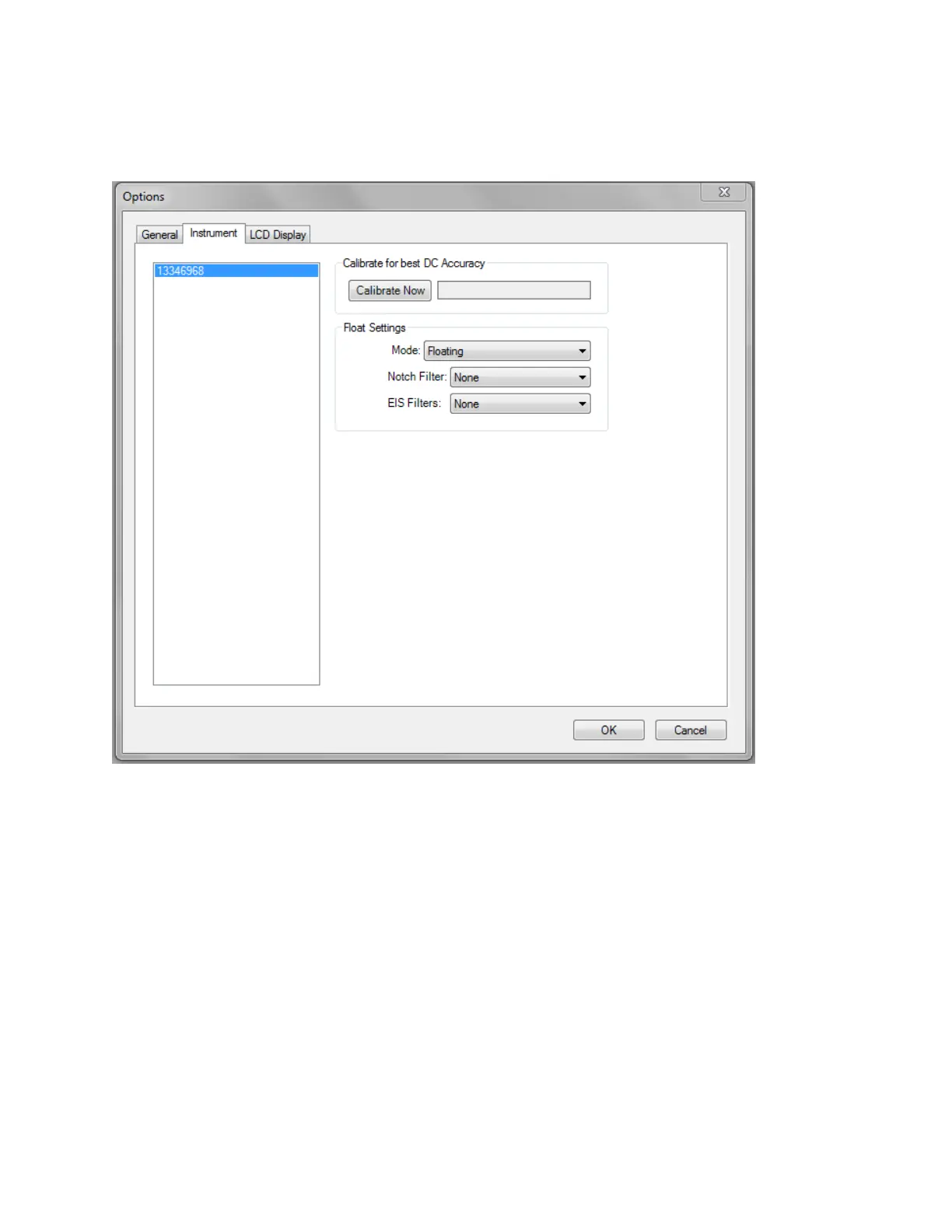
The PARSTAT MC control software, VersaStudio, provides an Options menu (Tools Options…) where
the mode can be changed to either “normal” or “floating” as shown below:
Figure 9. Changing from "Normal" operation to "Floating" operation
It is recommend that after one changes modes, a new calibration for DC accuracy be performed by selecting
the “Calibrate Now” button above the Flaoting Settings option.
In addition to the mode selections, the PMC-1000 and PMC-1000/DC also provides additional filters that
could be required with some cells in order to enhance the signal to noise.
The “Notch Filter” is specific for those frequencies associated with line power (50/60Hz), and can reduce
noise pick-up from power sources. The filter selection would depend on the line power frequency supplied
to the PARSTAT MC. Note: Notch Filters should be set to “None” if performing EIS actions.





 To Next Page