Operation 67
1208531 | 03.07.2012
NOTE Damage to material due to harsh vibration movement.
• Never use vibration while idling!
• Never use vibration while at a standstill!
• Only switch vibration on if the speed adjusting lever is set to an operating
speed.
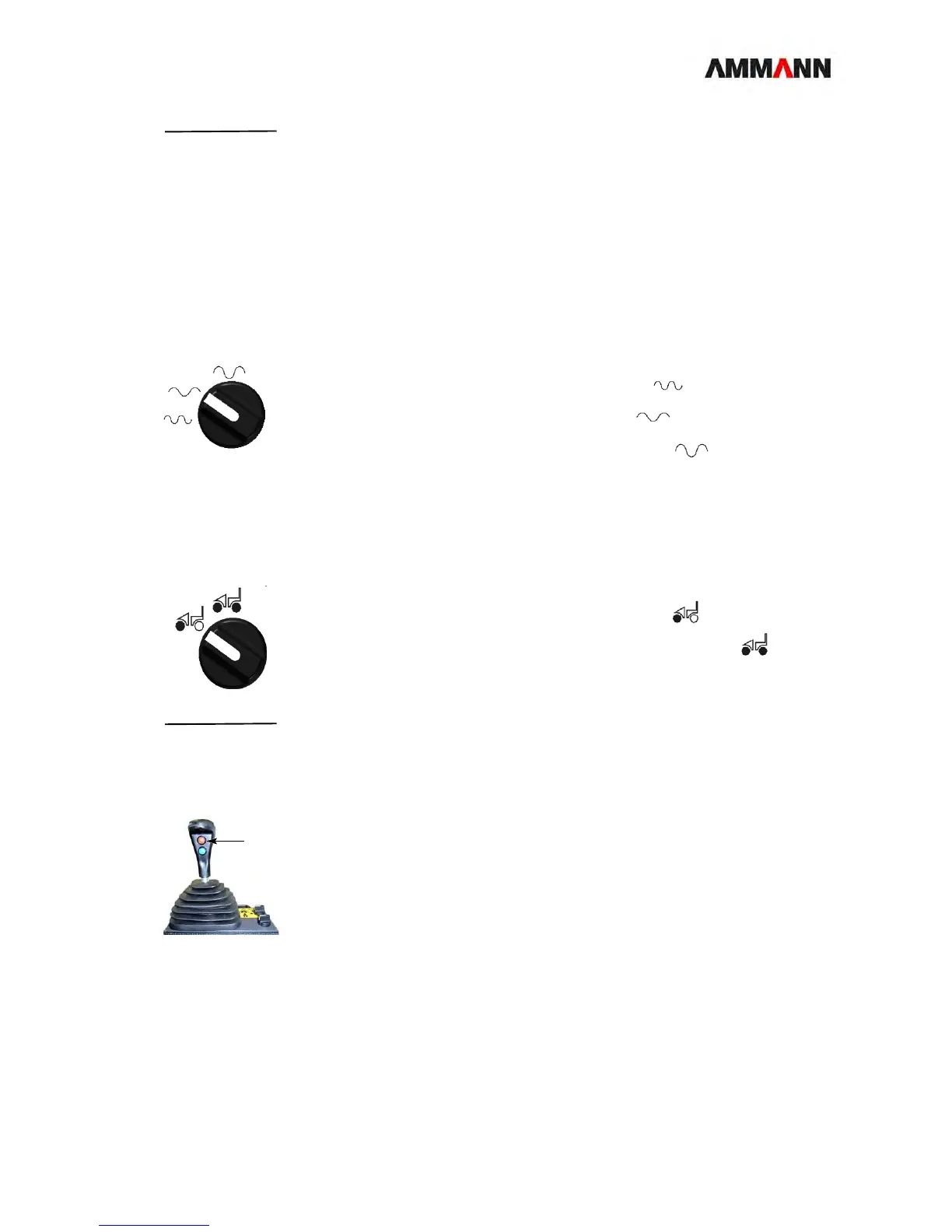
7.13.1 Preselecting the frequency
Frequency 1 Turn the switch:
2a Toward the left:High frequency / low amplitude.
2b To the center: Low frequency / low amplitude
2c Towards the right: High amplitude / low frequency.
7.13.2 Vibration on / off
Presetting 1 Turn the switch:
2a Toward the left:The roller only vibrates at the front.
2b toward right: The roller vibrates both at the front and the rear.
NOTE When switching from double to single vibration, there is a brief interruption of
the vibration.
Switching on / off 1 Press the top button briefly on the operating lever (1).
Vibration switches on.
2 Press the top button again on the operating lever (1).
Vibration switches off.
7.14 Vibration automation
In automatic mode vibration is switched on at speeds greater than 1-2 km/h and off
at speeds less than 1-2 km/h.
Vibration is not possible with the roller at a standstill.



 To Next Page