Encoder Configuration Options
34
N1000 Series User Manual
HostPlay Page
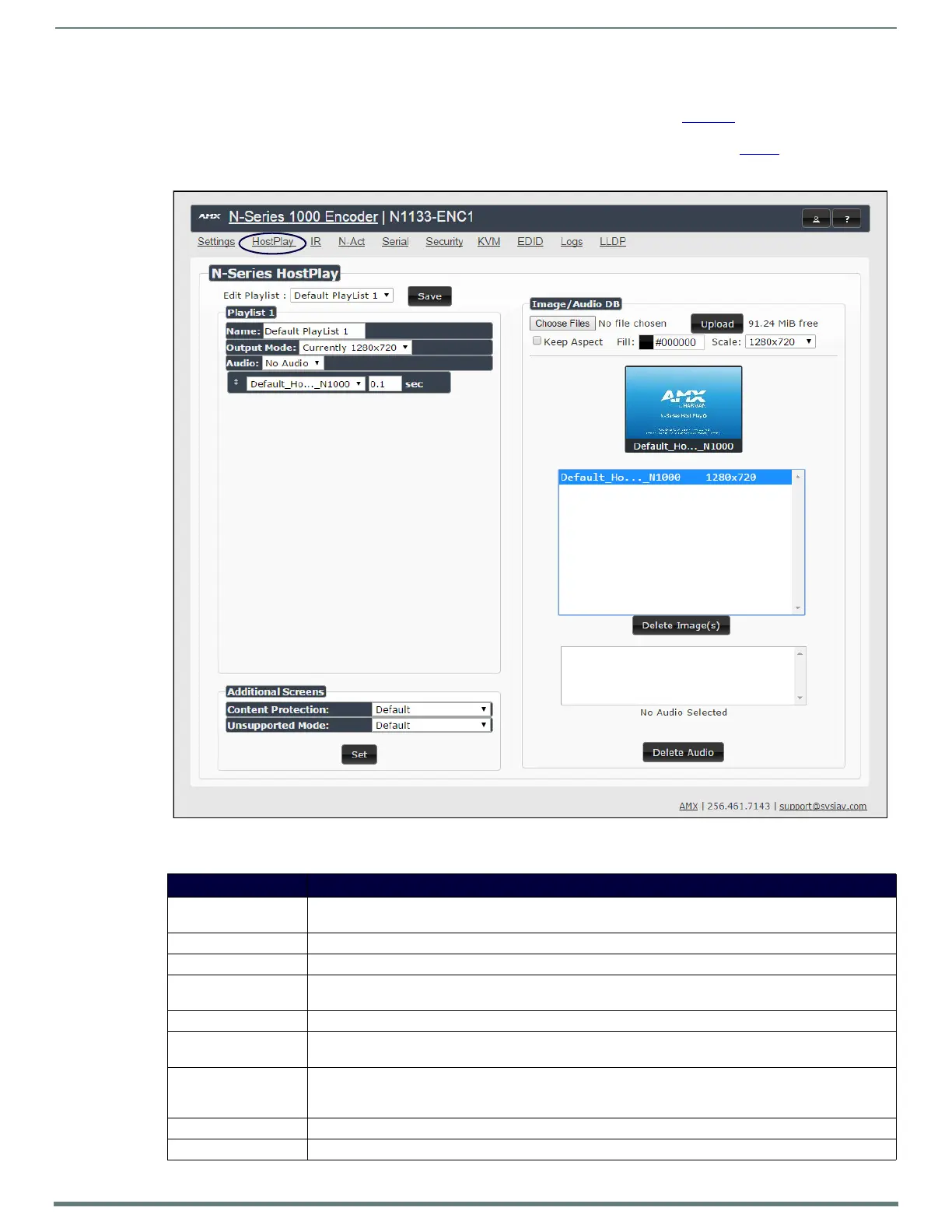
Click the HostPlay link at the top of any of the main web pages to access the page shown in Figure 30. This page allows you to
upload new images to the Encoders and configure the image playlists. The playlist will be shown on the display when no video is
being transmitted or received. Audio can be uploaded and set to play whenever HostPlay is active. See Table 7
for option
descriptions.
FIG. 30
HostPlay Page
TABLE 7 HostPlay Page Options
Option Description
Edit Playlist Select a playlist from the drop-down menu to view/edit the images currently used in the chosen image playlists.
If more than one image appears in the list, a transition time can be set for each image.
Save Click to save the current configuration.
Name Enter a name for the playlist.
Output Mode Select the HostPlay output resolution. The playlists that were uploaded in that resolution are then displayed for
your selection.
Audio Choose an audio file to play while the HostPlay image is on the screen.
Additional Screens Allows you to choose what is displayed as the HostPlay page if there is an unsupported mode or content
protection issue.
Image/Audio DB This section provides the ability to upload image and audio files to the N1000 Encoder database. You can also
use the Fill field to customize the background color (used behind HostPlay images that do not take up the
entire screen).
Delete Images Delete the selected image file from the playlist.
Delete Audio Delete the selected audio f ile from the playlist.


 To Next Page