Encoder Configuration Options
36
N1000 Series User Manual
N-Act Page
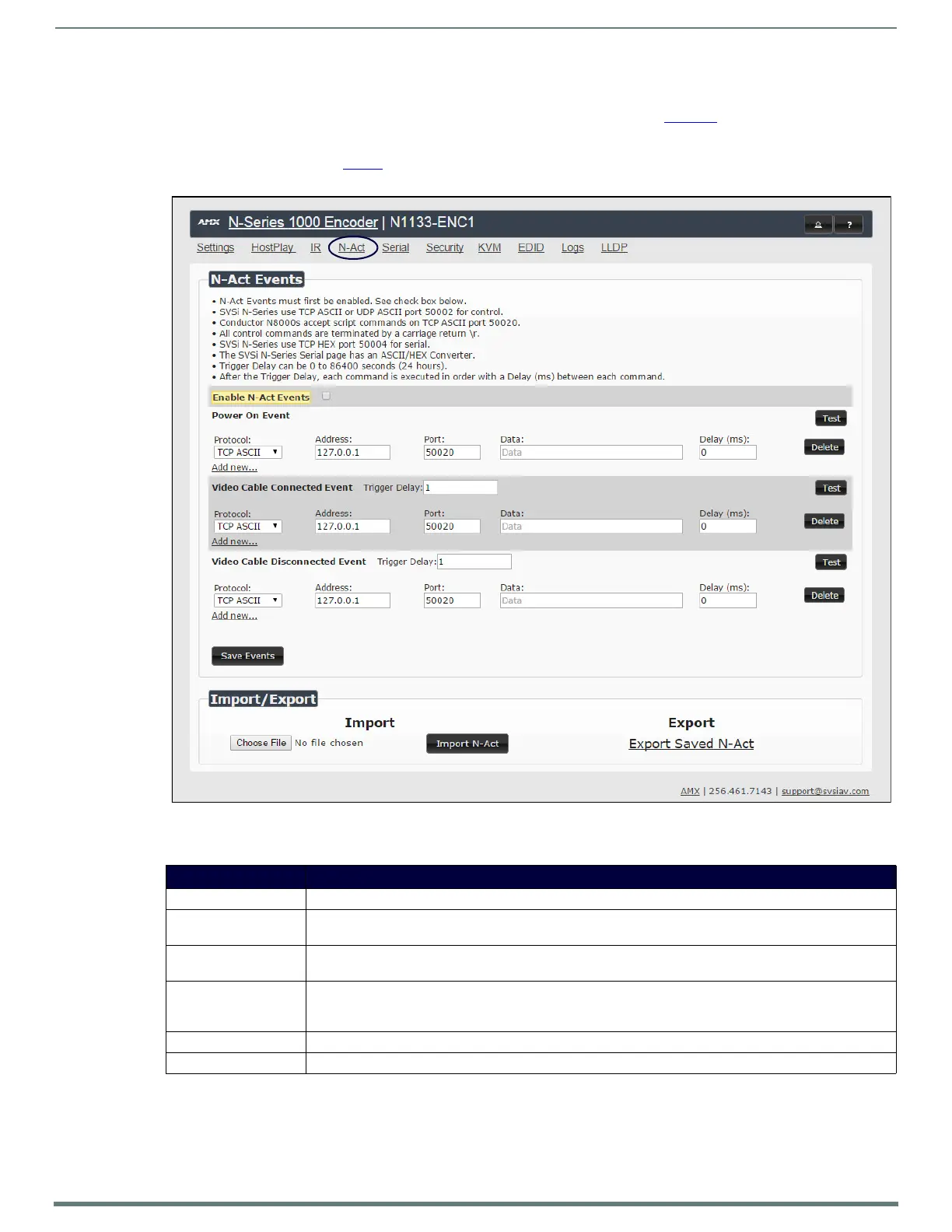
Click the N-Act link at the top of any of the main web pages to access the page shown in Figure 32. This page allows you to create
command lists which are performed automatically by the unit based on power or video connection (without the use of an outside
controller). For example, you can tell a projector and lights to come on when the Encoder powers up. You can add multiple
commands for each event. See Table 9
for option descriptions.
FIG. 32
N-Act Page
TABLE 9 N-Act Page Options
Option Description
Enable N-Act Events Enable to activate the configured events.
Power on Event Create/delete/test events to be performed when the Encoder powers on. Visit our website for more details on
Application Programming Interface (API) commands.
Video Cable Connected
Event
Create/delete/test events to be performed when the Encoder is connected to a video source. The Trigg er Delay
field specifies how long the device has to be connected for the command to be executed.
Video Cable
Disconnected Event
Create/delete/test events to be performed when the Encoder is disconnected from a video source. The Trigger
Delay field specifies how long the device has to be disconnected for the command to be executed. This keeps
accidental (momentary) disconnects from triggering the command sequence.
Save Events Click to save changes made to this page.
Import/Export Use this section of the page to import/export N-Act event configurations.


 To Next Page