Encoder Configuration Options
29
N1000 Series User Manual
Advanced Settings
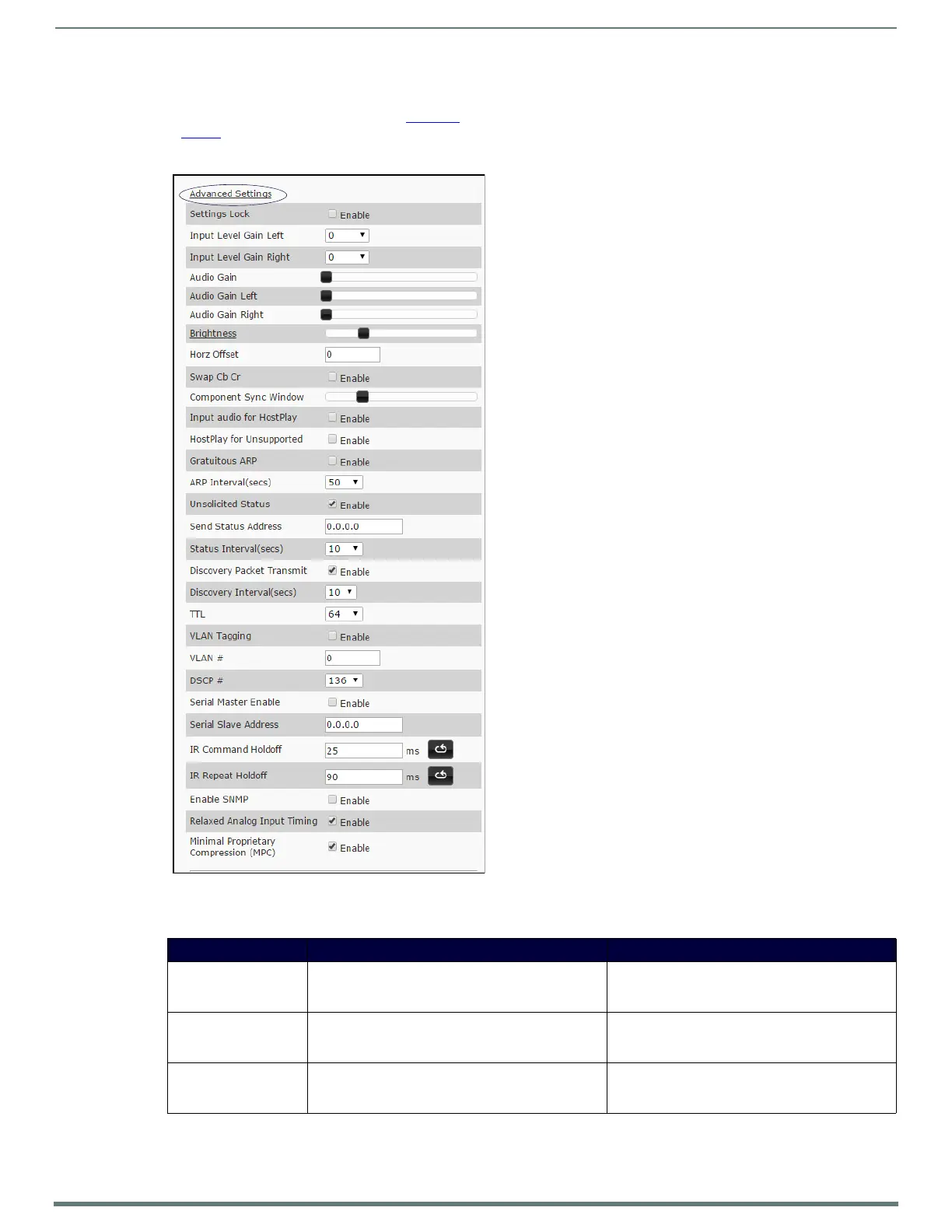
The section of the Settings page shown in Figure 24 is displayed when you click the Advanced Settings link. Options are described
in Table 2
.
FIG. 24
Advanced Settings
TABLE 2 Settings Page: Advanced Settings
Option Description Notes
Settings Lock Enable to lock the Encoder IP settings and stream
number, preventing automated processes (from N-Able
or N-Command) from occurring.
This does not prevent a control system from making
changes or a user from manually making changes.
Input Level Gain Left/
Right
Select a PRE-ENCODE cut in the audio signal. This can help prevent distortion of the audio when the
source is providing audio that is too loud/clipping.
Setting does not affect digital audio.
Audio Gain Slide right to provide a POST-ENCODE boost in the
audio signal (to both left and right channels).
This can help compensate when the source is
providing a weak audio signal. Does not affect digital
audio.


 To Next Page