12 I
I – 2 Milling Specific Operations
Incremental Distance Preset
Example: Drilling by traversing to display value zero with
incremental positioning
Enter the coordinates in incremental dimensions. These are indicated
in the following (and on the screen) with a preceding I (Incremental).
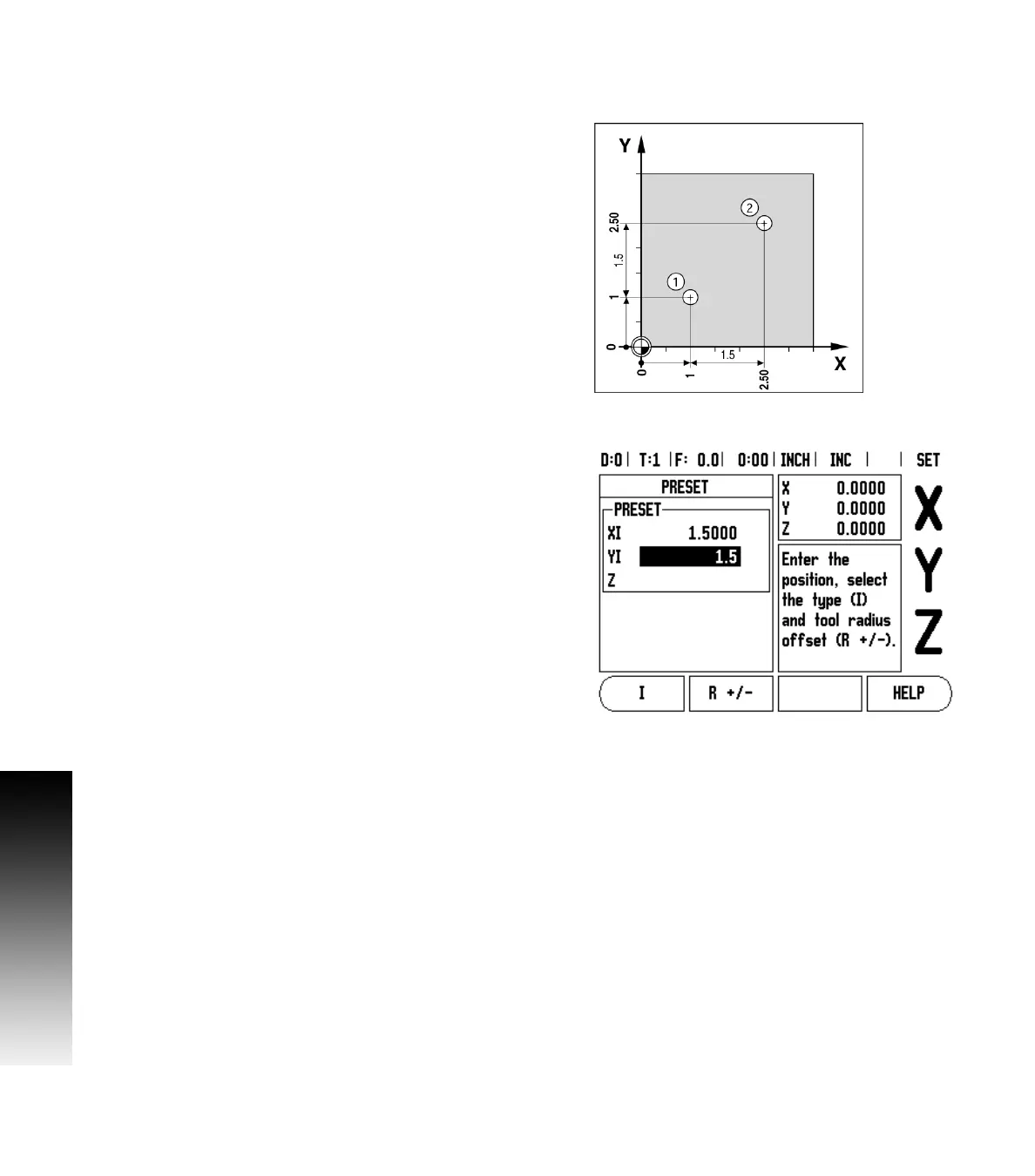
The datum is the workpiece zero. See Fig. I.16 & Fig. I.17.
Hole 1 at: X = 1” / Y = 1”
Distance from hole 1 to hole 2: XI = 1.5” / YI = 1.5”
Hole depth: Z = –0.5”
Operating mode: DISTANCE-TO-GO (INC)
Press the X axis key.
Enter nominal position value for hole 1: X = 1” and ensure no tool
radius is active. Note that these presets are Absolute Presets.
Press the Y axis key.
Enter nominal position value for hole 1: Y = 1”.
Ensure no tool radius compensation is showing.
Press the Z axis key.
Enter the nominal position value for the hole depth: Z = -0.5”. Press
ENTER hard key.
Drill hole 1: Traverse the X, Y and Z axis until the display value is zero.
The square in the near zero warning is now centered between the two
triangular marks. Retract the drill.
To preset the location for Hole 2:
Press the X axis key.
Enter nominal position value for hole 2: X = 1.5”, mark your input as
an incremental dimension, press the I soft key.
Press the Y axis key.
Enter nominal position value for hole 2: Y = 1.5”, mark your input as
an incremental dimension, press the I soft key.
Press ENTER.
Traverse the X and Y axes until the display value is zero. The square in
the near zero warning is now centered between the two triangular
marks.
To preset the Z axis:
Press the Z axis key.
Press the ENTER key (use last entered preset).
Drill hole 2: Traverse Z axis until the display value is zero. The square
in the near zero warning is now centered between the two triangular
marks.
Retract the drill.
Fig. I.16 Drilling example
Fig. I.17 Incremental screen



 To Next Page