SECTION 5 BASIC OPERATION PROCEDURE
5-7
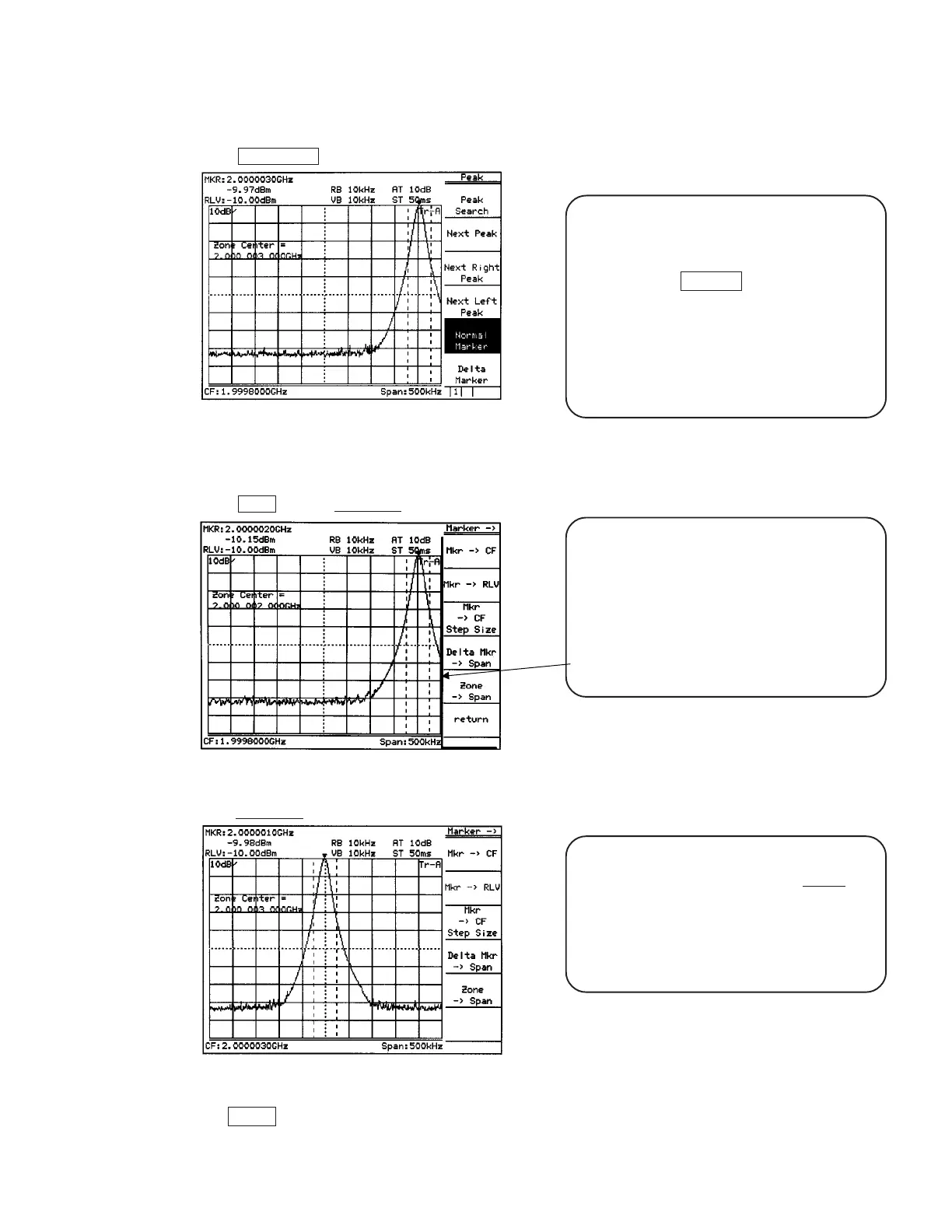
Press Peak Search key.
Fig. 5-9
The marker fetches the signal.
Press More key and marker → key in order.
Fig. 5-10
Press marker → CF key.
Fig. 5-11
When the soft key menu is pressed, a menu of
function related to the menu is further displayed.
In this case, as shown in the figure on the left, the
thick line (the line on the preceding page) is
displayed at the left of the soft key menu. This
indicates that a new menu is overlapped with the
preceding page.
*Advanced operation memo: It is convenient that
the page can also be turned over by repeatedly
pressing the panel key. This method is used when
key(s), such as Measure key, has a number of
pages. Besides, the Freq/Ampl and Marker-related
keys do not turn over the page by repeatedly
pressing the panel key. For these keys, because
the first page is important specially, it should always
be displayed when the panel key is pressed.
The page opened by pressing the soft key can
return to the preceding page by the Return key.
Besides, it can be checked that which soft key
menu was pressed previously to open the current
menu, as the menu title is displayed on the upper
row of the soft key.
Here, return to the screen of Fig. 5-8 and ensure that the screen changes to that of Fig. 5-11 only by pressing
the → CF key.












 To Next Page