18
ONE by APOGEE – User’s Guide
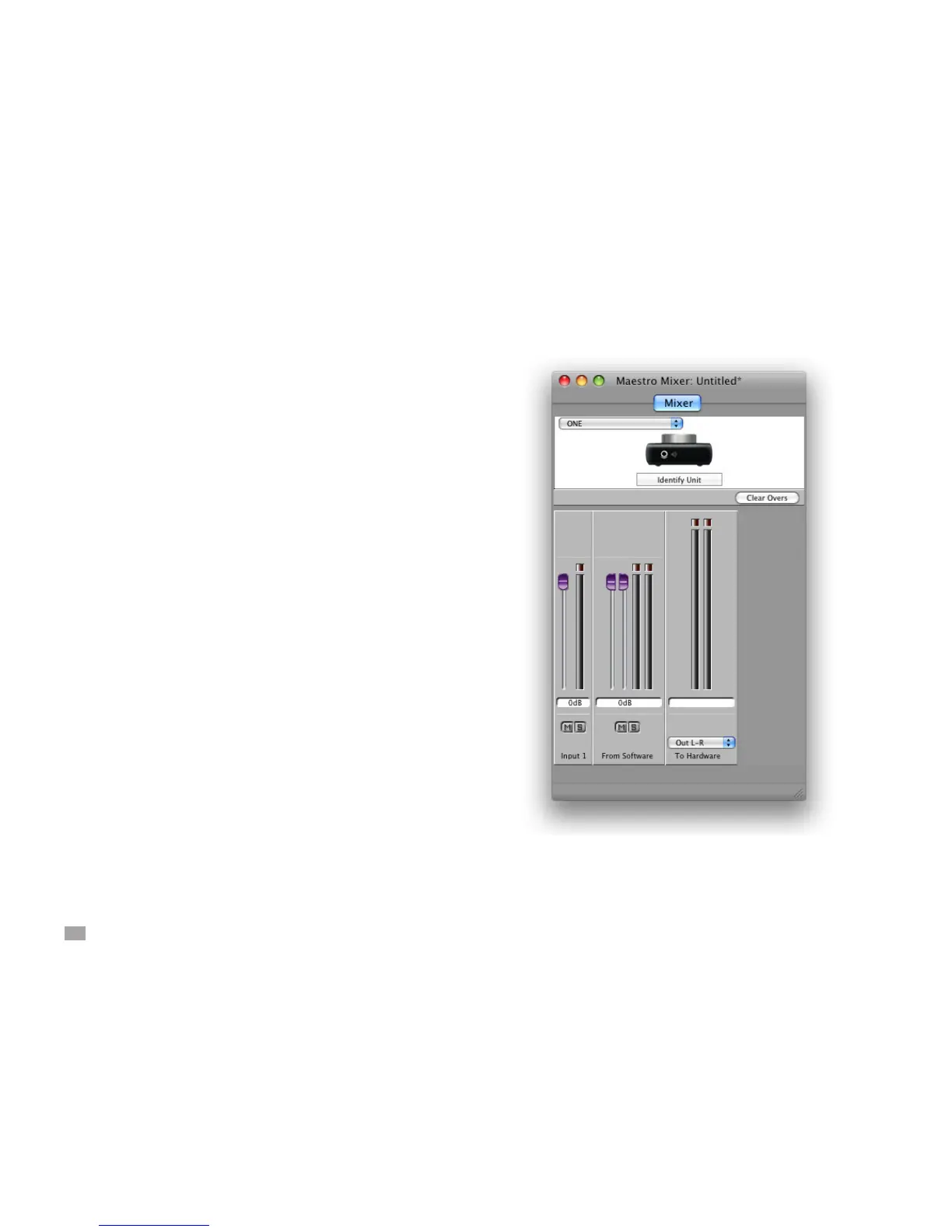
Maestro Mixer - Controls
The following Maestro Mixer controls are used to create a listening
mix while recording with ONE.
Input 1 - This fader adjusts the level of ONE's hardware input in the
listening mix. The input is routed to the center of the output stereo
eld. Adjust the Input gain (as described on page 5) before setting
this fader.
Input 1 meter - this meter displays the input level after conversion
from analog to digital.
From Software - This fader adjusts the level of playback from audio
applications in the listening mix.
From Software meter - This meter displays the stereo output level
of the audio software which with ONE is streaming audio.
Mute-Solo buttons - These buttons allow the associated channel
to be muted (M) or soloed (S). Soloing one channel mutes all other
channels.
To Hardware meters - This meter displays the stereo output level of
the Maestro mixer.
To Hardware menu - When this menu is set to None, the mixer is
disabled and completely removed from the signal path.
When this menu is set to Out L-R, the Maestro Mixer is inserted
between the software output and ONE's hardware output. When To
Hardware is set to Out L-R, set the From Software fader to 0 dB to
hear playback from iTunes or other Core Audio applications.



 To Next Page