Portable Test Equipment
User’s Guide
PTE-UGFW56a-EN www.appliedp.com
5.8.6 Adding or Editing Meters
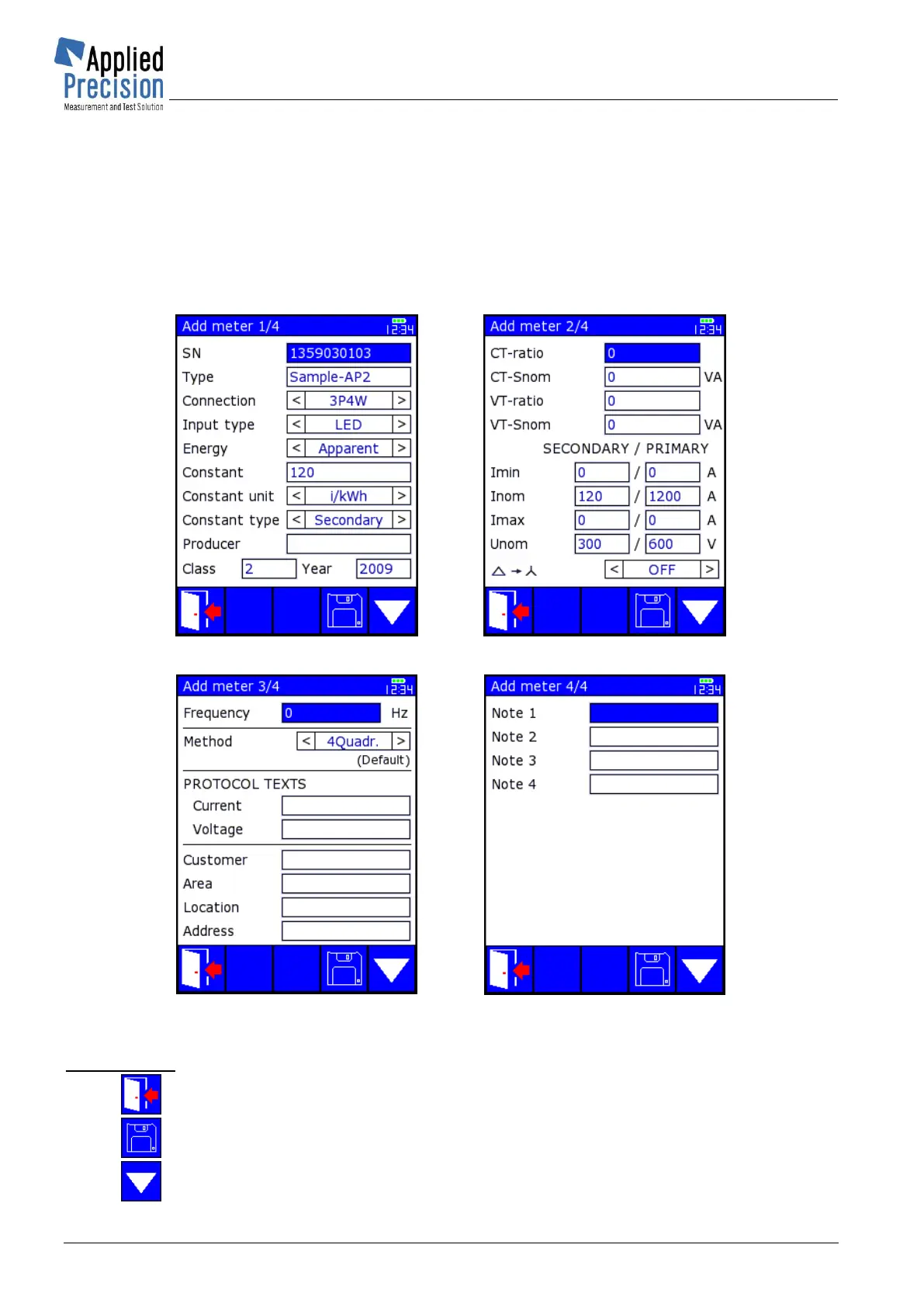
Adding of new meter (using F3) and editing of selected meter parameters (using F2) are performed
on screens with same content only the names of screens are different.
In Editing mode all actual meter parameters are shown in three screens and user can edit any of them
and save the changes using F4 key.
In Adding mode all actual meter parameters are shown in three screens and after changing required
parameters new meter is saved into database of meters. Newly added meter has associated no
results of tests (load points).
Add / Edit meter 1/4
* P08 / P16
Add / Edit meter 2/4
* P09 / P17
Add / Edit meter 3/4
* P19 / P21
Add / Edit meter 4/4
* P22 / P23
Control keys:
F1, ESC .......... Termination without saving changes or adding new meter
F4 ................... Saving of changes or adding new meter
F5 ................... Switching between screens 1/3, 2/3 and 3/3


 To Next Page
 Loading...