107
Managing Data
AQUOS zero2
Importing Data from Other
Mobiles
Import data from other mobiles, etc. using Bluetooth
®
.
Importing Data with Wi-Fi Direct
®
(Data Transfer)
Transfer data from previously used smartphone to handset
by connecting via Wi-Fi Direct.
Transfer data to handset without connecting to network
or saving data on SD Card.
In Home Screen, (Settings) System
Advanced Data transfer Follow onscreen
prompts
Receiving Data via Bluetooth
®
(e.g.,
Address Book)
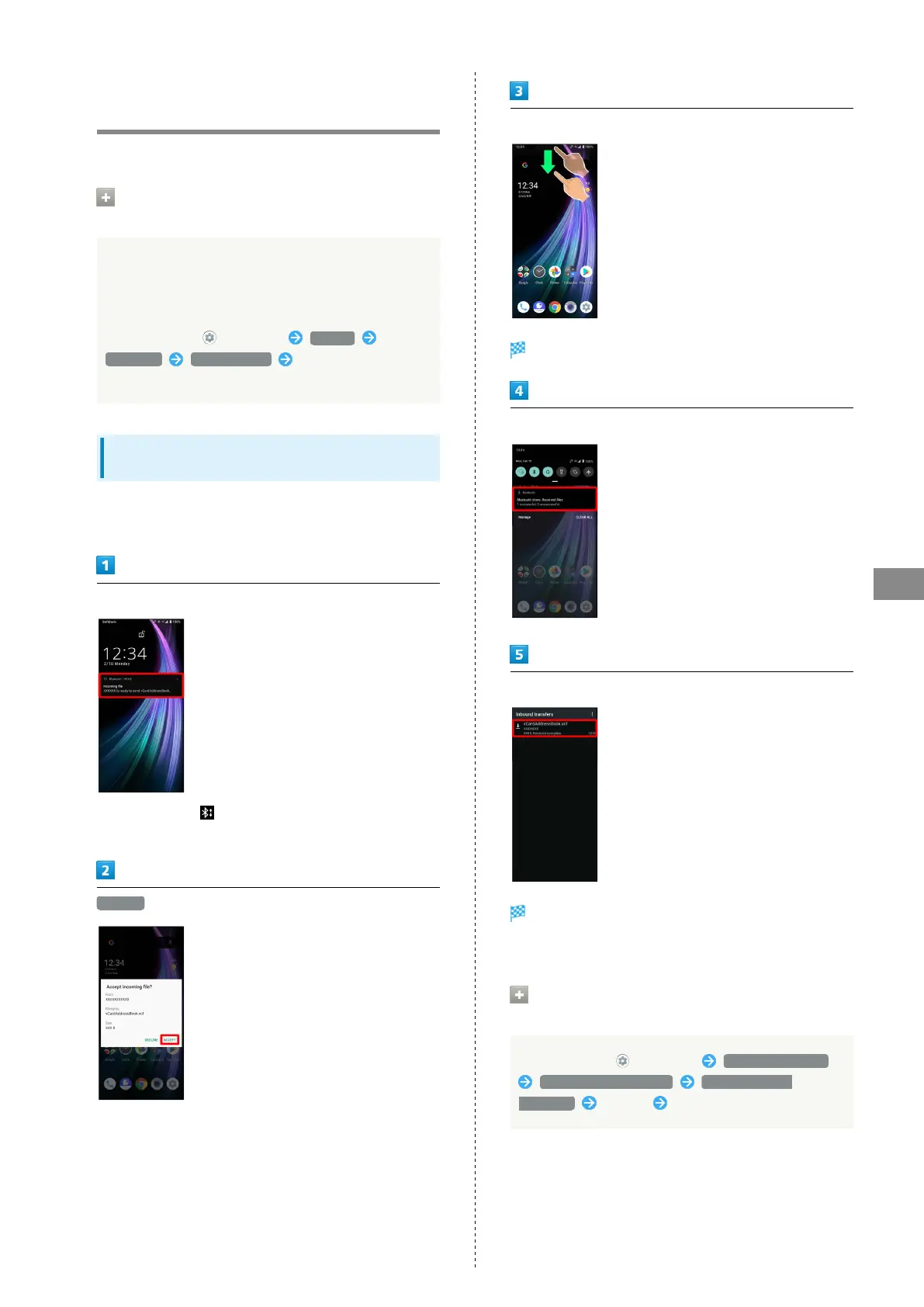
When data reception request arrives, notification appears in
lock screen. To receive data:
Tap Bluetooth
®
share notification twice
・
In Home Screen, appears on Status Bar. Drag Status Bar
down, then Tap Bluetooth
®
share notification.
ACCEPT
After data reception, Drag Status Bar down
Notifications Window opens.
Tap Bluetooth
®
share notification
Tap file
Data is saved.
・If confirmation appears, follow onscreen prompts.
Opening Files Received by Bluetooth
®
Transfer
In Home Screen, (Settings) Connected devices
Connection preferences File received via
Bluetooth Tap file Follow onscreen prompts



 To Next Page