177
Global Services
AQUOS zero2
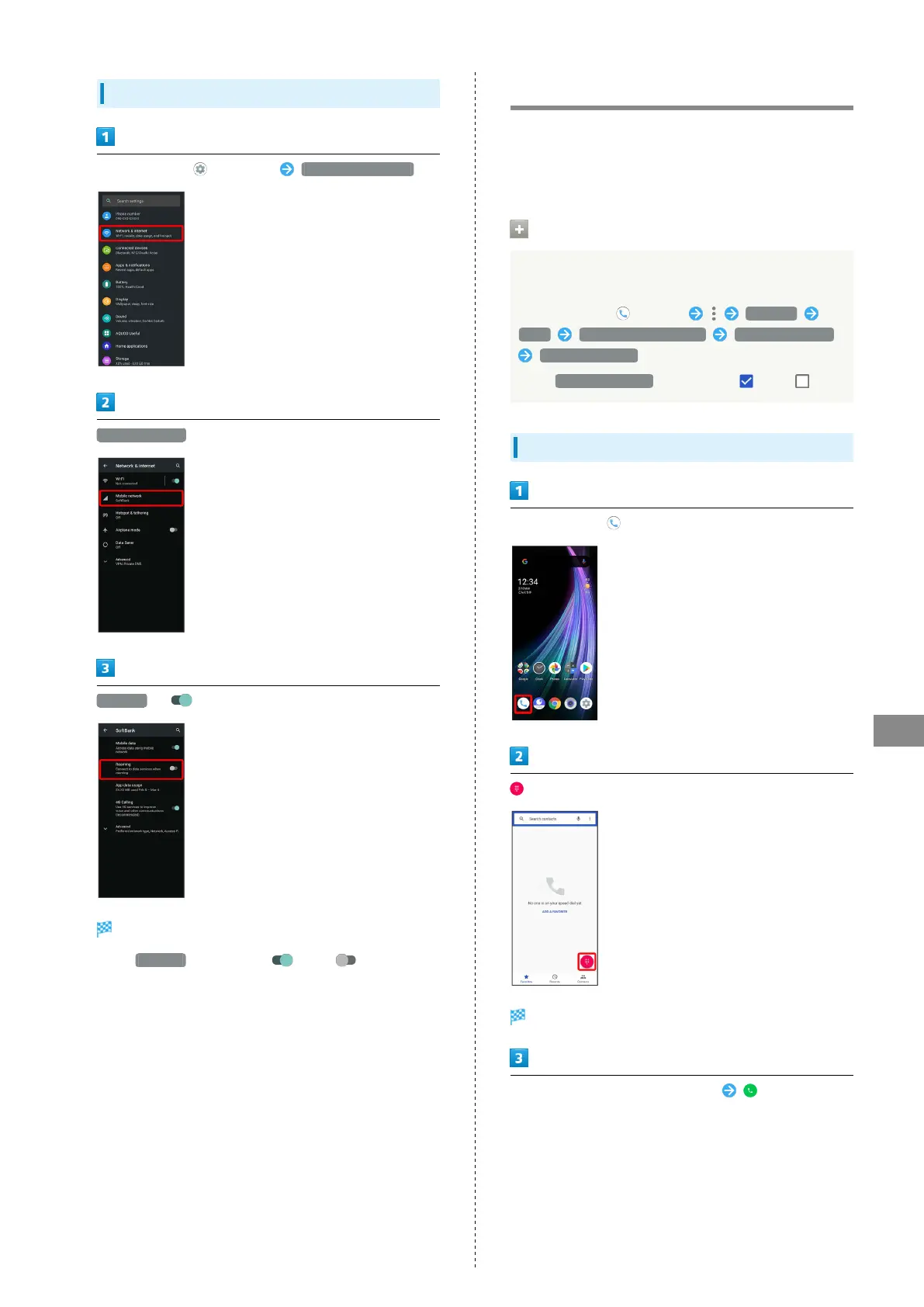
Changing Data Roaming Setting
In Home Screen, (Settings) Network & internet
Mobile network
Roaming ( )
Data roaming is enabled.
・
Tap Roaming to toggle on ( )/off ( ).
・If confirmation appears, follow onscreen prompts.
Calling from Outside Japan
See SoftBank Website to learn about roaming areas/rates, etc.
http://mb.softbank.jp/en/global_services/
Print out roaming area/rate information to carry while
traveling abroad as needed.
Enabling/Disabling Abroad Assistant
While outside Japan, use Abroad assistant to select how to
place calls.
In Home Screen, (Phone) Settings
Calls SoftBank call settings Int'l call settings
Abroad assistant
・
Tap Abroad assistant to toggle on ( )/off ( ).
Calling Japan
In Home Screen, (Phone)
Dialpad window opens.
Use onscreen dialpad to enter number
・Do not add + before the number.



 To Next Page