148
Operation Password and Center Access
Code
Center Access Code is a four-digit code set in subscription
contract; necessary to use optional services from landlines,
etc.
・Do not forget Center Access Code. If you forget the code,
contact us for recovery. For details, contact Customer
Service.
・Be careful not to reveal security codes to others. If misused
by others, SoftBank Corp. is not liable for any resulting
damages.
Resetting Operation Password
If prompted for Operation Password, PASSWORD RESET
OK . Continue by following onscreen prompts.
・My SoftBank authentication is required to reset
Operation Password.
Setting Operation Password
In Home Screen, (Settings) Security
Operation password setting OK Enter Operation
Password OK Re-enter Operation Password
OK OK
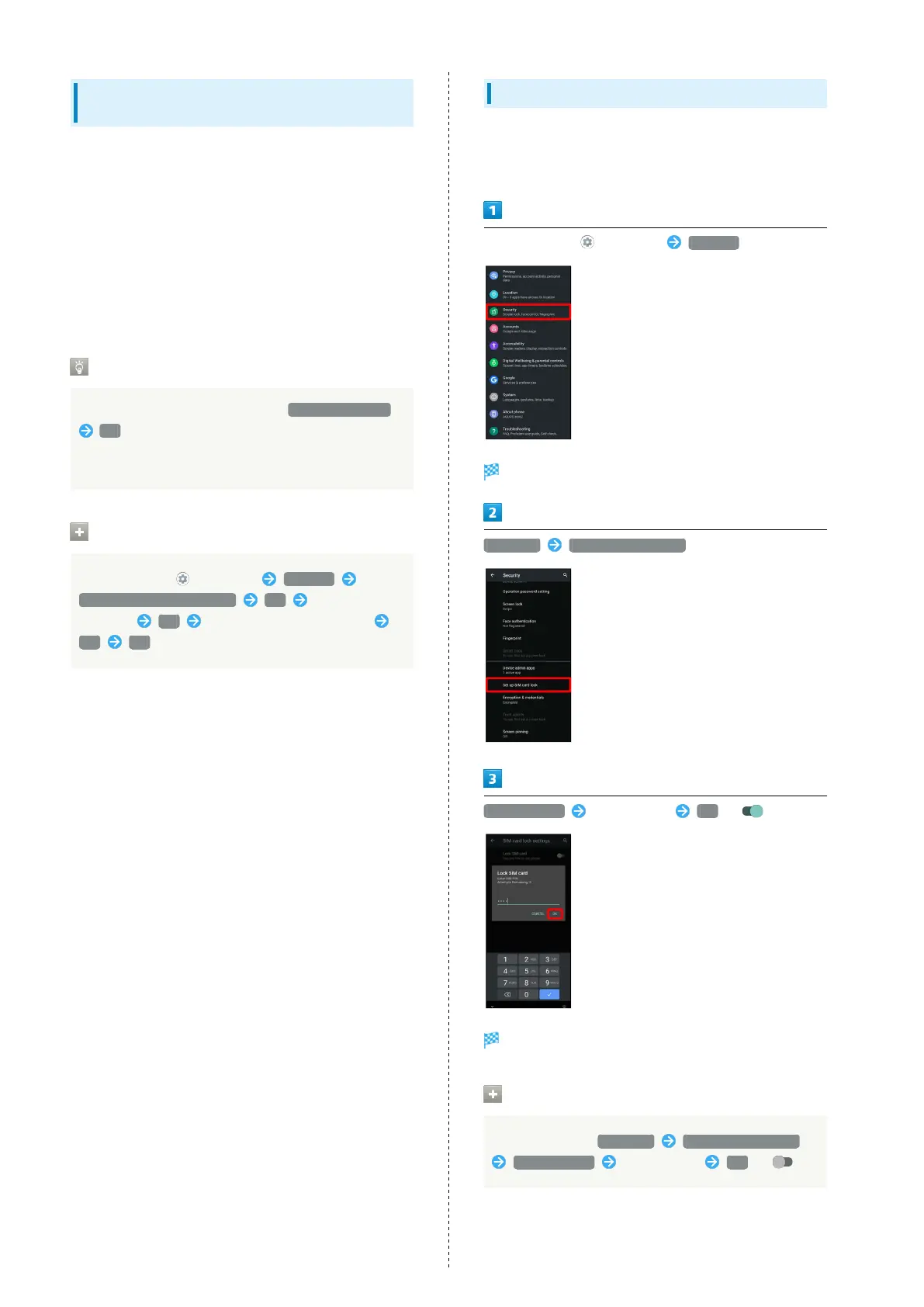
Enabling SIM PIN
When SIM PIN is enabled, PIN entry is required for handset use
each time handset is powered on with SIM Card installed. It is
effective for preventing unauthorized use by others.
In Home Screen, (Settings) Security
Security menu opens.
Advanced Set up SIM card lock
Lock SIM card Enter SIM PIN OK ( )
SIM card lock is enabled.
Disabling SIM Card Lock
In Security menu, Advanced Set up SIM card lock
Lock SIM card Enter SIM PIN OK ( )



 To Next Page