MAINTENANCE AND CLEANING
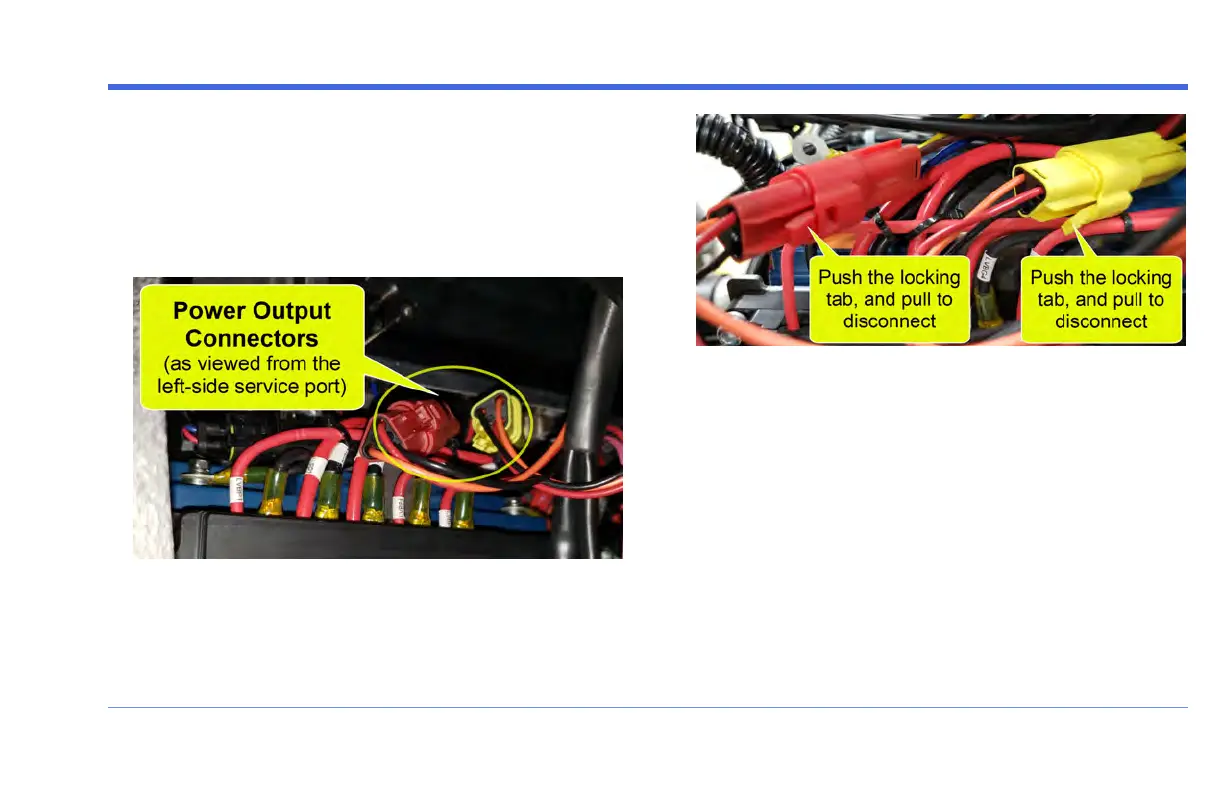
STEP 4: Unplug the Power Output Connectors
Look into the left-side service port to locate the RED and
YELLOW Power Output Connectors.
These 3-wire connectors are side by side, to the left of the
steering column:
Press the locking tab down, and gently pull to unplug
each connector.
STEP 5: Wait 10 seconds, then plug both con-
nectors back in
Wait at least 10 seconds, then plug both Power Output
Connectors back in: Gently slide the connectors into their
plugs until the locking tabs snap.
Note that these connectors are indexed - they cannot
accidentally be plugged in incorrectly, and it doesn't
matter which one is plugged in first.
FUV Owner's Guide - 133



 To Next Page