DISPLAY
Drive Screen - Main Elements
Speedometer
Indicates the current speed.
Trip
Odometer
Indicates the distance the FUV has been
ridden (in miles) during this trip. Press
the Trip Odometer to reset.
Odometer
Indicates the total distance the FUV has
been ridden (in miles).
Power Meter
Indicates energy usage in real time.
Battery
Charge Level
Indicates the amount of energy
remaining in the batteries.
Telltales
A row of icons along the bottom of the
Display provides quick feedback for
important functions and system
warnings (see page 51).
Resetting the Trip Odometer
To reset the Trip Odometer on the Drive screen to zero,
press the Trip Odometer on the Display.
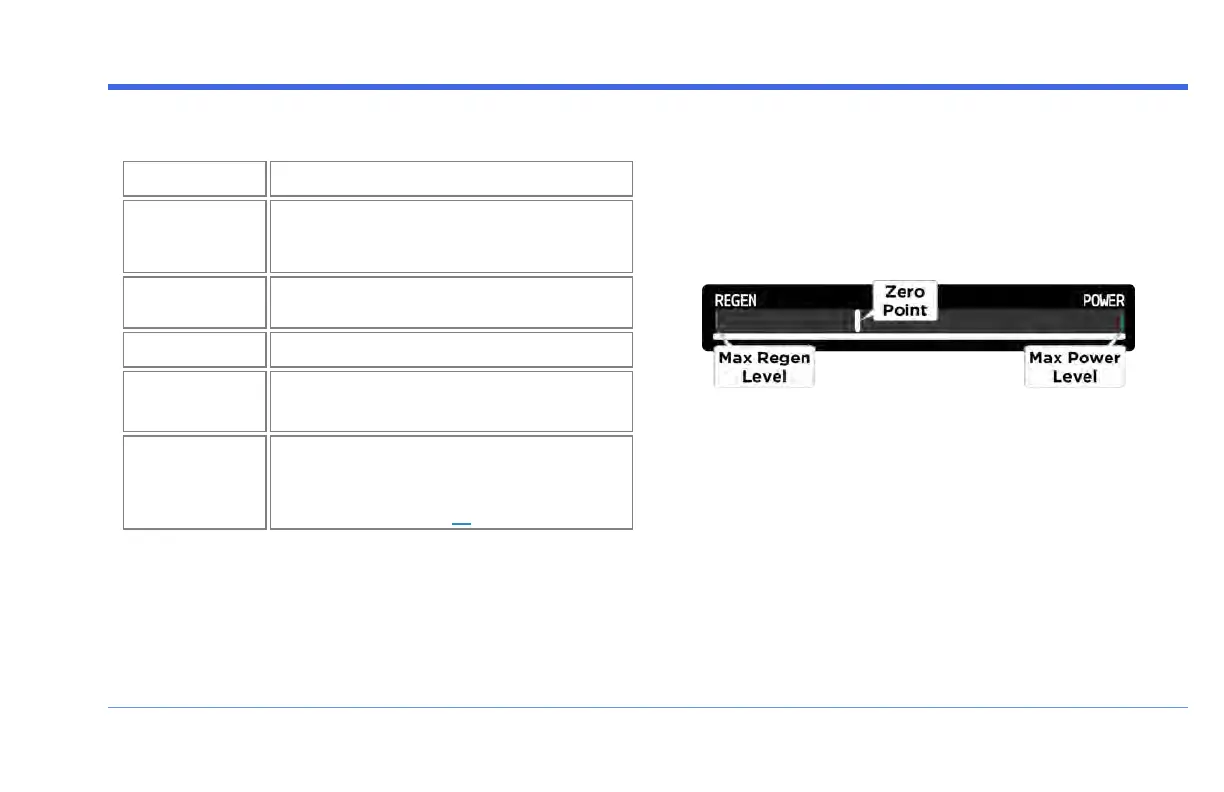
Power Meter
Use the Power Meter to monitor your power usage as you
drive: it indicates the level of energy being used
(POWER), and the level of regen power that is currently
being fed to the Batteries (REGEN) via the Kinetic Energy
Recovery System (KERS).
l
Max Regen Level : The green tick on the far left
represents the maximum level of REGEN power
available.
l
Zero Point : The white tick in the middle area
represents the "Zero Point" between POWER and
REGEN. The Power Meter stays on the Zero Point
when neither the throttle nor the Kinetic Energy
Recovery System is being used (for example, when
sitting still or when coasting).
FUV Owner's Guide - 49


 To Next Page