DISPLAY
Display
The FUV features a color Display that provides useful
information regarding the current state of the FUV (OFF,
ON and START). It also provides touch options to turn the
FUV ON and OFF, as well as to change the PIN assigned
to the FUV:
Display: OFFState
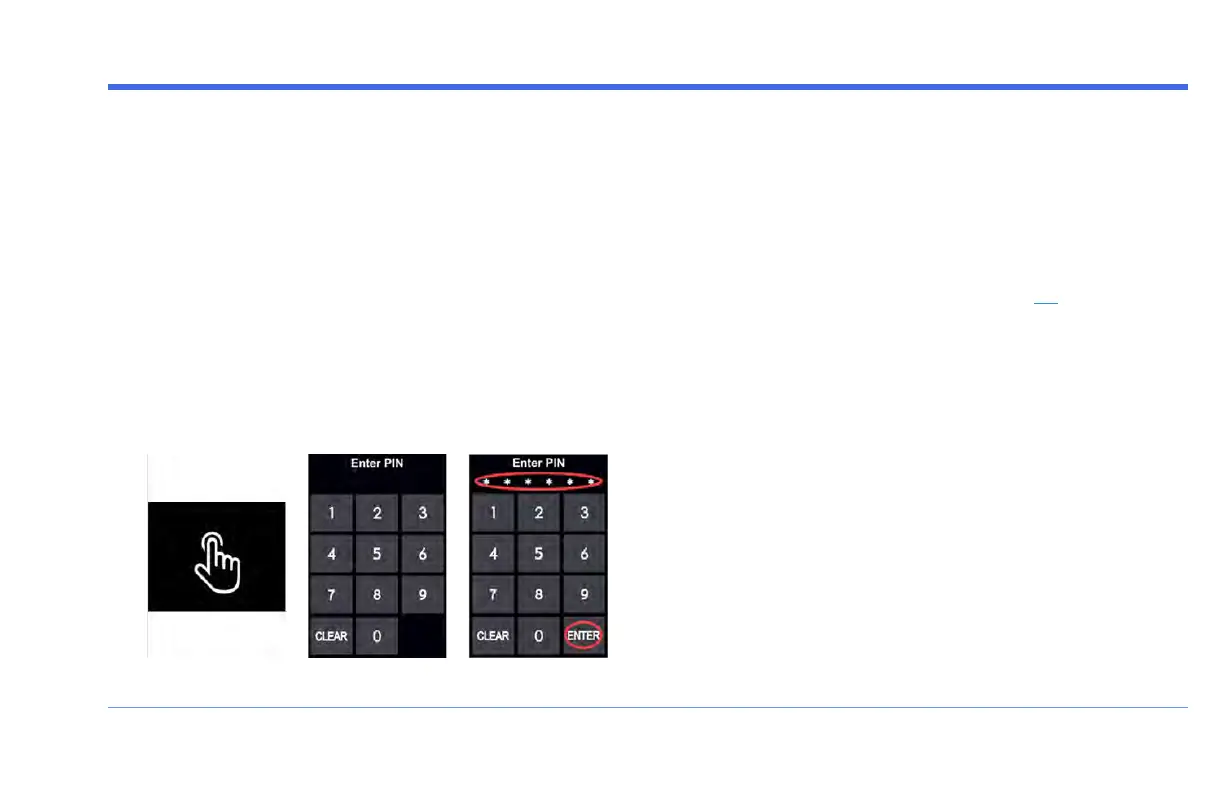
When the FUV is OFF, the Display is black. In this case, the
FUV can be turned ON via the on-screen PIN keypad.
Turning the FUVON via the Display
1. Press anywhere on the Display to invoke the Enter
PIN keypad.
2. Enter the 6-digit PIN assigned to the FUV.
3.
Press ENTER to turn the FUV ON and open the
Drive Screen.
Note that the FUV can also be turned ON using the Key,
or via the Arcimoto Mobile App (see page 84).
Display: ON State (Drive Screen)
Drive Screen
When the FUVis turned ON, the Display turns on and
presents the Arcimoto logo. When the FUV is started, the
Display updates to show the Drive screen.
The Drive Screen provides all the information you need to
operate the FUV, in a simple visual layout:
FUV Owner's Guide - 47



 To Next Page